Project management tools · #10 of 10 · Best for simple team and client communication
Basecamp Review 2026: Is It Worth It?
Basecamp is 37signals' project management and team communication tool. Each project gets one page that brings together a message board, to-do lists, a Kanban-style Card Table, a schedule, group chat, automatic check-ins, and docs and files. Its biggest strengths are simplicity, calm communication, easy client access and flat pricing with no per-user fees. The trade-off is deliberate: it leaves out Gantt dependencies, resource management and deep reporting. This review covers pricing, project organisation, collaboration, client work, AI, integrations, ease of use, reporting, security and overall value.
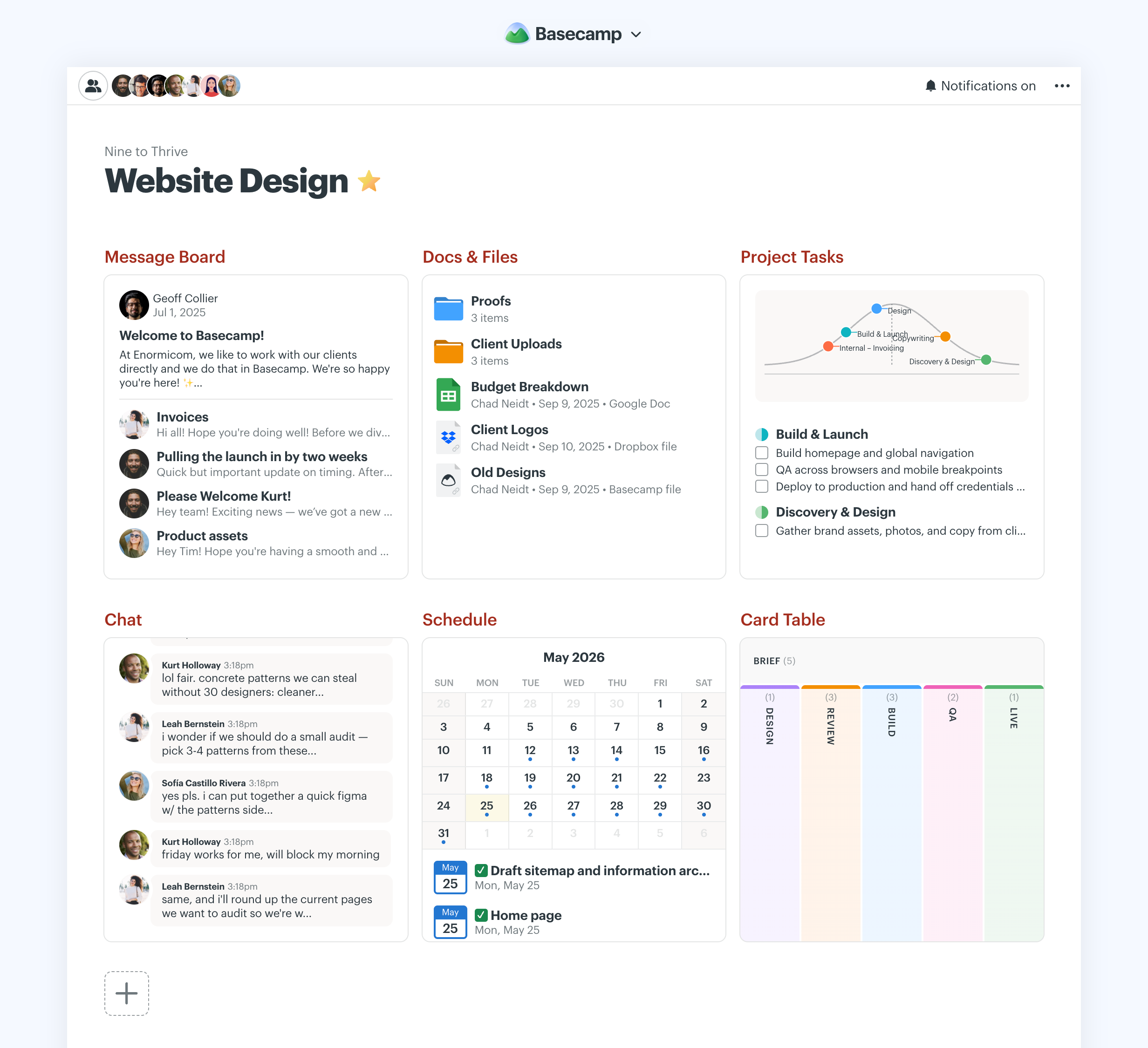
Basecamp review: quick verdict
| Best for | Agencies, small businesses and remote teams that want communication-centred projects, simple client access and flat pricing |
| Less suitable for | Teams that need Gantt dependencies, resource and capacity planning, portfolio reporting or Scrum sprints |
| Our overall score | 7.6/10, ranked #10 in our top 10 project management tools |
| Price | Free plan (1 project); Freelancer $25, Studio $59 and Pro $99 per month flat; Unlimited $299/month billed annually; no per-user fees |
| Free trial | 30 days on Freelancer, Studio and Pro; 45 days on Unlimited; no credit card required |
| Capterra rating | 4.4/5 from 14,449 reviews (checked 7 October 2026) |
| G2 rating | 4.1/5 from 5,489 reviews (checked 5 October 2026) |
Basecamp is one of the easiest project tools to adopt, and it is very good at one thing: keeping a project's discussions, tasks, files and decisions in one calm, well-organised place that clients can join. Flat pricing makes it unusually economical for larger teams and agencies. The trade-offs are real: project controls and reporting are limited, most plans cap the number of active projects, reviewers regularly complain about notification volume, and there are no built-in AI features yet, only access for AI agents you run yourself.
Our scores
Scores use our standard review methodology, the same for every tool we review.
What Is Basecamp?
Basecamp is web-based project management and team communication software. Instead of organising work around tasks and views, it organises everything around projects: each project has a single page, and the tools on that page replace the email threads, chat apps and shared drives that projects usually spill into.
Teams typically use it for:
- Client projects, with clients invited into the same space and shown only what they should see
- Internal projects, from a website redesign to an office move
- Team and company announcements, using a company-wide HQ and team spaces
- Recurring check-ins that replace routine status meetings
- File and document sharing, kept next to the discussions about them
- Simple Kanban workflows, such as support requests or content production
Basecamp runs in the browser and as apps for iOS, Android, Mac and Windows, and people can reply to many notifications by email. The current version, which 37signals presents as "Basecamp 5 is all new for 2026", added a new home screen, faster search with live filtering, My Bar, subtasks, account-wide Everything pages, voice notes and an editor with tables and Markdown.
Basecamp is not a portfolio or resource management platform, and it does not try to be one: its premise is that most teams need clearer communication more than more project controls.
Who Owns Basecamp?
Basecamp is made by 37signals, a privately held company based in Chicago. 37signals was founded in 1999 by Jason Fried, Carlos Segura and Ernest Kim, and launched Basecamp in 2004 as its first commercial product. The company renamed itself Basecamp in 2014 and returned to the 37signals name in 2022. Jeff Bezos has held a minority stake through Bezos Expeditions since 2006. 37signals also makes the HEY email service.
For buyers, the practical point is that Basecamp is a mature, independent product with more than two decades of history, not a start-up that may change direction after its next funding round.
How Does Basecamp Work?
Basecamp has a deliberately flat structure:
- Account: your company's Basecamp, with a company HQ for organisation-wide announcements and optional team spaces.
- Projects: one per client job, initiative or ongoing process. Each has its own people and its own page.
- Tools on the project page: Message Board, To-dos, Card Table, Docs & Files, Campfire chat, Schedule and Automatic Check-ins. You switch on only the tools a project needs.
- To-do lists and to-dos: each to-do can have assignees, a due date, notes, files and, since Basecamp 5, subtasks. To-do lists can be tracked on a Hill Chart.
- Cross-project views: Home, My Bar, Everything pages, the Lineup timeline, the global calendar, Activity and Reports show what is happening across all projects.
A typical workflow for an agency client project looks like this:
Kick-off message → to-do lists for each phase → client invited and given selected updates → Hill Chart shows progress → files and approvals discussed in comments → project archived
For example, a design agency opens a project for a new client website, posts a kick-off message with the brief, creates to-do lists for discovery, design and build, and invites the client. Internal discussions stay hidden, while the client sees milestone updates and the designs they need to approve. Each Friday an automatic check-in asks the team what they worked on, and the account manager reads the Hill Chart rather than calling a status meeting.
Basecamp Key Features
Message Boards
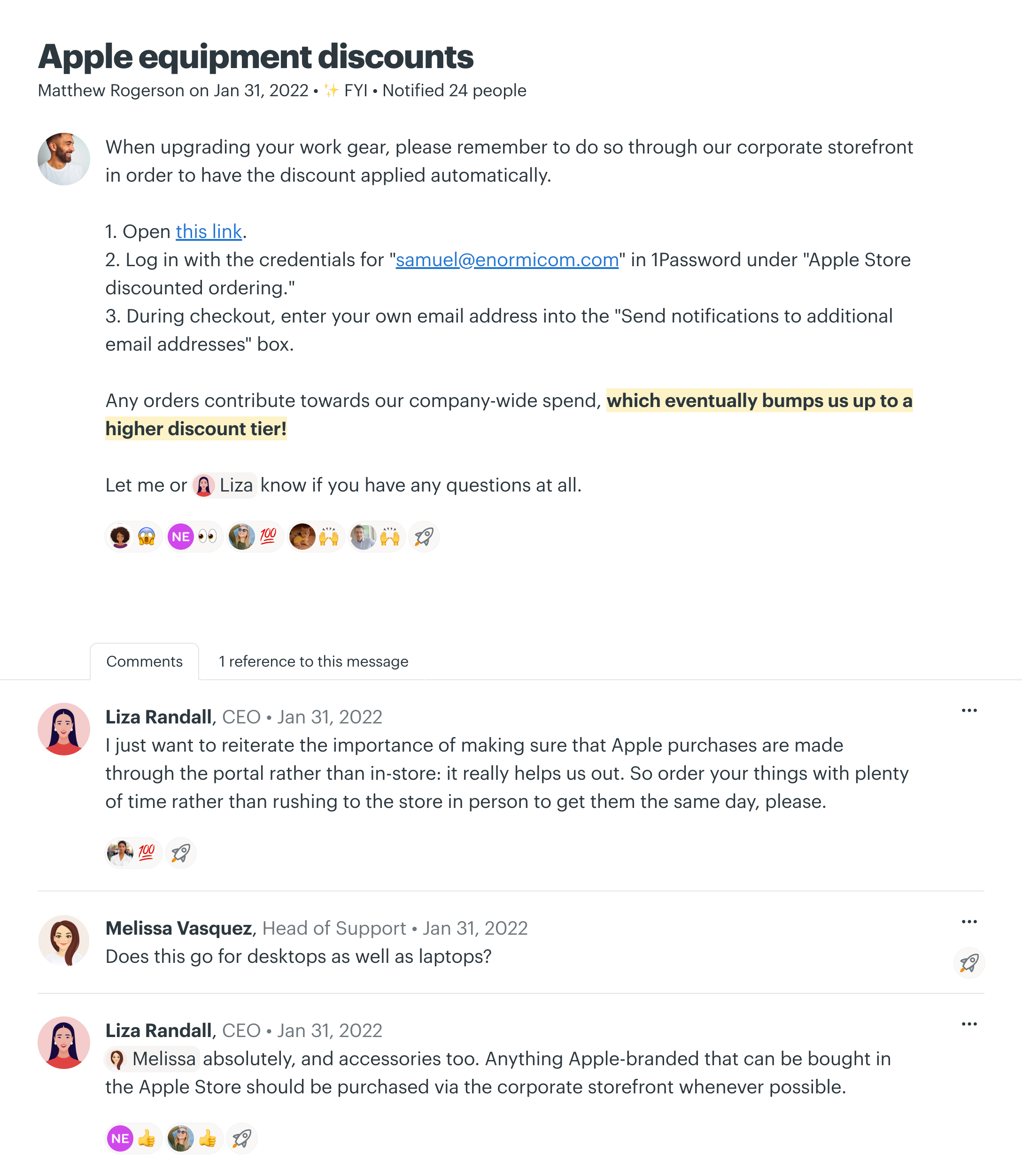
The Message Board is where announcements, proposals and longer discussions live. Each message has its own threaded comments, messages can be organised by category, and people can "boost" a post with a short reaction instead of adding another comment. The aim is to replace internal email: decisions are recorded on the project, where anyone joining later can find them.
It is especially valuable for teams that work asynchronously, encouraging fewer, more considered updates instead of a stream of chat.
To-dos and Subtasks
To-do lists hold the actual work. Each to-do can have one or more assignees, a due date, notes, files and comments, and lists can be grouped and reordered. Basecamp 5 added subtasks on to-dos and loose to-dos that are not tied to a list.
This is enough for most client and internal projects, but it is intentionally simple. There are no task dependencies, no custom fields, no priorities beyond the order of the list, and only one level of subtasks. On Capterra, limited advanced features, including subtasks and customisation, are a recurring complaint from teams that have outgrown Basecamp. If you need a lightweight starting point outside software, our to-do list template follows the same idea.
Card Table (Kanban)
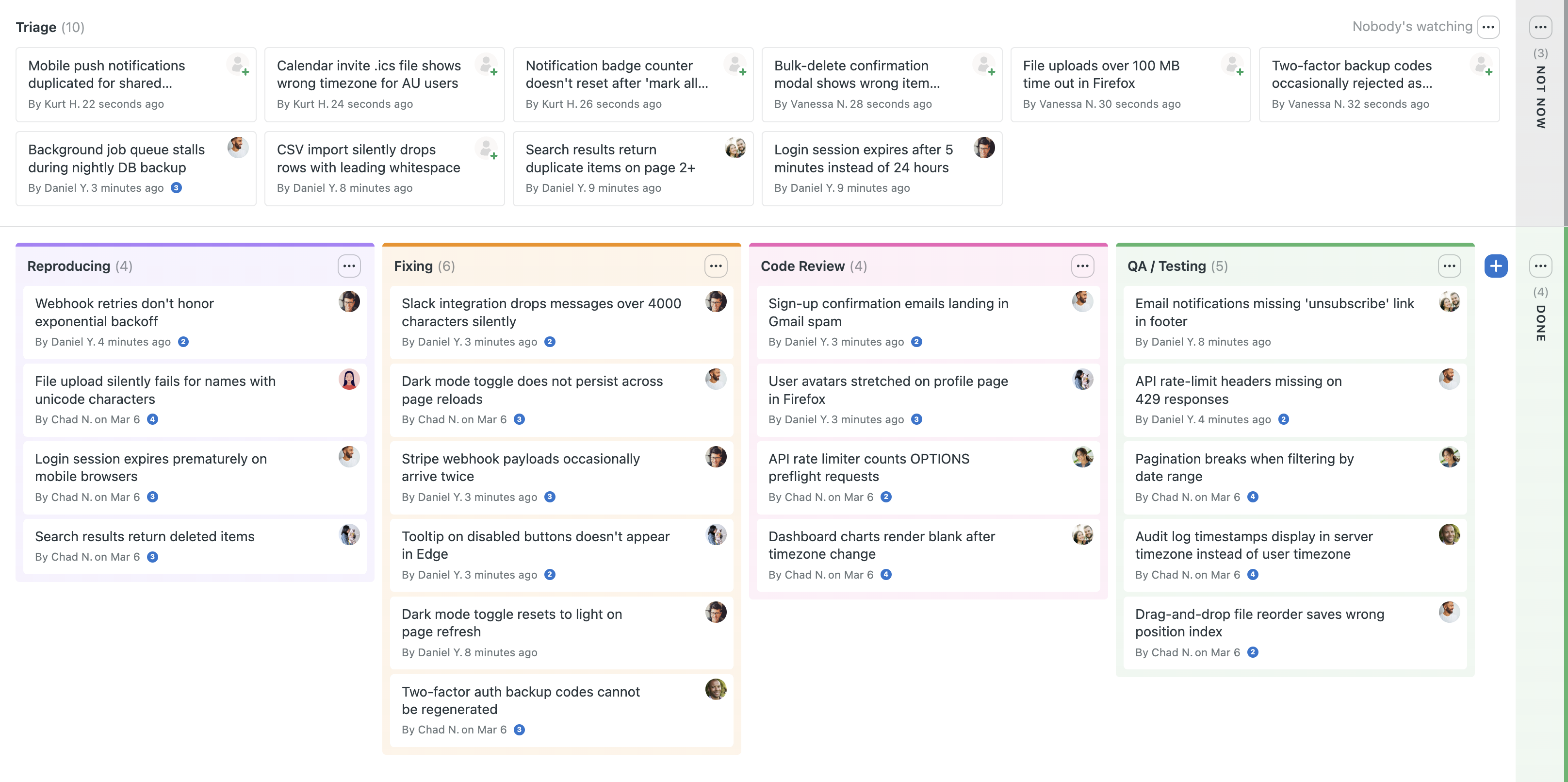
The Card Table is Basecamp's version of a Kanban board, which 37signals says is designed for reactive work. New ideas, requests and bugs arrive in a Triage section; approved cards are dragged into workflow columns that you name, colour and reorder for each project; a Not Now column keeps ideas you do not want to lose; an optional On Hold section within a column holds blocked cards; and finished cards go to Done. You can watch particular columns, so an editor is notified only when something reaches Editing.
It works well for request intake, bug triage, content pipelines and simple support queues, and each card has its own page for discussion and files. 37signals does not describe WIP limits, swimlanes or flow metrics, so teams practising Kanban more formally will find it basic.
Hill Charts
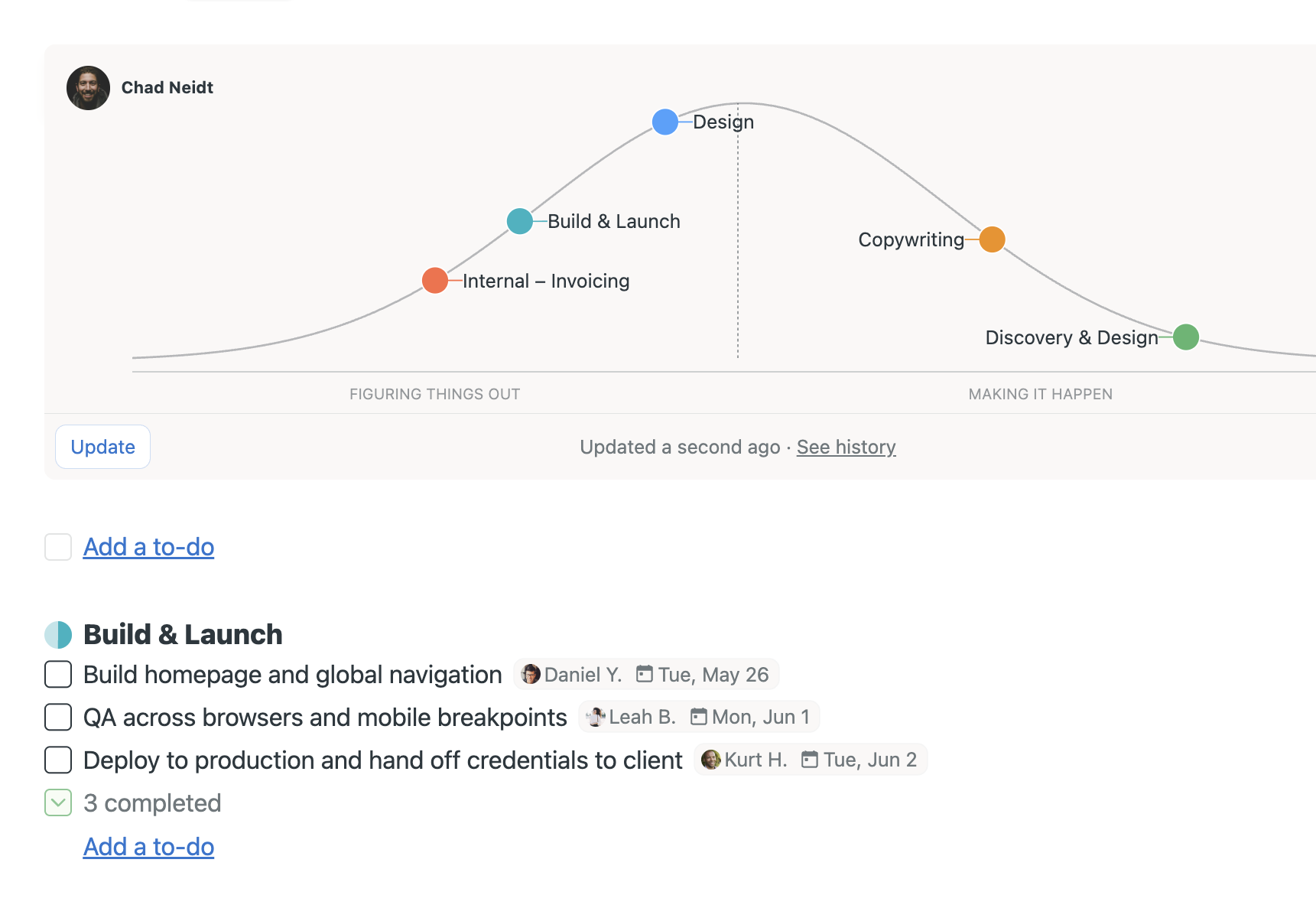
Hill Charts are Basecamp's most distinctive feature. Every piece of work is treated as having two phases: going uphill, while the team is still figuring out the approach and resolving unknowns, and going downhill, once the approach is clear and it is a matter of execution. You switch on Hill Chart tracking for a to-do list, and a dot for that list appears on the hill.
Dots are moved by hand: someone clicks Update and drags each dot to where they judge the work to be. Basecamp is explicit that this status is human judgement, not something calculated from completed tasks. Every update is saved as a snapshot in the project history, can carry commentary, and can be commented on, so managers can see what is moving and what is stuck without asking. A dot that never leaves the uphill side is often a sign that the work needs to be broken down differently.
Hill Charts are useful for creative and software work where "80% of tasks done" says little about real progress, but they depend on honest updates and do not replace a schedule.
Schedule, Calendar and the Lineup
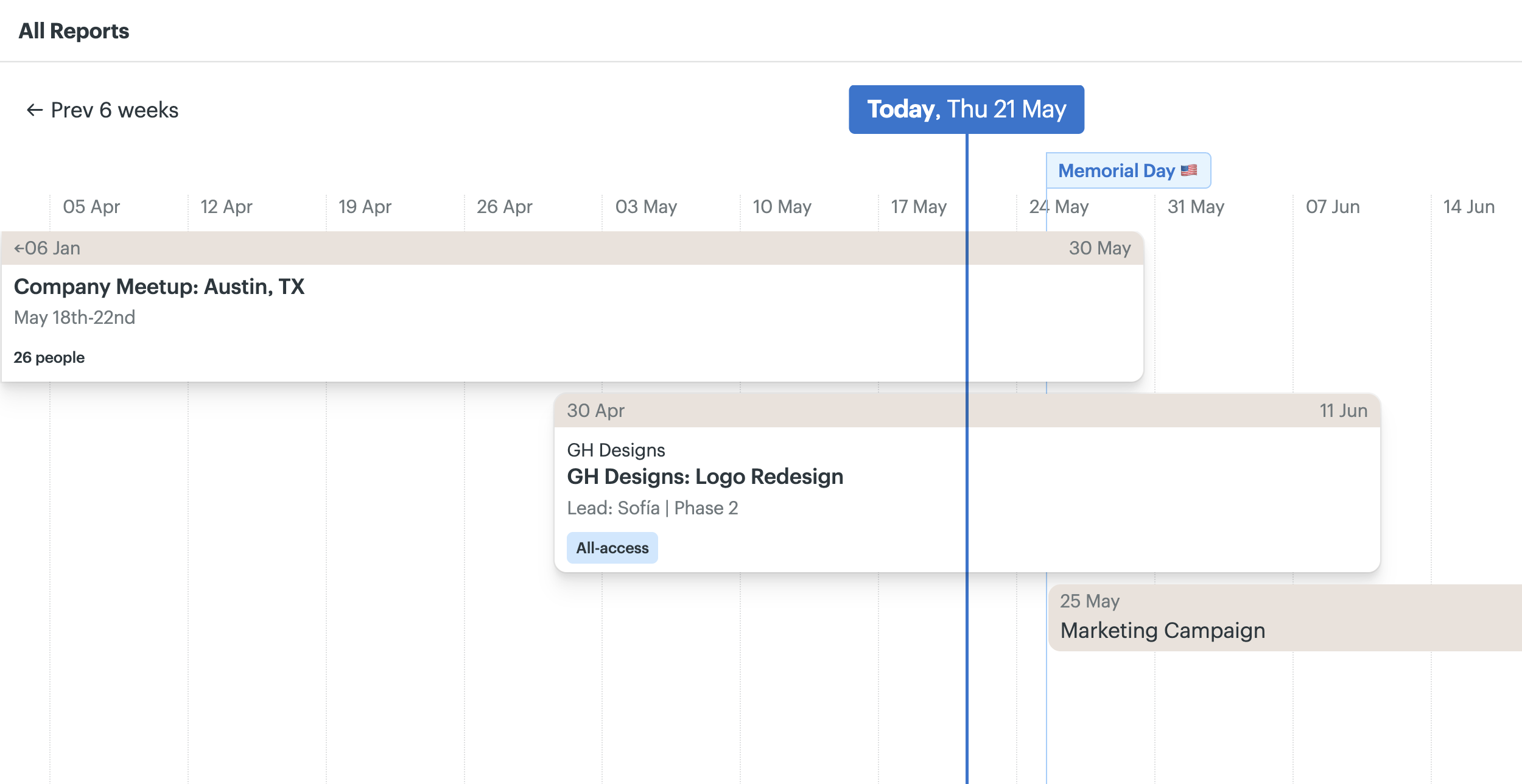
Each project has a schedule for deadlines and events, and Basecamp 5 adds full-screen global and project calendars that can be subscribed to from other calendar apps. The Lineup shows every project as a bar on a timeline by its start and end dates, giving a simple overview of what is running when.
What Basecamp does not offer is a real Gantt chart: there are no task dependencies, no critical path, no baselines and no automatic rescheduling. Third-party integrations such as Ganttify and Le Gantt can add Gantt views, but teams whose projects depend on detailed scheduling should treat this as a core limitation rather than a missing extra.
Campfire Chat and Pings
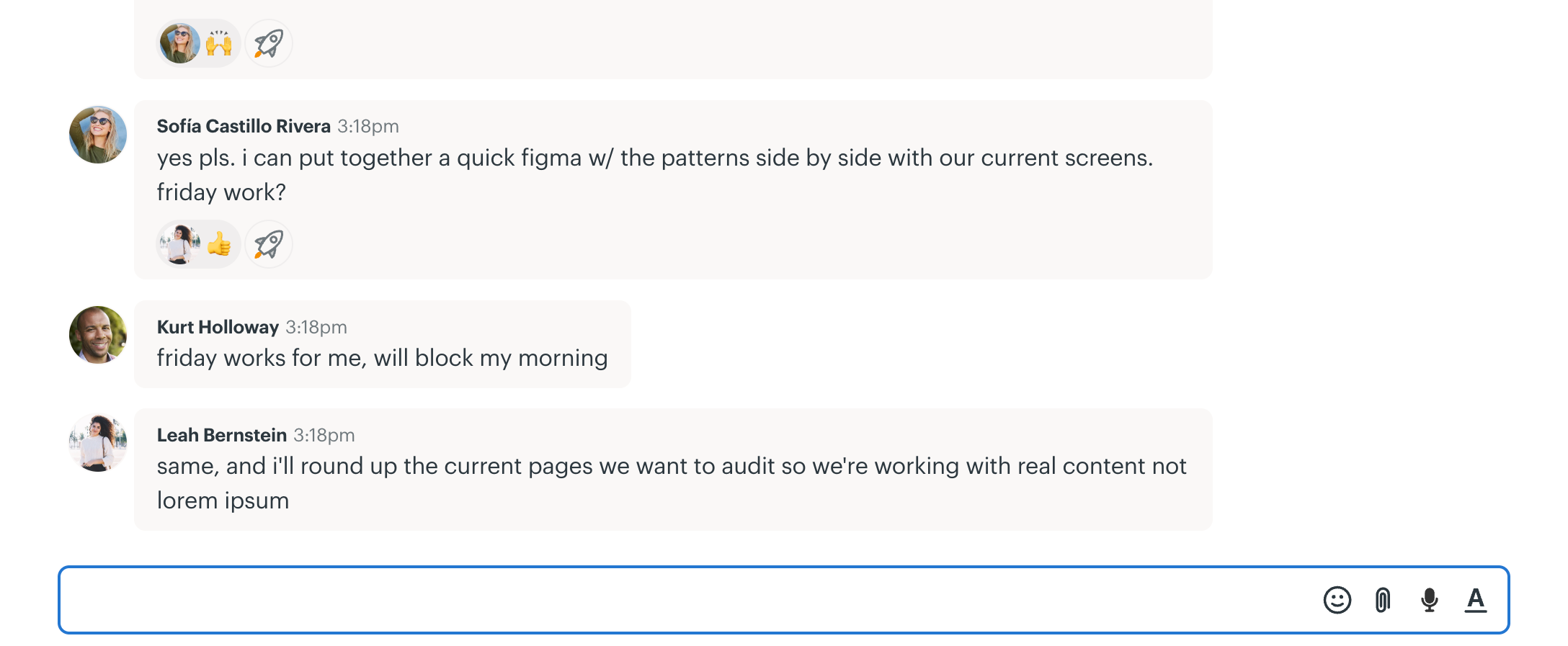
Every project has a Campfire, a real-time group chat for quick questions and casual conversation, with file sharing and image previews. Pings are private one-to-one or small-group messages. Notifications and pings appear in the "New For You" sidebar alongside your work, and Bubble Up lets you snooze an item so it resurfaces later.
For many small teams, this replaces a separate chat tool; organisations that live in Slack or Microsoft Teams will find no native connection to either.
Automatic Check-ins
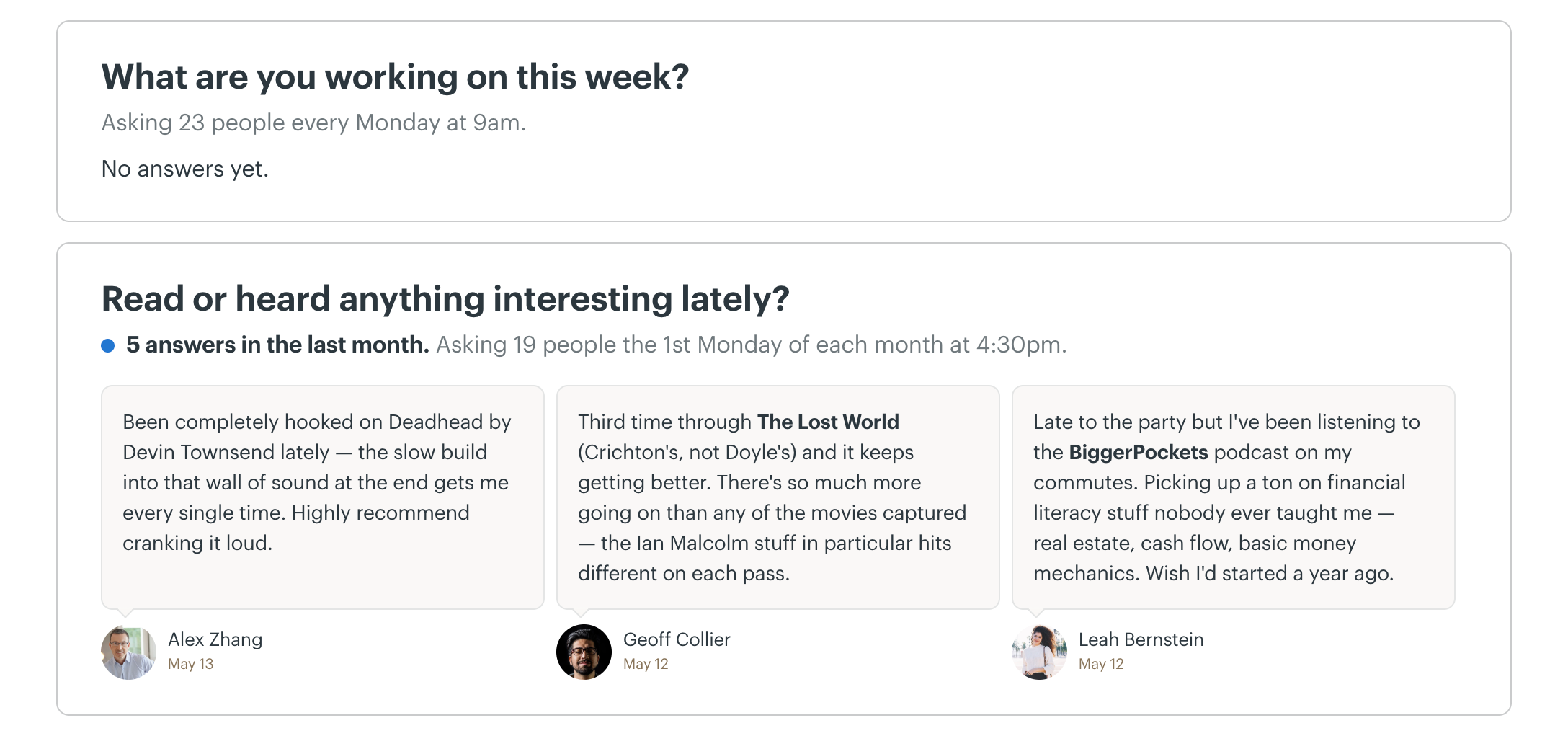
Automatic Check-ins ask a recurring question on a schedule, such as "What did you work on this week?" every Friday or "What are you planning today?" each morning, and collect everyone's answers in one place. They replace routine status meetings, and the history becomes a record of how a project unfolded.
Docs & Files
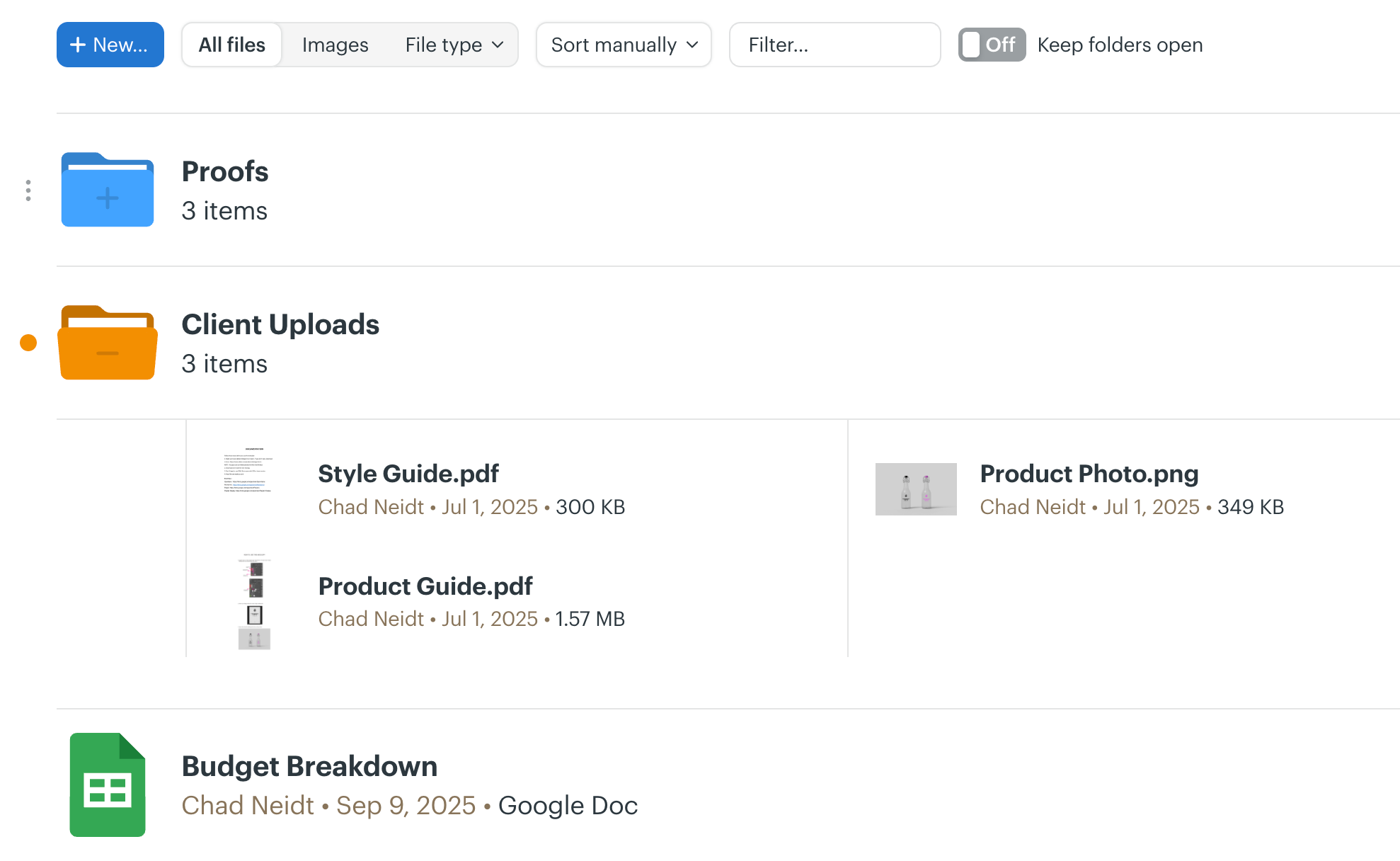
Docs & Files holds documents written in Basecamp, uploaded files and links to cloud files such as Google Docs, Figma or Dropbox, organised in folders. Basecamp 5 merged its two layouts into one with better previews and filtering, and the new editor supports basic tables, Markdown and colour-coded code blocks. Each item has its own comment thread, so feedback stays with the file.
This is convenient, but it is not a full document management system. On Capterra, "fragmented updates and version challenges" is a frequent topic, with 41% of the 547 reviews mentioning it negative, so agree early where final versions live.
My Bar, Everything Views and Search
My Bar gives each person instant access to their assignments, upcoming events, bookmarks and private notes from any screen. Everything pages gather all messages, documents, comments or files from across every project, and the Activity view shows what happened, grouped by topic and filterable by project or person. Basecamp 5 also brought faster search with live filtering on most screens, a universal menu for jumping anywhere, and keyboard shortcuts revealed by pressing Shift.
These address a long-standing criticism: in Capterra reviews, navigation and finding older items are recurring frustrations. Test search on a realistic amount of data during the trial.
Basecamp AI Features
Basecamp has taken a different route on AI from most of its competitors. As of October 2026, it has no built-in AI features such as AI summaries, writing assistance or AI-generated tasks. In a March 2026 post, 37signals co-owner David Heinemeier Hansson wrote that the company had experimented with many AI features but did not ship them because it is "not that easy to make something that's actually good", and that the team keeps working on native AI features.
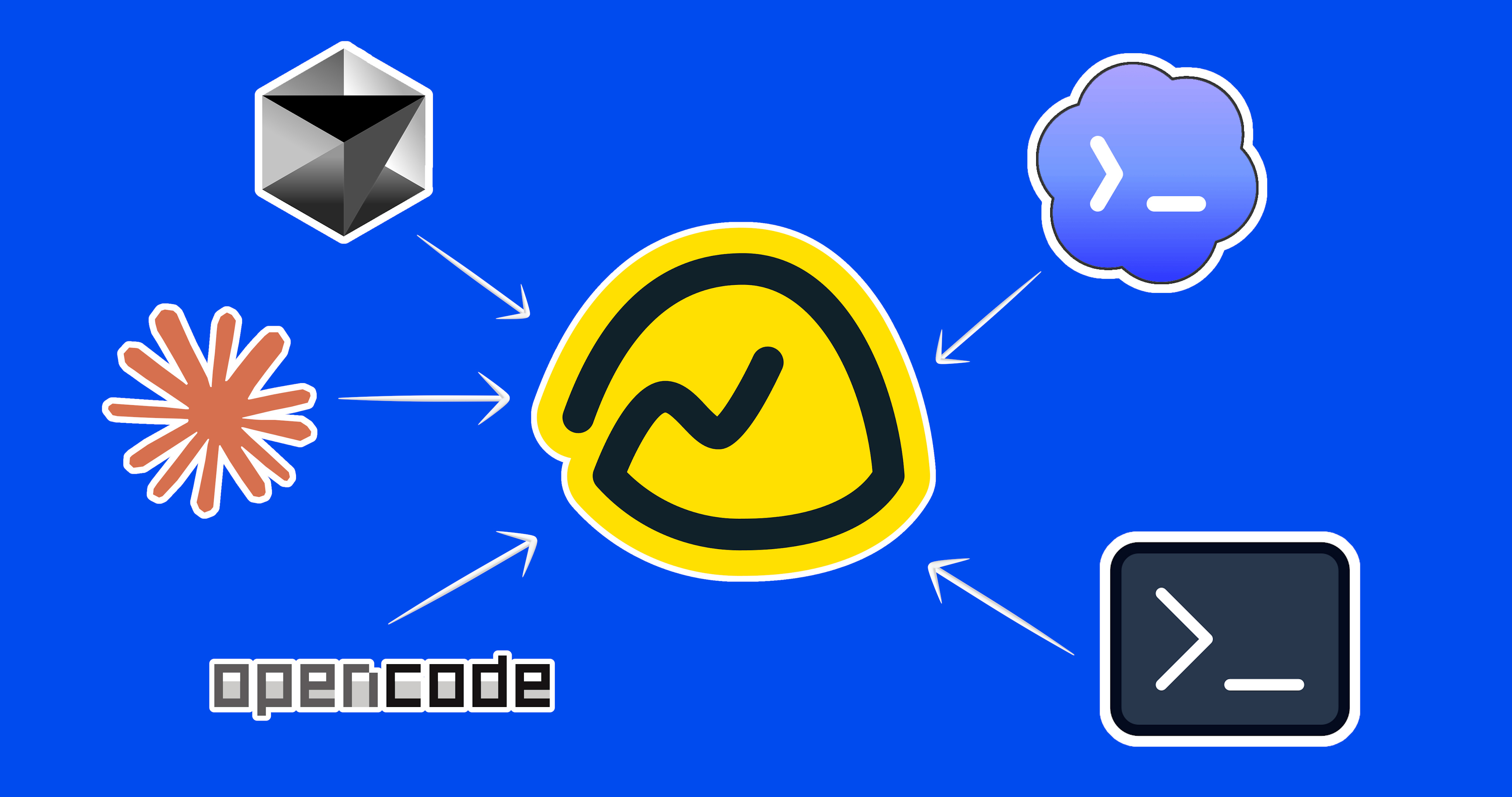
Instead, Basecamp has made itself agent-accessible. 37signals launched a revamped API, a new command-line interface (CLI) and a skill that teaches AI agents how to use them. Its agents page lists official SDKs for Go, Ruby, TypeScript, Swift and Kotlin, names agents such as Claude, Codex, OpenCode and Cursor, and states that "your agents can do anything in Basecamp you can do". The pricing page lists "Bring your own AI agents", CLI access and skills, and ChatGPT and Claude AI connectors on its plans, with full MCP support marked as coming soon.
In practice, this means technical teams can automate Basecamp work with the AI tools they already use: an agent could create to-dos from meeting notes, summarise a week of messages or move cards on a Card Table. Non-technical buyers who want AI built into the interface should look elsewhere for now. 37signals publishes little detail on permission scoping for agents, which appear to act with the access of the person who connects them, so decide who may connect agents before rolling this out. Our guide to AI project management tools shows how other tools approach AI.
Basecamp Collaboration and Client Features
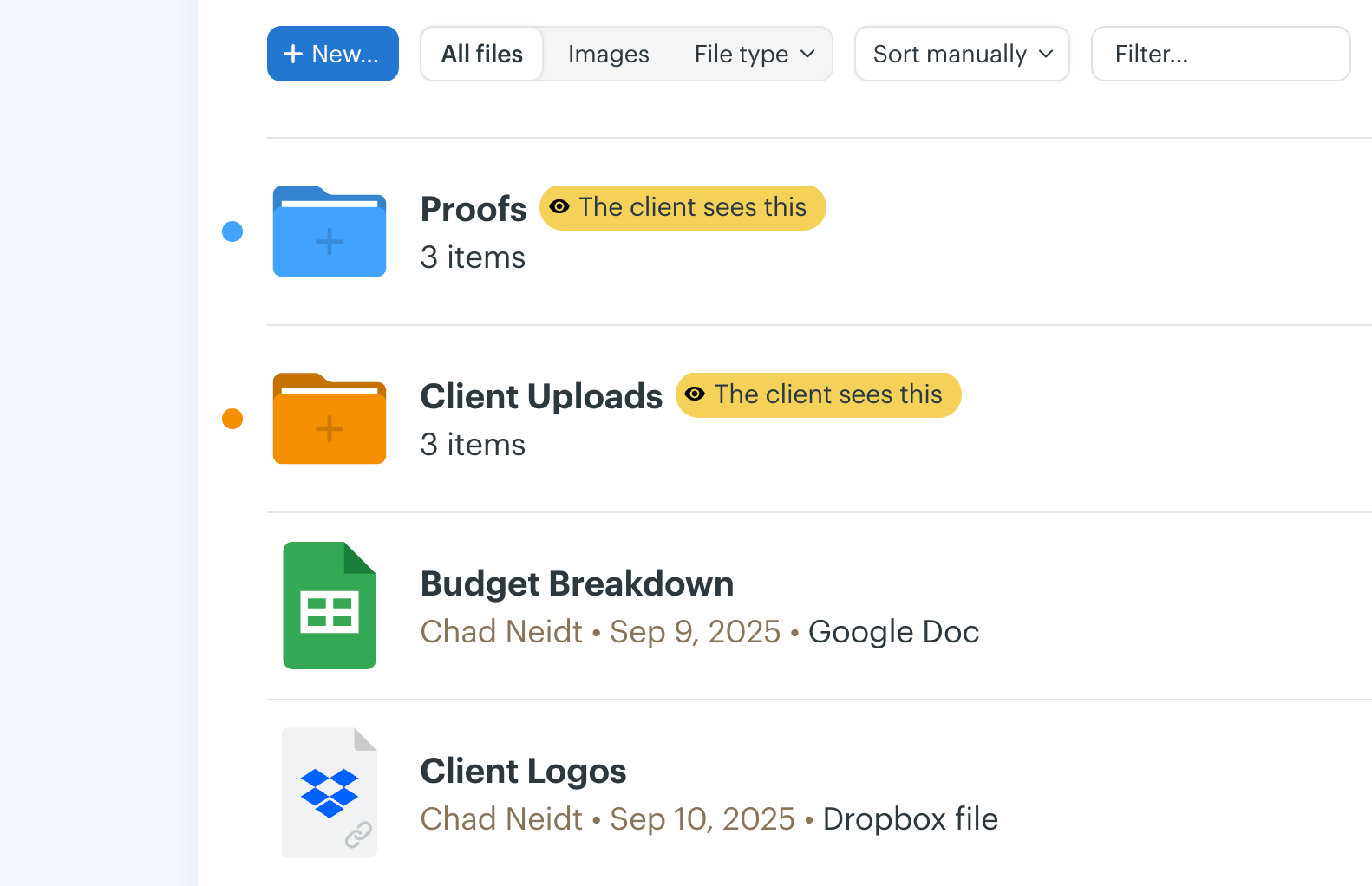
Collaboration is Basecamp's core purpose. Messages, comments, chat, check-ins, files and to-dos all live on the project they belong to, and every item has its own discussion thread, so context is not lost in email. Basecamp's own approach is to notify only the people who need to know, and you choose who is notified when you post.
Client work is where Basecamp stands out. You can invite clients into a project and decide which messages, to-dos, files and events they can see, keeping internal discussion separate. Because paid plans have no per-user fees (Freelancer allows up to 20 users), adding clients does not increase the bill. For agencies and consultancies this is often the deciding factor. Our communication plan template can help agree what clients see and when.
The downside, according to users, is notification volume. On Capterra, "overwhelming and inconsistent notifications" is one of the most discussed topics, with 48% of the 664 reviews mentioning it negative. Agree notification settings and when to use messages, chat and pings early in a rollout.
Basecamp Reporting and Visibility
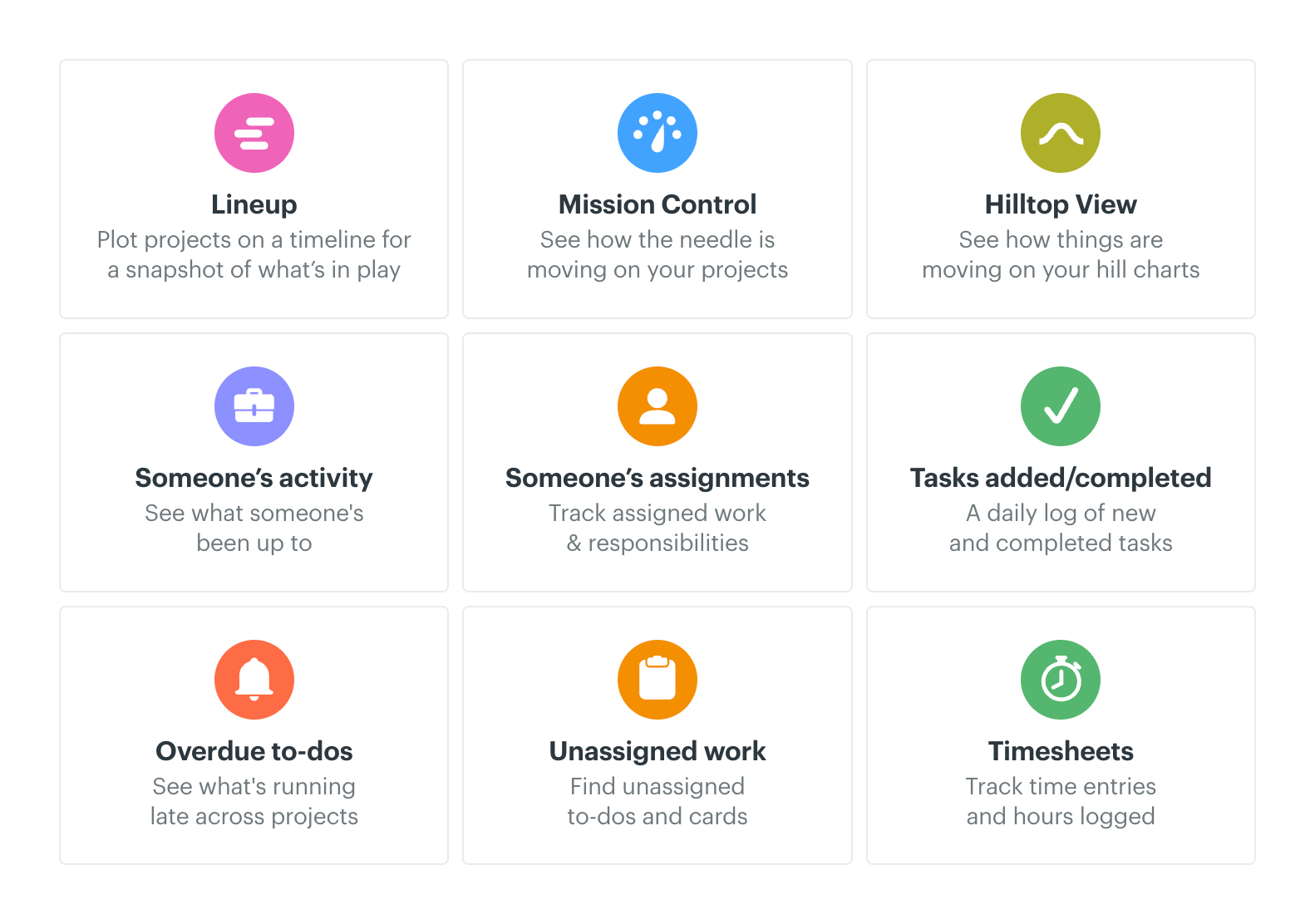
Basecamp's Reports give high-level overviews such as what is overdue, what is assigned to whom and what is coming up, across projects. Combined with the Activity feed, Hill Chart history, the Lineup and Everything views, a manager can usually see what is happening without asking for a status report.
This is operational visibility, not analytics. There are no custom dashboards, charts, budget tracking, time-based utilisation reports or portfolio rollups. Capterra reviewers cite limited reporting as a recurring drawback, and third-party tools such as Bridge24 and ClicData exist largely to fill that gap. Teams that need to report formally on many projects, or to manage multiple projects against budgets and capacity, will find Basecamp too light.
Basecamp Integrations
Basecamp's integrations directory lists 93 third-party integrations in nine categories (checked 7 October 2026). They include time tracking and invoicing tools such as Harvest, Toggl, Clockify and Everhour; reporting and planning tools such as Ganttify, Le Gantt and Bridge24; automation platforms such as Zapier, Zoho Flow and Unito; plus customer support, software development and mobile tools. These are built by third parties, not by 37signals, so check each one's quality and pricing separately.
Basecamp lists basic time tracking on every plan, the revamped API and SDKs support custom integrations, and the CLI and agent skills open Basecamp to AI tools. What is missing compared with mainstream rivals is a native integration with Slack or Microsoft Teams; 37signals positions Campfire and pings as the replacement, and third-party connectors exist if you need them.
Basecamp Ease of Use
Initial Setup
Setup takes minutes rather than days: create a project, pick the tools it needs, invite people and start posting. There are no custom fields to design and no workflow engine to build, which is exactly why many teams choose it.
Learning Curve
Basecamp is one of the easiest project tools to learn, and Capterra's ease-of-use sub-score of 4.3/5 reflects that. Reviewers repeatedly describe the interface as simple and say it reduces email and meetings. Non-technical staff and clients usually need little or no training, which matters when you are inviting people from outside the organisation.
Interface
The interface is calm and consistent: every project looks the same, and every item has the same comment and notification controls. The downsides are the flip side of that simplicity. Some teams want more structure than to-do lists offer, finding older items can be cumbersome, and Capterra's "occasional glitches and slowdowns" topic is 51% negative across 384 reviews. Accounts with many active projects benefit most from Basecamp 5's improved search, My Bar and Everything views.
Basecamp Mobile and Desktop Apps
Basecamp has apps for iOS and Android and desktop apps for Mac and Windows, and the Card Table and other project tools are available in the mobile apps. You can also reply to many notifications by email, which makes it easy for occasional participants, including clients, to take part without logging in.
Reviewers generally find the mobile apps practical for keeping up with messages, chat and to-dos. 37signals does not advertise offline working, so treat mobile as a companion for staying in touch rather than a full replacement for the web app.
Basecamp Pricing
Basecamp charges a flat monthly price per account rather than per user, with plans differing mainly by the number of active projects and storage. Archived or deleted projects do not count towards the active-project limit.
| Plan | Price | Active projects | Users | Storage |
|---|---|---|---|---|
| Free | $0 | 1 | 5 max | 1 GB |
| Freelancer | $25/month | Up to 3 | Up to 20 | 5 GB |
| Studio | $59/month | Up to 10 | Unlimited | 25 GB |
| Pro | $99/month | Up to 25 | Unlimited | 100 GB |
| Unlimited | $299/month, billed annually | Unlimited | Unlimited | 1,000 GB |
Freelancer, Studio and Pro list annual billing as an option but do not show a separate annual price, so confirm the billing period at checkout. Paid plans include 24/7/365 support, and 37signals offers 10% off for registered US 501(c)(3) non-profits and free accounts for K-12 schools and universities for class work. You can cancel any time without a contract, but you cannot downgrade from a paid plan to Free. Pricing checked on Basecamp's pricing page on 7 October 2026; always confirm before buying.
Basecamp Free Plan
The Free plan costs $0 and allows one project, up to five users and 1 GB of storage, with no time limit and no credit card. It is enough to try Basecamp properly on a single real project, or for a very small team running one ongoing workstream. It is not a long-term option for a business running several projects at once.
Basecamp Freelancer Plan
At $25 per month, Freelancer allows three active projects, 20 users and 5 GB, and adds 24/7/365 support. It suits freelancers and very small studios with a handful of clients.
Basecamp Studio Plan
At $59 per month, Studio allows 10 active projects, unlimited users, 25 GB and unlimited tools per project. For a small agency or business, this is likely the best-value starting point, because the price does not change as you add staff or clients.
Basecamp Pro Plan
At $99 per month, Pro allows 25 active projects, unlimited users and 100 GB. It suits growing agencies and mid-sized businesses whose main constraint is the number of concurrent projects.
Basecamp Unlimited Plan
At $299 per month billed annually, Unlimited removes the project cap and includes 1,000 GB of storage, priority 24/7/365 support, personalised onboarding with a Basecamp expert, enhanced admin features and the option to pay annually by cheque, ACH, wire or card. The pricing page also mentions buying additional storage, though its figures for this are inconsistent, so check with 37signals if storage matters.
Basecamp Free Trial
Basecamp offers a 30-day free trial on Freelancer, Studio and Pro, and a 45-day trial on Unlimited. No credit card is required, and nothing is charged automatically when the trial ends. Use the trial to run one or two real projects, including a client if you work with them, so you can judge notifications, client visibility and search with real data.
How Flat Pricing Compares with Per-User Pricing
Flat pricing is Basecamp's biggest commercial advantage. A 30-person company on Studio pays $59 a month in total, whatever the number of users. The same team on a per-user tool priced at $10 per user per month would pay $300 a month, and more if clients need paid seats. The calculation reverses for very small teams with many projects: three people running 30 active projects would need Unlimited at $299 a month, which is more than many per-user tools would cost. Count your active projects, not just your people, before choosing a plan.
Basecamp Pros and Cons
Pros
- Very simple and calm to use; minimal training needed
- Flat pricing with no per-user fees
- Excellent client access with control over what clients see
- Messages, tasks, chat, files and schedules in one place
- Hill Charts show real progress, not just task counts
- Automatic check-ins replace routine status meetings
- Fast setup with very few configuration choices
- Long free trials with no credit card
- Open API, CLI and SDKs for AI agents and integrations
Cons
- No task dependencies, critical path or real Gantt chart
- No resource, capacity or budget management
- Limited reporting and no custom dashboards
- Active-project caps on all plans except Unlimited
- Notification volume is a common complaint
- No built-in AI features yet
- Little customisation: no custom fields or workflow rules
- Not designed for Agile or Scrum teams
- No native Slack or Microsoft Teams integration
This matches what users report: people value Basecamp's simplicity and the way it centralises communication, while limited advanced features, notifications and occasional performance issues are the most common drawbacks.
What Do Basecamp Customers Say?
- Ease of use: 4.3/5
- Features: 4.2/5
- Customer service: 4.3/5
- Value for money: 4.2/5
What G2 reviewers like most
- Ease of use
- Easy project coordination
- Collaboration tools
Most common G2 complaints
- Limited features
- Lacks advanced reporting and scheduling
- Limited for complex workflows
Ratings and review themes as published on G2 and Capterra on 5 October 2026; summarised in our own words. Visit the links above for full, verified user reviews.
On Capterra, Basecamp is rated 4.4/5 from 14,449 reviews, with sub-scores of 4.3 for ease of use, 4.2 for features, 4.2 for value for money and 4.3 for customer service (checked 7 October 2026). On G2, it is rated 4.1/5 from 5,489 reviews (checked 5 October 2026). The themes below summarise these third-party reviews in our own words, not 37signals' testimonials.
Positive themes. Reviewers most often praise having messages, tasks, files and schedules in one place, less email and fewer meetings, the simple interface, straightforward file sharing and easy collaboration with remote colleagues and clients. In Capterra's topic summaries, unified team communication (94% positive across 1,767 reviews), team collaboration (96% positive) and centralised file sharing (95% positive) stand out.
Negative themes. The most common complaints are excessive or hard-to-manage notifications (48% negative), version and update fragmentation in documents (41% negative), occasional glitches and slowdowns (51% negative), limited advanced features such as reporting, customisation and invoicing, pricing that some smaller users feel is high for the functionality, and cumbersome navigation and search.
When reading reviews yourself, check whether a review was invited or incentivised by the vendor; both Capterra and G2 label these. Many of Basecamp's reviews refer to older versions, so give more weight to recent reviews that mention Basecamp 5.
Basecamp Customer Support
Paid plans include 24/7/365 support, according to Basecamp's pricing page, and Unlimited adds priority support that jumps the queue plus personalised onboarding with a Basecamp expert. The pricing page does not list a support tier for the Free plan. 37signals also publishes help guides for each feature.
Support is well regarded in third-party reviews, with a Capterra customer service sub-score of 4.3/5. Because the product is simple, most teams need less support than they would with a heavily configurable platform.
Basecamp Security
According to 37signals' security policy, data in transit is encrypted using HTTPS, uploaded files are encrypted at rest, and database backups are encrypted with AES-256, taken daily and stored in multiple locations. The policy also states plainly that application databases are "generally not encrypted at rest", relying instead on the same protection and monitoring as the rest of its systems. Basecamp is hosted with the colocation provider Summit, which publishes a SOC 3 report and makes its SOC 2 Type II report available under NDA.
37signals publishes a completed CAIQ v4.1 self-assessment and a HECVAT for higher-education reviews, and card payments are handled under a PCI DSS SAQ A self-assessment. Basecamp supports two-factor authentication with standard authenticator apps and backup codes. We could not find SAML single sign-on, SCIM provisioning or a SOC 2 report for 37signals itself advertised, so organisations with formal identity or compliance requirements should confirm these directly with 37signals before buying.
Basecamp for Different Types of Teams
Basecamp for Agencies and Client Services
This is Basecamp's strongest fit. Each client gets a project, clients see only what you share, adding them costs nothing on paid plans, and the message board keeps approvals and decisions on record. Time tracking and invoicing need third-party tools such as Harvest.
Basecamp for Small Businesses
Small businesses benefit from fast setup, a predictable monthly bill and a tool that non-technical staff will actually use. The main question is how many projects you run at once, since that decides the plan.
Basecamp for Remote Teams
Message boards, automatic check-ins and Hill Charts support asynchronous work across time zones, reducing the need for status meetings. Teams that rely heavily on real-time chat may still prefer a dedicated chat tool alongside it. Our meeting notes template helps when meetings are still needed.
Basecamp for Marketing and Creative Teams
Card Tables work well for content pipelines and creative requests, and files with comment threads keep feedback in one place. Teams that need formal proofing, campaign calendars with dependencies or performance reporting will find Basecamp light.
Basecamp for Software Teams
37signals builds its own software in Basecamp, and Card Tables and Hill Charts suit small product teams. But there are no backlogs, sprints, story points or velocity reports, so teams following Scrum should look at dedicated tools; see our guide to Scrum software tools.
Basecamp for Non-profits and Education
The 10% non-profit discount, free classroom accounts and the low learning curve make Basecamp a practical choice for volunteer-heavy organisations and schools.
Basecamp for Larger Organisations
Flat pricing scales well on Unlimited, but organisations needing portfolio reporting, resource planning or SAML SSO will usually need a more structured platform for enterprise project management.
Who Should Use Basecamp?
Great for
- Agencies and consultancies working with clients
- Small businesses wanting simple project communication
Look elsewhere if
- Teams needing scheduling, resource or portfolio controls
- Software teams running sprints
Basecamp Feature Checklist
| Feature | Basecamp |
|---|---|
| Free plan | ✓ Yes |
| Gantt / timeline | ◐ Partial |
| Kanban boards | ✓ Yes |
| Time tracking | ✓ Yes |
| Resource & workload management | ✕ No |
| Portfolio management | ◐ Partial |
| Docs & wiki | ✓ Yes |
| Automations | ✕ No |
| Agile / sprint tools | ✕ No |
| Proofing & approvals | ✕ No |
| Built-in AI | ✕ No |
| Guest / client access | ✓ Yes |
| Flat (non per-user) pricing | ✓ Yes |
Basecamp Alternatives and Comparisons
Basecamp fits teams of almost any size, from freelancers with a few clients to companies with hundreds of people on one flat-priced account. It is easy to adopt, even for beginners: new users can start with a single project page, a message board and a to-do list, then add Card Tables, Hill Charts and check-ins as they need them. If you would like to see how it stacks up, we compare Basecamp with Asana, monday.com, ClickUp, Trello, Wrike and others on pricing, features and use cases on dedicated pages:
- Asana: choose it for structured task management. Compare Basecamp vs Asana.
- Wrike: choose it for full project, resource and approval management. Compare Basecamp vs Wrike.
- monday.com: choose it for flexible, visual workflows. Compare Basecamp vs monday.com.
- Trello: choose it for simple Kanban at per-user pricing. Compare Basecamp vs Trello.
- Notion: choose it for docs and wikis with projects. Compare Basecamp vs Notion.
Basecamp comparisons
Is Basecamp Worth It?
Basecamp is likely worth it if you:
- Want project communication, tasks and files in one calm place instead of email and chat.
- Work with clients and want to control what they see without paying for their seats.
- Have a growing team and want a predictable monthly price.
- Value fast adoption by non-technical staff over configurability.
- Work asynchronously or remotely and want fewer status meetings.
- Run a moderate number of projects at the same time.
It may not be worth it if:
- Your projects depend on dependencies, critical path or detailed scheduling.
- You need resource, capacity or budget management.
- Leadership expects dashboards and portfolio reporting.
- Your development teams run Scrum with backlogs and sprints.
- You want AI built into the interface today.
- You are a very small team running many projects at once.
Our verdict: Basecamp's simplicity is both its biggest advantage and its biggest limitation. For agencies, small businesses and remote teams whose main problem is scattered communication, it is easy to recommend, and flat pricing makes it good value as teams grow. For organisations that need structured planning, reporting and resource control, it is too light, which is why it ranks tenth in our project management software review despite strong user satisfaction.
Frequently asked questions
Is Basecamp good project management software?
Yes, for communication-centred projects. Basecamp keeps messages, to-dos, files, schedules and chat in one place, is very easy to learn and rates 4.4/5 on Capterra. It deliberately leaves out dependencies, resource management and detailed reporting, so it suits agencies and small teams more than organisations running complex, date-driven projects.
Is Basecamp free?
Yes. Basecamp's Free plan costs $0 and includes one project, up to five users and 1 GB of storage, with no time limit and no credit card required. Teams running more than one project at a time need a paid plan, starting with Freelancer at $25 per month.
How much does Basecamp cost?
Basecamp costs $0 on Free, $25 per month on Freelancer, $59 on Studio and $99 on Pro, and $299 per month billed annually on Unlimited. Prices are flat per account, not per user; plans differ mainly by active projects and storage (checked 7 October 2026).
Does Basecamp have a free trial?
Yes. Basecamp offers a 30-day free trial on Freelancer, Studio and Pro and a 45-day trial on Unlimited. No credit card is required, and nothing is charged automatically when the trial ends.
Does Basecamp charge per user?
No. All Basecamp plans have a flat monthly price with no per-user fees. Studio, Pro and Unlimited allow unlimited users, Freelancer allows up to 20 and Free up to five. The main limit on most plans is the number of active projects.
Does Basecamp have Gantt charts?
No. Basecamp has project schedules, calendars and the Lineup timeline of all projects, but no Gantt chart with task dependencies, critical path or baselines. Third-party integrations such as Ganttify and Le Gantt can add Gantt views.
Does Basecamp have Kanban boards?
Yes. The Card Table is Basecamp's Kanban-style board, with a Triage section for new requests, custom coloured columns, a Not Now column, On Hold sections and a Done column. Each card has its own page for discussion and files.
Does Basecamp have AI?
Not built in, as of October 2026. Instead, Basecamp is agent-accessible: a revamped API, a CLI, skills and SDKs let AI agents such as Claude, Codex and Cursor work in Basecamp, and the pricing page lists ChatGPT and Claude connectors. 37signals says it is still working on native AI features.
What are Basecamp Hill Charts?
Hill Charts show progress on to-do lists as dots on a hill. Uphill means the team is still figuring out the approach; downhill means it is executing. Dots are moved manually, every update is saved as a snapshot, and stuck work becomes easy to spot.
Is Basecamp easy to use?
Yes. Basecamp is one of the easiest project management tools to learn, with a 4.3/5 ease-of-use score on Capterra. Setup takes minutes, and clients and non-technical staff usually need little training. Some reviewers find navigation and search cumbersome in accounts with many projects.
What is Basecamp best used for?
Basecamp is best for client projects, agency and consultancy work, small-business projects, remote teams that work asynchronously, team announcements and simple Kanban workflows such as request intake or content production.
Is Basecamp better than Asana?
It depends on what you need. Basecamp is simpler, centred on communication and priced per account; Asana offers more structured task management, timelines, goals and portfolios, priced per user. See our Basecamp vs Asana comparison.
Is Basecamp better than Trello?
They suit different needs. Trello focuses on visual Kanban boards; Basecamp combines a Kanban-style Card Table with messages, to-dos, chat, check-ins and files for each project. See our Basecamp vs Trello comparison.
Does Basecamp integrate with Slack and Microsoft Teams?
Not natively. 37signals positions Basecamp's Campfire chat and pings as the alternative, but third-party integrations listed in its directory can connect Slack and Microsoft Teams. Zapier, Zoho Flow and Unito can also link Basecamp to other apps.
What are the main disadvantages of Basecamp?
The main disadvantages are no task dependencies or Gantt charts, no resource or budget management, limited reporting, active-project caps on most plans, notification volume, little customisation and no built-in AI features.
Product screenshots are © 37signals LLC and shown for the purpose of review, with links to their source pages.