Project management tools · #8 of 10 · Best for docs and projects in one workspace
Notion Review 2026: Is It Worth It?
Notion is a connected workspace that combines documents, wikis and databases, and lets teams build project trackers, roadmaps and sprint boards on top of those databases. Its biggest strength is flexibility: specs, meeting notes and the tasks that come out of them can live in the same place. For project management, that same flexibility means you design much of the system yourself, and Notion has no native time tracking, resource management or advanced scheduling. This review covers docs, databases, project features, AI, collaboration, integrations, ease of use, pricing and overall value.
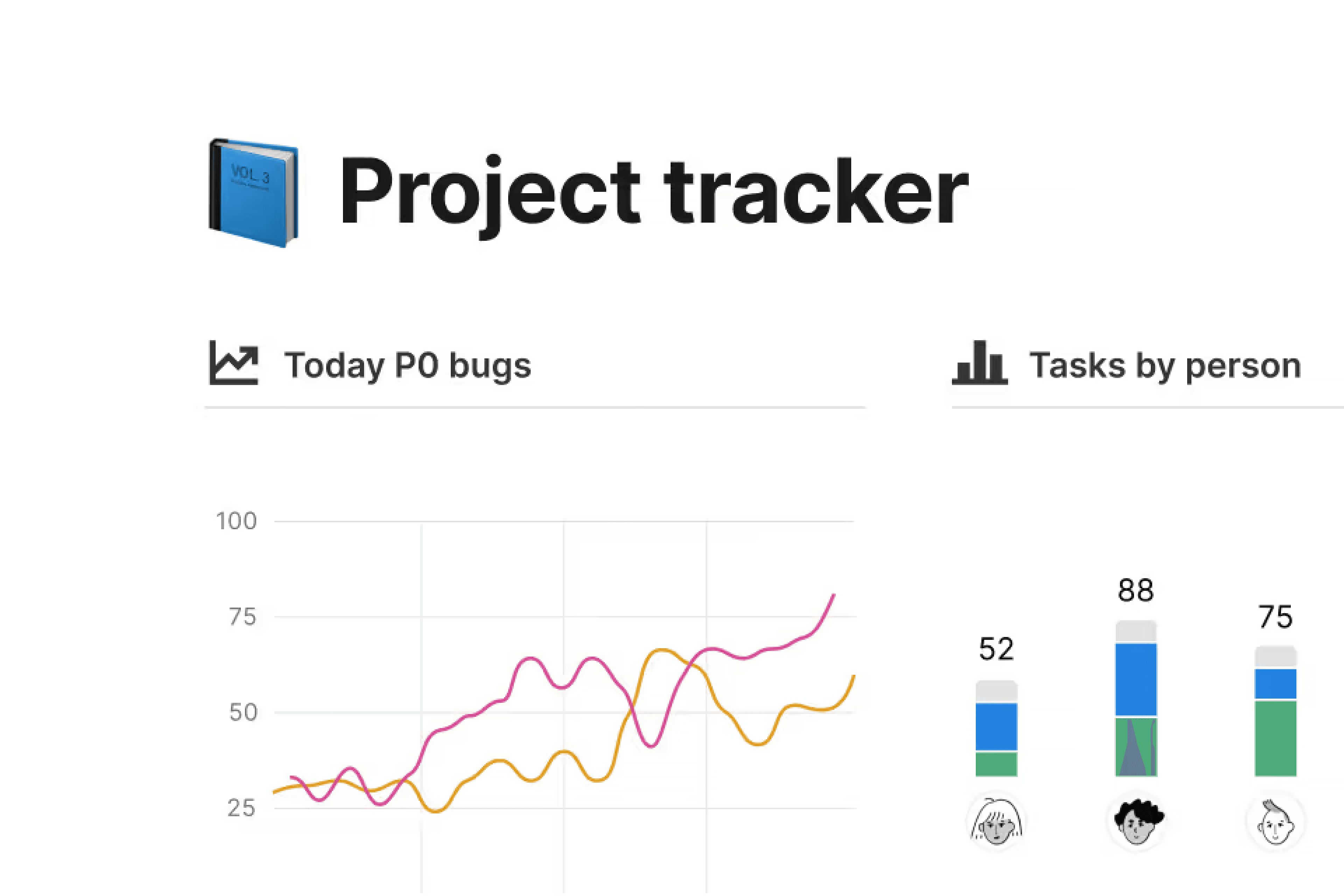
Notion review: quick verdict
| Best for | Teams that want documents, wikis and lightweight-to-moderate project tracking in one flexible workspace |
| Less suitable for | PMOs and teams that need resource, budget, time-tracking and portfolio controls out of the box |
| Our overall score | 8.0/10, ranked #8 in our top 10 project management tools |
| Price | Free plan; Plus $10 and Business $20 per member/month (yearly rate); Enterprise on quote |
| Free trial | Free plan instead of a published trial; Notion AI is a limited trial below Business |
| Capterra rating | 4.7/5 from 2,834 reviews (checked 7 October 2026) |
| G2 rating | 4.6/5 from 13,862 reviews (checked 5 October 2026) |
Notion is an excellent workspace for documentation and knowledge, and a capable, very flexible tool for lightweight to moderately complex project tracking. It is at its best when a team wants specs, wikis, meeting notes and tasks connected in one place. The trade-offs for project work are real: you build and maintain the structure yourself, there is no native time tracking, workload view or portfolio reporting, large databases can feel slow, and the most useful AI features now sit on the Business plan and, for agents, on paid credits.
Our scores
Scores use our standard review methodology, the same for every tool we review.
What Is Notion?
Notion is a cloud-based workspace made of pages and databases. Every page is built from blocks (text, headings, to-do lists, tables, images, embeds), and any page can contain a database: a structured collection of items with properties such as status, owner, date and priority. Project management in Notion is built on those databases.
Teams use it for:
- Docs and wikis, from company handbooks to product specs and meeting notes
- Projects and tasks, tracked in databases shown as boards, timelines, calendars or tables
- Roadmaps and sprints, especially in product and engineering teams
- Forms and intake, collecting requests straight into a database
- Lightweight dashboards, using charts and filtered database views
- AI assistance, through Notion AI, Notion Agent and Custom Agents
Notion runs in the browser and as apps for Windows, macOS, iOS and Android, and the company also offers Notion Calendar and Notion Mail as companion apps. It is neither a simple to-do app nor a classic project management suite. It is a set of building blocks that can become a project system, which is why it sits in our project management software rankings as the docs-first option rather than a dedicated PM platform.
Who Owns Notion?
Notion is made by Notion Labs, Inc., a privately held, venture-backed company based in San Francisco. It was founded in 2013 by Ivan Zhao and colleagues, launched Notion 1.0 in 2016, and has since acquired the calendar app Cron (now Notion Calendar) and the email company Skiff, whose technology underpins Notion Mail.
For buyers, the practical point is that Notion is an established, independent product with a large user base, not a side project of a bigger suite vendor.
How Does Notion Work?
Notion's structure is simple at the top and flexible underneath:
- Workspace is your organisation's account.
- Teamspaces group pages by team or department, with their own members and permissions (private teamspaces need Business).
- Pages hold documents and can be nested inside each other without limit.
- Databases are pages that hold items. Each item is itself a page, so a task can contain its full brief, files and discussion.
- Properties add structure: status, assignee, dates, priority, select fields, formulas, and relations and rollups that link databases together (for example, tasks to projects).
- Views show the same database as a table, board, timeline, calendar, list, gallery or chart, each with its own filters and sorting.
A typical project workflow looks like this:
Request submitted through a form → item lands in a database → owner, status and dates set → brief written inside the item → progress tracked on a board or timeline → automation notifies the team → charts summarise status
For example, a product team relates a Projects database to a Tasks database. Each project page holds the spec, decisions and a linked view of its tasks; engineers work from a filtered board, while the product lead watches a timeline of all projects. You design all of this yourself or start from a template, such as our meeting notes template for the notes that feed it.
Notion Key Features
Docs and Wikis
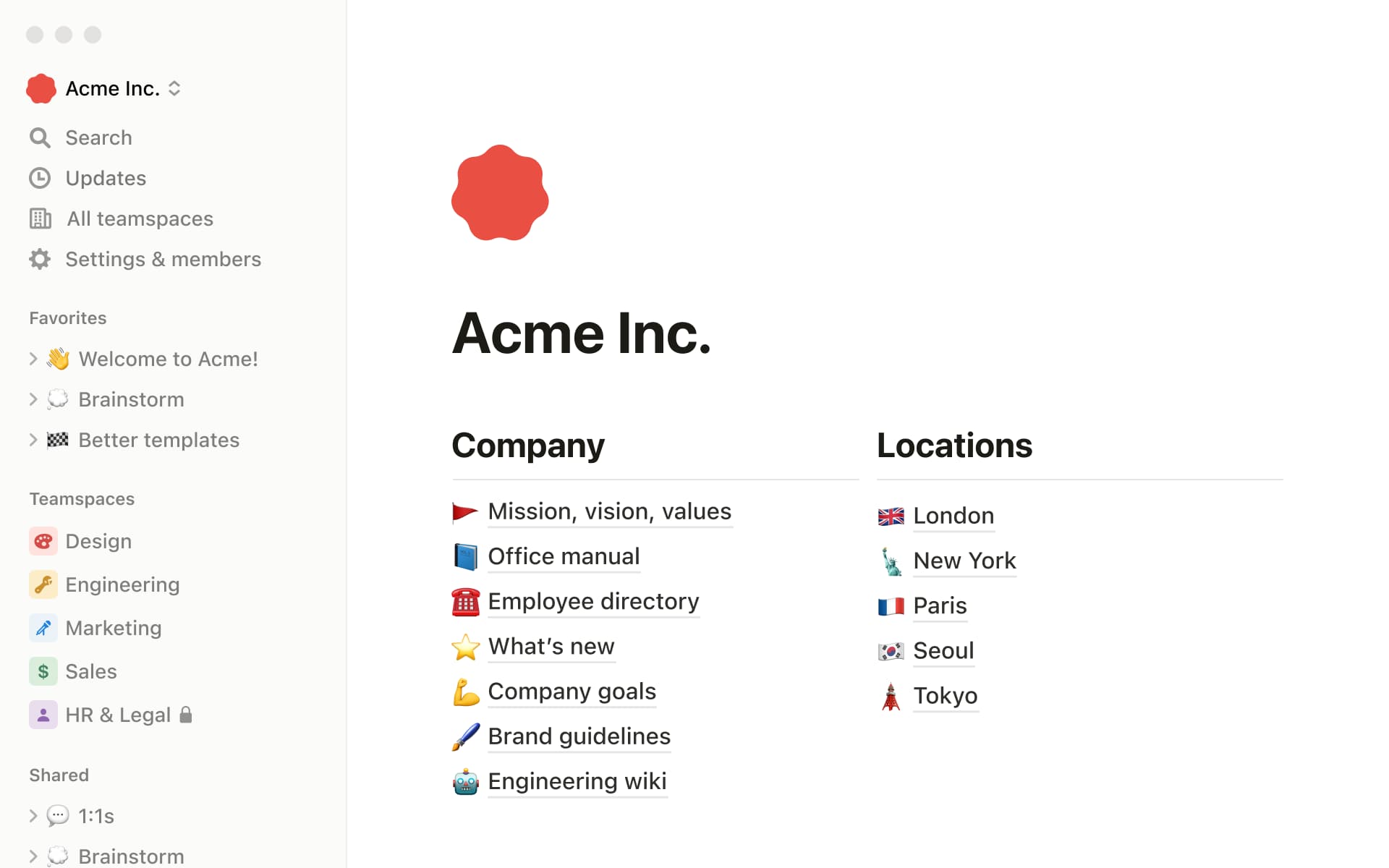
Documentation is Notion's core strength. Pages are fast to write in, easy to nest, and can embed databases, files, Figma frames, code and much more. Wikis gather pages into a searchable knowledge base, and the Business plan adds verified pages so readers know which documents are current.
For project teams, this matters because the reasoning behind work, such as the project brief, requirements and decisions, stays next to the tasks themselves. In most dedicated PM tools, that context lives in a separate document system.
Databases and Properties
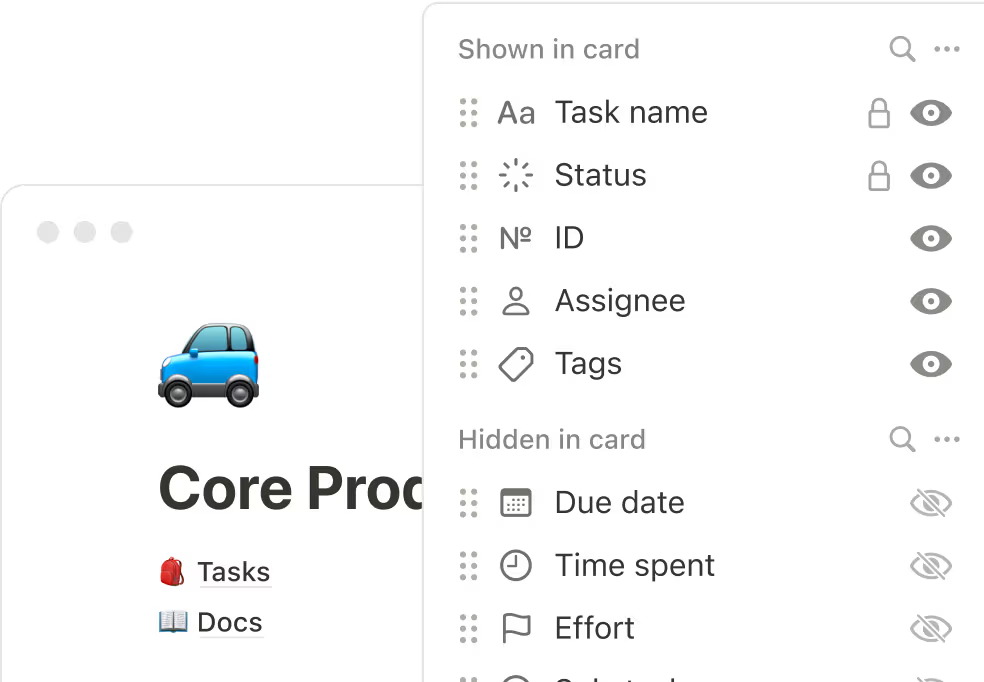
Databases are the engine behind every project feature in Notion. Properties hold structured data, formulas calculate values, and relations and rollups connect databases, so a project can show how many of its tasks are done, or a client page can list every project for that client.
This is powerful and genuinely flexible, but it is also where the work is. Someone has to design the databases, decide which properties matter and keep them consistent. Done badly, you end up with several half-used databases that nobody trusts.
Projects and Tasks
Notion's projects and tasks setup gives you linked Projects and Tasks databases with assignees, statuses, due dates, subtasks, a progress bar and a personal "My tasks" view. Notion says you can mark when one task is blocking another to avoid bottlenecks, and dependencies are visible on the timeline.
It covers what most small and medium teams need for day-to-day task dependencies and ownership. It does not include the controls found in dedicated tools, such as workload balancing, time budgets or project-level financials. If you prefer to start simpler, our free project tracker template shows the minimum fields a tracker needs.
Board (Kanban) View
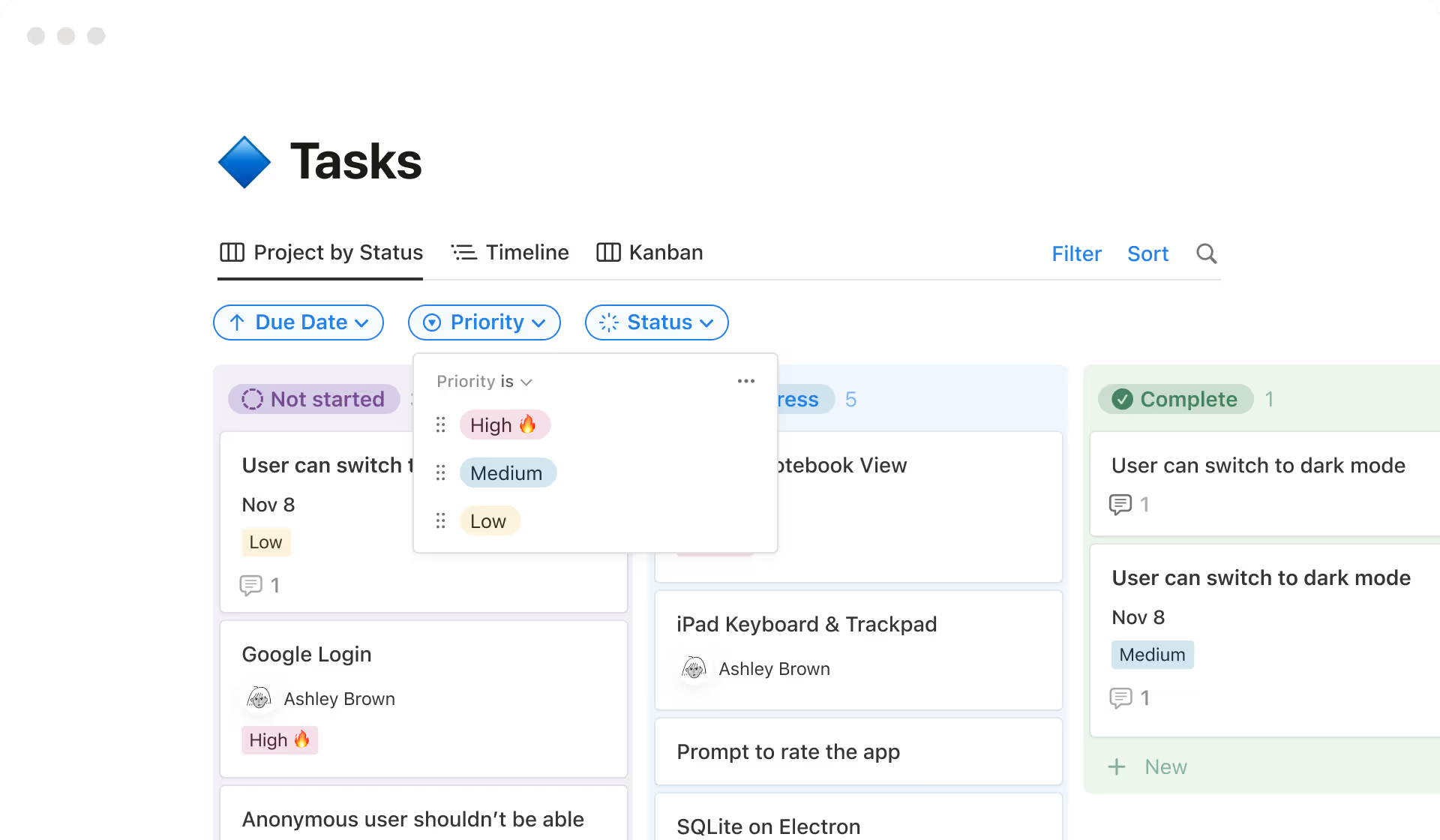
Board view shows database items as cards grouped by status or any select property, and you drag cards between columns to update them. Filters and sub-groups let one database serve several boards, such as one per team. Board view is available on every plan, including Free.
Timeline View
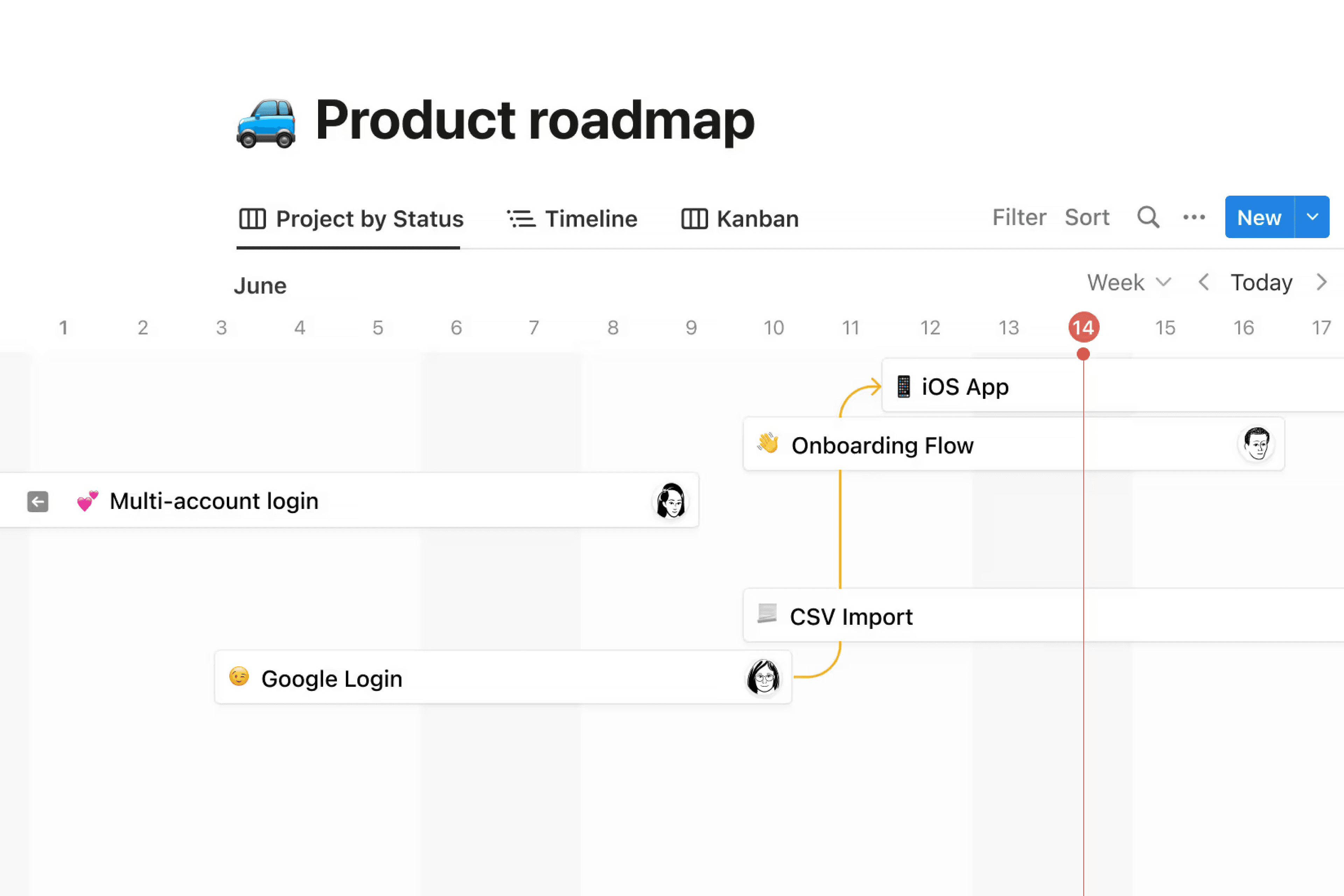
Timeline view plots database items with a date range on a Gantt-style chart. You can drag items to change dates or stretch them to change duration, and the vendor highlights dependencies on the timeline to help teams spot blocked work. It is well suited to roadmaps and high-level project plans.
It is not a full scheduling engine. Notion's documentation does not describe baselines, critical path analysis or lead and lag times, which teams running complex, date-driven projects expect from a dedicated Gantt chart tool. For a product roadmap, Notion's timeline is often enough; for a construction-style schedule, it usually is not.
Sprints
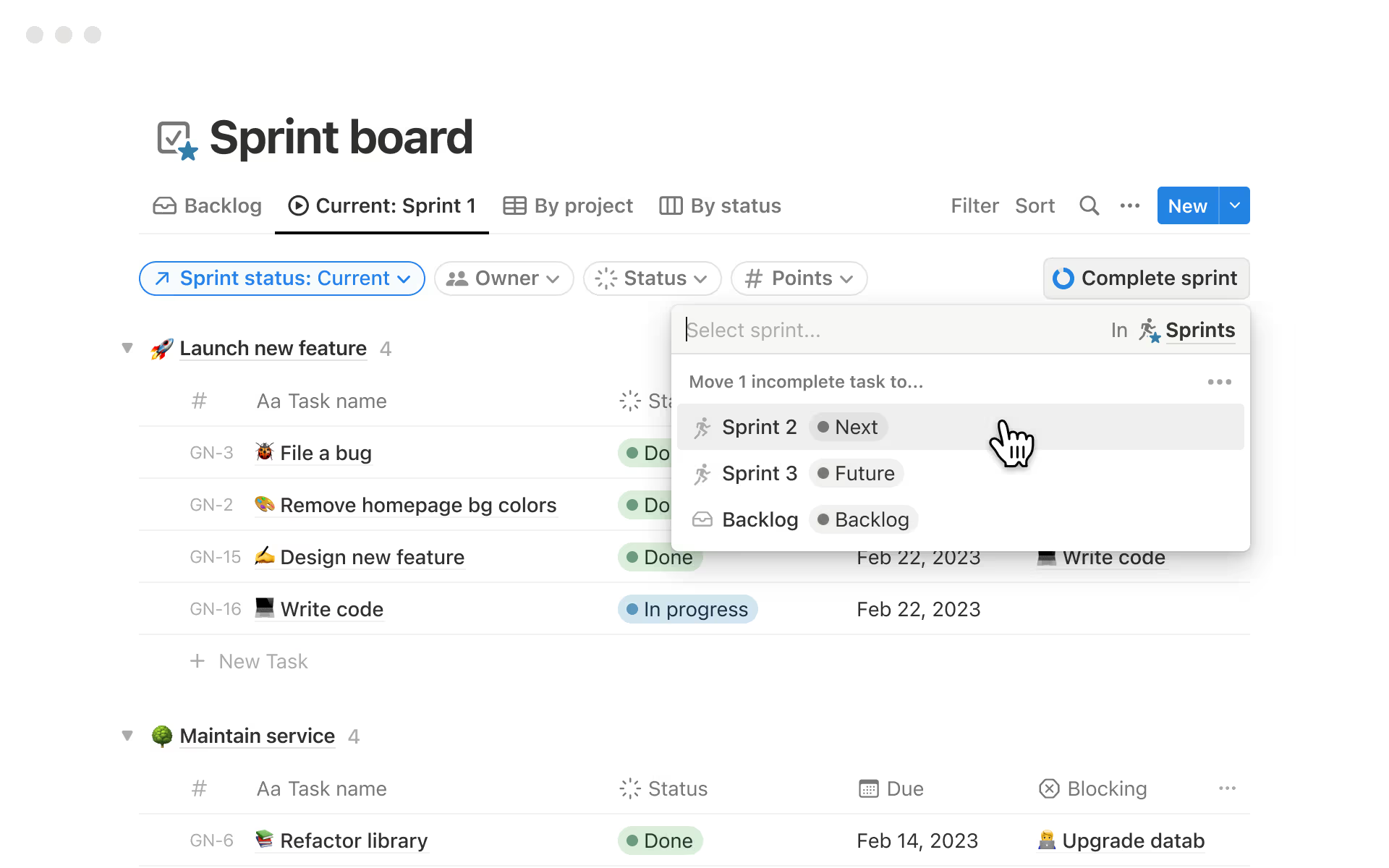
For product and engineering teams, Notion can add sprints to a task database. Turning them on creates a Sprints database and a sprint board with Current sprint, Sprint planning and Backlog views. Sprints can last one to eight weeks, and you choose whether unfinished tasks roll into the next sprint, return to the backlog or stay put. With automated sprints, each sprint closes and the next one starts on schedule.
This covers the basics of sprint planning well, but lacks Jira's depth, such as velocity and burndown reports, so larger engineering organisations often keep Notion for specs and a dedicated tracker for issues.
Forms
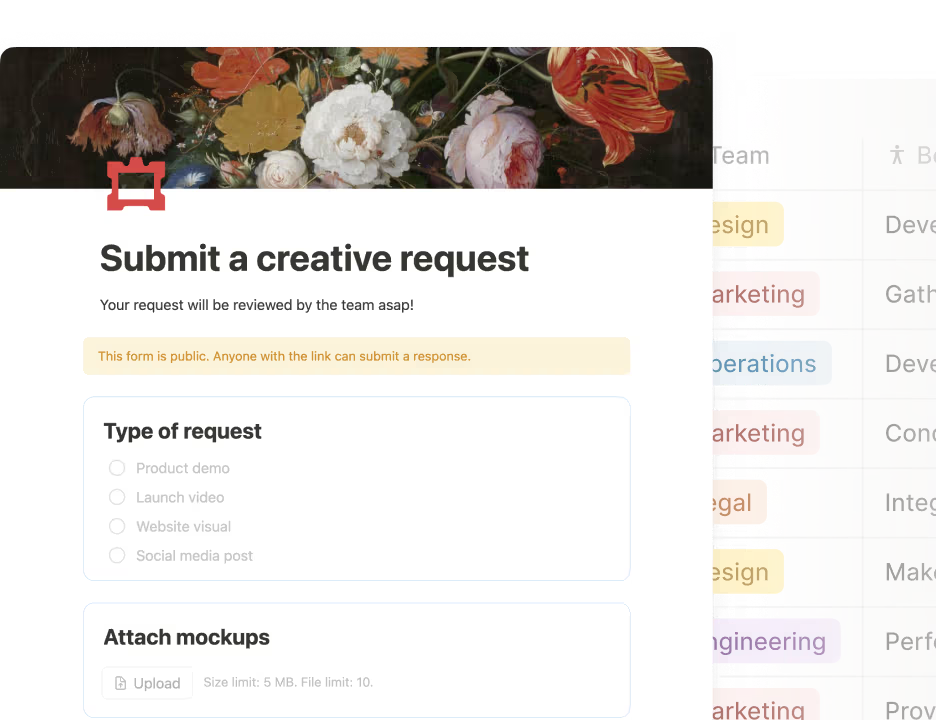
Notion forms send each response straight into a database, so requests become trackable items without copying them from email. The Free plan has basic forms, Plus removes Notion branding and adds customisation, and conditional logic needs Business. Combined with automations, a form can be the front door for design requests, bug reports or content ideas, similar to our work request template.
Database Automations
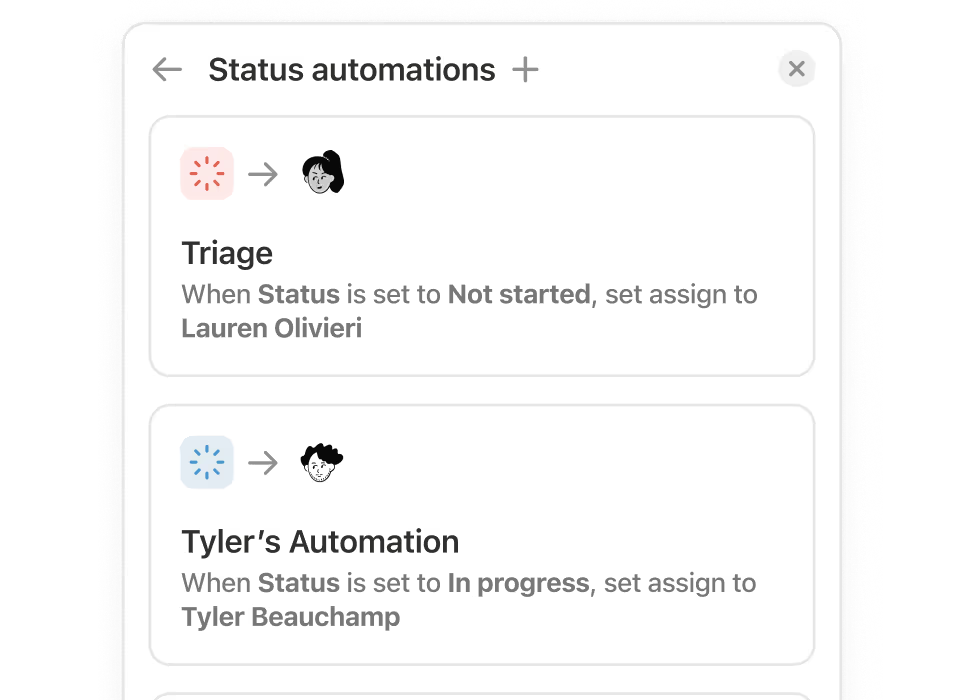
Database automations run when a page is added, a property changes or a recurring schedule fires. Actions include editing properties, adding or editing pages, sending notifications, sending email through Gmail, posting to Slack and sending webhooks. Automations require a paid plan; Free users are limited to Slack notification automations and can use, but not edit, automations included in templates.
They handle routine coordination well, but they are simpler than the rule engines in dedicated work management tools; multi-step logic usually needs webhooks, an external automation tool or Custom Agents.
Charts and Dashboards
Notion can turn any database into a bar, line or donut chart, and you can place several charts and filtered views on one page as a dashboard. Free includes one chart; Plus and above include unlimited charts. This gives managers a reasonable status overview, but it is assembled by hand rather than provided as ready-made project reports.
Notion AI Features
AI is now central to Notion, and its plan structure has changed. According to Notion's pricing and AI pages, Notion AI is included with the Business and Enterprise plans; Free and Plus workspaces get only a limited trial. Since 4 May 2026, Custom Agents run on Notion credits, an add-on for Business and Enterprise priced at $10 per 1,000 credits monthly or $13 per 1,000 on annual terms. Credits are shared across the workspace, and unused credits do not roll over.
Notion Agent
Notion Agent is the built-in assistant. Notion says it can complete multi-step tasks using context from your workspace, connected apps and the web, creating or editing pages and databases from a chat, such as drafting a project plan from meeting notes or building a task database from a brief.
AI Meeting Notes
AI Meeting Notes transcribes meetings and summarises key points and action items without adding a bot to the call. For teams whose projects are driven by meetings, this links decisions directly to the pages where work is tracked.
Enterprise Search
Enterprise Search, still labelled beta, searches across Notion and connected apps such as Slack, Google Drive and GitHub, which helps when you need to find where a decision was made.
Custom Agents
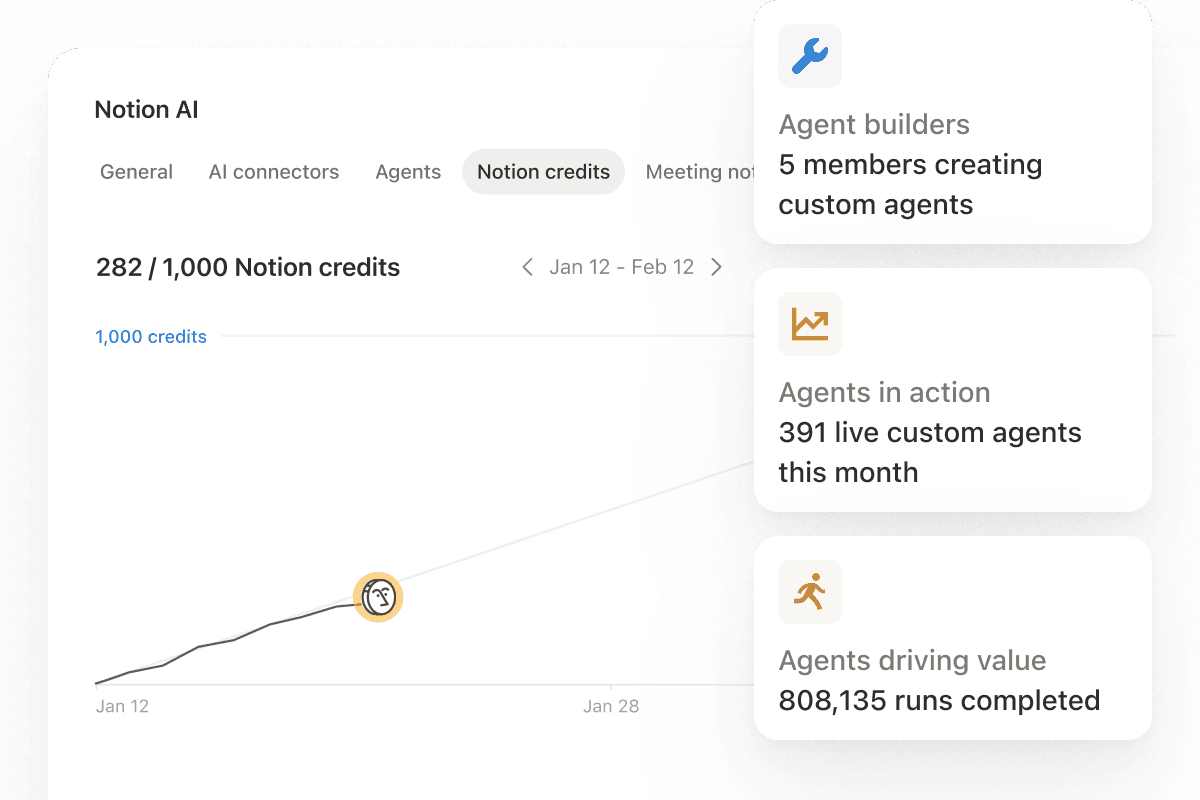
Custom Agents are team-wide automations that run on triggers or schedules, whether or not anyone is online. Notion lists triggers such as Slack mentions and emoji reactions, incoming email, calendar events and recurring schedules, and examples such as Q&A agents, task-routing agents and agents that compile recurring status reports. Admins can control who builds agents, see what each one can access, pause any agent, and track credit usage with alerts at 80% and 100%; every run is logged.
These are best understood as configurable workflow automation, not autonomous team members. They follow the instructions and access you give them, consume credits on every run, and need an owner. A weekly project status report agent can save real time, but budget for credits before rolling agents out widely.
Writing, Autofill and Research Mode
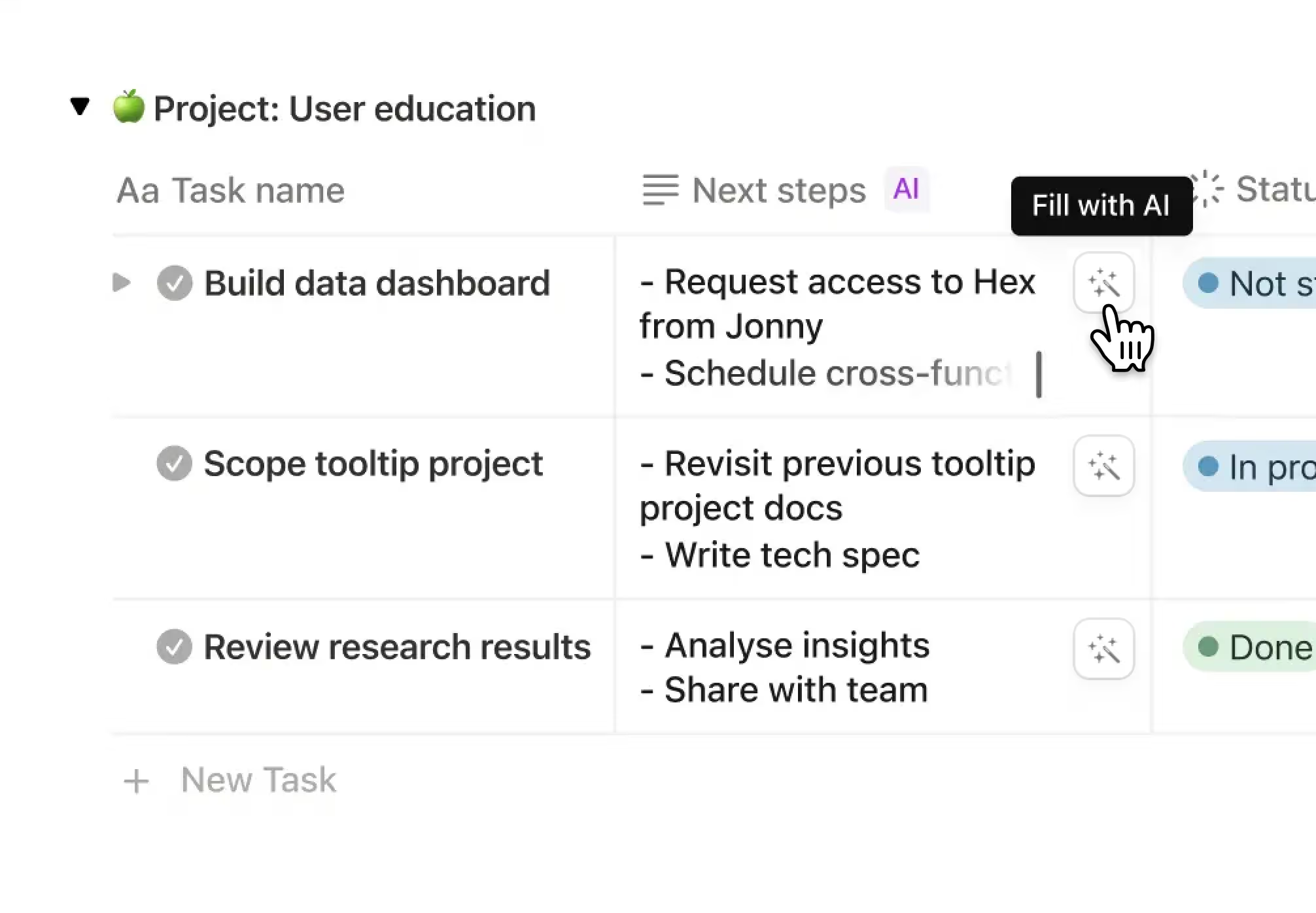
Notion AI can draft and improve text inside pages, and Autofill can populate database properties automatically, for example summarising each project or extracting key results. Research Mode generates longer reports from your workspace and the web. Notion states that it does not train AI models on customer content, and Enterprise customers get zero data retention with its AI providers.
Notion Collaboration Features
Collaboration is where Notion users are happiest. Several people can edit a page at once, comment on any block, @mention colleagues and pages, and follow updates through the inbox. Guests can be invited to specific pages: Free allows 10 external guests and Plus and above allow unlimited guests. Page history runs from 7 days on Free to 30 days on Plus, 90 days on Business and unlimited on Enterprise.
On Capterra, the real-time collaborative workspace is one of the most positively reviewed themes, at around 97% positive among reviews that mention it. The downside is structure: because anyone can create pages and databases, workspaces can sprawl. Agree a teamspace structure, naming conventions and owners for key databases early, especially for remote teams that rely on written documentation.
Notion Reporting and Dashboards
Reporting in Notion is built from the same pieces as everything else: database views, filters, formulas, rollups and charts. A well-built dashboard page can show projects by status, overdue tasks per owner and progress across a quarter, and Business adds page analytics showing who viewed and edited pages.
What Notion does not offer is packaged project reporting: no built-in portfolio reports, workload charts or burndown charts. If leadership needs consistent reporting across many projects, someone has to build and maintain it. Our guide to managing multiple projects explains what that reporting usually needs to show.
Resource Management and Time Tracking
This is Notion's clearest gap for project managers. It has no native time tracking, no workload or capacity view and no resource scheduling. Teams can approximate these with number properties (estimated hours, effort points), rollups and third-party time-tracking integrations, but there is nothing equivalent to the workload views in Wrike, monday.com or ClickUp.
For small teams, this rarely matters. For agencies billing hours, professional services firms or PMOs doing capacity planning and resource allocation, it is usually a deciding factor against using Notion as the main project system.
Notion Integrations
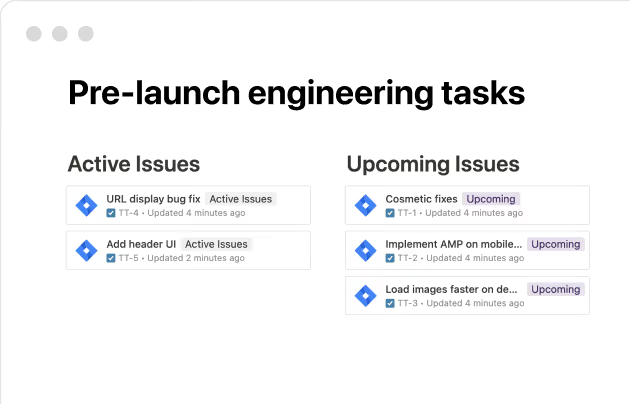
Notion's integrations gallery covers engineering, design, sales, marketing, analytics, automation, security and identity tools. Plan matters here: Plus includes basic connections such as Slack and Google Drive, while Business adds premium connections such as GitHub and Asana. Notion's projects page highlights bringing GitHub pull requests and issues, Jira bug updates, Figma designs and Slack messages into Notion pages.
Other listed integrations include an AI connector for Microsoft Teams, Linear, Loom, Canva, Tableau and Calendly, plus identity and security tools such as Microsoft Entra ID, OneLogin and Splunk, and a public API supports custom integrations. In practice, integrations are good at pulling context into Notion; deep two-way project syncing is more limited than in some dedicated PM tools.
Notion Ease of Use
Initial Setup
A new workspace starts close to empty, which is liberating for some teams and paralysing for others. Templates help, but a team-wide project system still means designing databases, relations, views, permissions and automations. A small team can be productive in an afternoon; a department-wide setup is a project in its own right.
Learning Curve
Writing pages and ticking off tasks is easy, and most people pick it up within minutes. Databases, relations, rollups and formulas take longer, and this is where Notion's reputation for a learning curve comes from. G2 users list a steep learning curve for advanced setups and limited features for complex project management among the main drawbacks, while still rating Notion highly overall. Capterra's ease-of-use sub-score of 4.4 is good, but lower than its features and value scores.
Performance and Interface
The interface is clean and minimal, which most users like. The most consistent complaint on Capterra is performance: around 85% of reviews that discuss large amounts of content describe Notion as sluggish. Very large databases, heavy relations and long pages are where this shows, so plan to archive old work and keep databases focused.
Notion Mobile App and Offline Access
Notion's iOS and Android apps let you read and edit pages, update tasks, comment and check notifications. Capterra feedback on mobile is mixed, with about half of reviews on mobile usability negative, so treat the apps as companions for updates and reading rather than for building or reorganising databases.
Offline access now exists on the desktop and mobile apps for all plans, with limits: you mark pages for offline use on each device, only the first 50 rows of a database download automatically, and embeds, forms and buttons do not work offline. Capterra reviewers still list offline functionality as a weakness, so test it if your team often works without a connection.
Notion Pricing
Notion's published plans are below. Prices are per member per month at the yearly rate; Notion says paying yearly saves up to 20%, and listings such as Capterra show the monthly-billed rates as $12 for Plus and $24 for Business. Guests are free but limited to the pages they are invited to.
| Plan | Published price | Best for |
|---|---|---|
| Free | $0 | Individuals and very small trials |
| Plus | $10/member/month | Small teams that need unlimited collaborative use |
| Business | $20/member/month | Growing teams that want Notion AI, SSO and private teamspaces |
| Enterprise | Contact sales | Large organisations with advanced security and admin needs |
Add-ons include Notion credits for Custom Agents and extra AI usage ($10 per 1,000 credits monthly, $13 per 1,000 annually, Business and Enterprise only) and custom domains for Notion Sites ($8 per month per domain billed yearly, or $10 monthly). Pricing checked on Notion's pricing page on 7 October 2026; always confirm before buying.
Notion Free Plan
The Free plan is aimed at individuals. It includes pages and databases with subtasks, dependencies and custom properties, basic forms and sites, Notion Calendar and a trial of Notion AI. The limits matter for teams: blocks are unlimited for one person but limited once a workspace has two or more members, uploads are capped at 5 MB per file, page history lasts 7 days, and you get 10 guests and one chart. It is a good way to evaluate Notion, but not a long-term home for a team.
Notion Plus Plan
At $10 per member/month on yearly billing, Plus removes the block limit for teams and adds unlimited file uploads (a per-file size limit may apply), unlimited charts and guests, custom forms and sites, 30-day page history and basic connections such as Slack and Google Drive. It suits small teams that want collaborative docs and project tracking, but note that Notion AI is only a trial on Plus. Students and educators can get a one-member Plus plan free with a school email.
Notion Business Plan
At $20 per member/month on yearly billing, Business is the plan Notion recommends. It adds Notion AI (Notion Agent, AI Meeting Notes and Enterprise Search), SAML SSO, private teamspaces, granular database permissions, verified pages, conditional logic in forms, premium connections such as GitHub and Asana, 90-day page history and page analytics. For most teams using Notion as their main workspace, and anyone who wants AI included, this is the plan to evaluate.
Notion Enterprise Plan
Enterprise is quote-based and adds SCIM provisioning, advanced security controls, the audit log, SIEM and DLP connections, custom data retention, unlimited page history, zero data retention with LLM providers, premium support and a customer success manager. It is designed for large organisations with formal IT and compliance requirements.
Notion Free Trial
Notion's pricing page does not advertise a standard free trial of its paid plans; the Free plan is the main way to try the product, and Notion AI is available as a limited trial below Business. Notion's agents page refers to Business trials, so ask sales if you want to test Business features. Notion's pricing page also states a refund window: three days for monthly plans and 30 days for annual plans. Whichever way you test it, rebuild one real project, with its brief, tasks and views, using the people who will use it.
Notion Pros and Cons
Pros
- Excellent docs, wikis and knowledge management
- Very flexible databases, relations and views
- Specs, notes and tasks connected in one place
- Strong real-time collaboration
- Board, timeline, calendar and sprint views
- Strong value on Plus and Business
- Capable AI: Agent, meeting notes, Custom Agents
- Large template gallery and community
- Mature security certifications
Cons
- No native time tracking or resource management
- Project systems take design effort to build and maintain
- Timeline lacks baselines and critical path
- Can feel sluggish with large databases or pages
- Reporting must be assembled by hand
- Notion AI requires Business; agents need paid credits
- Workspaces can sprawl without clear ownership
- Offline and mobile still weaker than desktop
- Less suited to large, structured portfolios
This balance matches what users report: people love Notion's flexibility and collaboration, while performance with large content, offline access and the effort of building advanced setups are the recurring drawbacks.
What Do Notion Customers Say?
- Ease of use: 4.4/5
- Features: 4.6/5
- Customer service: 4.4/5
- Value for money: 4.6/5
What G2 reviewers like most
- Ease of use
- Flexible organisation
- Integrated AI features
Most common G2 complaints
- Steep learning curve for advanced setups
- Limited features for complex PM
- Takes time to learn
Ratings and review themes as published on G2 and Capterra on 5 October 2026; summarised in our own words. Visit the links above for full, verified user reviews.
On Capterra, Notion is rated 4.7/5 from 2,834 reviews, with sub-scores of 4.4 for ease of use, 4.6 for features, 4.6 for value for money and 4.4 for customer service (checked 7 October 2026). On G2, it is rated 4.6/5 from 13,862 reviews (checked 5 October 2026). The themes below summarise these third-party reviews in our own words.
Positive themes. Reviewers most often praise Notion as a flexible, all-in-one hub for notes, docs and projects (about 98% positive in Capterra's topic summary), its real-time collaborative workspace (about 97% positive) and the productivity gained from integrations (about 95% positive). G2 users highlight ease of use, flexible organisation and the built-in AI.
Negative themes. The most common complaints are sluggish performance with large content (about 85% of related Capterra reviews are negative), limited offline functionality (about 76% negative) and mobile app usability (about 50% negative). G2 users add the learning curve for advanced setups and limited features for complex project management.
Many positive reviews describe Notion as a notes and knowledge tool rather than a project system, so read reviews from teams that use it the way you plan to, and check whether a review was invited or incentivised by the vendor (both Capterra and G2 label these).
Notion Customer Support
Notion provides a detailed help centre, guides, video tutorials, a template gallery and a large user community. Enterprise customers get premium support and a dedicated customer success manager; on other plans, support is mainly self-service and through in-app messaging.
Capterra's customer service sub-score of 4.4/5 is solid, though experiences vary between reviewers. For a large rollout, ask during the sales process exactly which onboarding and support are included.
Notion Security
Notion's security page states that it holds a SOC 2 Type 2 attestation and certifications for ISO 27001, ISO 27017, ISO 27018 and ISO 27701. Healthcare organisations can process protected health information after signing Notion's Business Associate Agreement under HIPAA, and Notion says its privacy programme is mapped to GDPR and other global privacy regulations. It hosts on AWS and Cloudflare infrastructure.
Plan matters for controls: SAML SSO, private teamspaces and granular database permissions start on Business, while SCIM provisioning, the audit log, advanced security controls, SIEM and DLP connections and zero data retention with LLM providers are Enterprise features. For AI, Notion states that it does not train models on customer content. As with any vendor, confirm current certifications and their scope in Notion's trust documentation during procurement.
Notion for Different Types of Teams
Notion for Product and Engineering Teams
This is one of Notion's strongest fits: specs, PRDs, roadmaps, decision logs and sprint boards in one connected space, with GitHub and Jira context pulled in. Many teams use Notion for planning and documentation and keep a dedicated issue tracker for engineering execution.
Notion for Marketing and Content Teams
Editorial calendars, campaign briefs, content databases with status and owner, and request forms all work well in Notion, and the docs-first approach suits teams that write for a living. Approval workflows and proofing are basic compared with dedicated creative tools.
Notion for Start-ups and Small Businesses
For start-ups, Notion can be the wiki, roadmap and project board at once, which is excellent value on Plus or Business. The risk is building elaborate systems before the team needs them.
Notion for Project Managers and PMOs
Be realistic here. Notion can track projects and give a readable overview, but it lacks the resource management, time tracking, baselines, portfolio reporting and standardised controls that a PMO typically relies on. Many PMOs use Notion for documentation alongside a dedicated platform such as Wrike.
Notion for Enterprises
Large organisations often adopt Notion as a knowledge and collaboration layer, helped by Enterprise security and admin controls. As the main system for complex, cross-department delivery it is less common; see our guide to enterprise project management for the capabilities that usually matter at that scale.
Who Should Use Notion?
Great for
- Start-ups and small teams wanting docs and tasks together
- Product teams managing specs and roadmaps
Look elsewhere if
- PMOs needing resource, budget and portfolio controls
- Teams wanting ready-made PM features out of the box
Notion Feature Checklist
| Feature | Notion |
|---|---|
| Free plan | ✓ Yes |
| Gantt / timeline | ✓ Yes |
| Kanban boards | ✓ Yes |
| Time tracking | ✕ No |
| Resource & workload management | ✕ No |
| Portfolio management | ◐ Partial |
| Docs & wiki | ✓ Yes |
| Automations | ✓ Yes |
| Agile / sprint tools | ◐ Partial |
| Proofing & approvals | ✕ No |
| Built-in AI | ✓ Yes |
| Guest / client access | ✓ Yes |
| Flat (non per-user) pricing | ✕ No |
Notion Alternatives and Comparisons
Notion fits teams of almost any size, from individuals and small teams to large organisations that want docs, wikis and projects in one connected workspace. Beginners can start from a ready-made template and simple pages, then add databases, timelines and automations as their work grows. If you would like to see how it stacks up, we compare Notion with ClickUp, Asana, monday.com, Trello and others on pricing, features and use cases on dedicated pages:
- ClickUp: choose it for docs plus richer project management. Compare Notion vs ClickUp.
- Wrike: choose it for full project and resource management. Compare Notion vs Wrike.
- Asana: choose it for dedicated task management. Compare Notion vs Asana.
- Trello: choose it for simple boards. Compare Notion vs Trello.
- Basecamp: choose it for simple communication-centred projects. Compare Notion vs Basecamp.
Notion comparisons
Is Notion Worth It?
Notion is likely worth it if you:
- Want docs, wikis and project tracking in one workspace.
- Are a small or medium team, or a product, engineering or content team.
- Value flexibility and are willing to design your own databases and views.
- Want built-in AI for writing, meeting notes and search (on Business).
- Need strong real-time collaboration on written work.
It may not be worth it as your main project tool if you:
- Need time tracking, workload or resource management.
- Want project management features ready to use without building them.
- Run complex schedules that need baselines and critical path.
- Need standardised reporting across a large portfolio.
- Work with very large databases or often without a connection.
Our verdict: Notion's flexibility is both its biggest advantage and its main limitation. As a workspace for knowledge and lightweight-to-moderate project tracking, it is excellent value, which is why it earns 8.0/10 and a place in our top 10 project management tools. As a replacement for a dedicated project management platform in a PMO or resource-heavy organisation, it falls short. Before committing, read our guide on how to choose project management software and build one real project in the Free plan.
Frequently asked questions
Is Notion good for project management?
Yes, for lightweight to moderately complex projects. Notion offers task databases, boards, timelines, sprints, forms and automations, all connected to your docs. It lacks native time tracking, resource management, baselines and packaged portfolio reporting, so PMOs and resource-heavy teams usually need a dedicated project management tool.
Is Notion free?
Yes. Notion's Free plan costs $0 and is aimed at individuals. It includes pages, databases, basic forms and sites, and a trial of Notion AI, but blocks are limited for workspaces with two or more members, uploads are capped at 5 MB and page history lasts 7 days.
How much does Notion cost?
Notion costs $0 on Free, $10 per member/month on Plus and $20 per member/month on Business at the yearly rate, with Enterprise priced on request. Monthly billing costs more; Notion says yearly saves up to 20%. Notion credits for Custom Agents are extra (checked 7 October 2026).
Does Notion have a free trial?
Notion's pricing page does not advertise a standard free trial of paid plans. The Free plan is the main way to try it, and Notion AI comes as a limited trial on Free and Plus. Notion refers to Business trials for agents, so ask sales if you need one.
Is Notion easy to use?
Partly. Writing pages and managing simple task lists is easy. Building project systems with relational databases, rollups, formulas and automations takes more learning, and G2 users cite a steep learning curve for advanced setups. Capterra rates its ease of use 4.4/5.
What is Notion best used for?
Notion is best for documentation, wikis, meeting notes, product specs and roadmaps, combined with lightweight to moderate project and task tracking. It suits start-ups, product and engineering teams, content teams and any team that wants knowledge and work in one place.
Is Notion better than ClickUp?
It depends on your priorities. Notion is stronger for documents and flexible knowledge management; ClickUp offers more built-in project management, including time tracking and workload views. See our Notion vs ClickUp comparison.
Is Notion better than Asana?
Neither is universally better. Notion suits docs-heavy teams that want to build their own systems, while Asana offers dedicated task, goal and portfolio management with less setup. See our Notion vs Asana comparison.
Does Notion have Gantt charts?
Notion has a timeline view that works like a simple Gantt chart, showing items with date ranges and dependencies. It does not offer baselines or critical path analysis, so complex schedules are better handled in a dedicated Gantt tool.
Does Notion have Kanban boards?
Yes. Board view turns any database into a Kanban board grouped by status or another property, with filters and sub-groups. It is available on every plan, including Free.
Does Notion have AI, and how much does it cost?
Yes. Notion AI, including Notion Agent, AI Meeting Notes and Enterprise Search, is included on Business and Enterprise; Free and Plus get a limited trial. Custom Agents run on Notion credits, sold to Business and Enterprise customers at $10 per 1,000 credits monthly or $13 per 1,000 annually.
Does Notion have time tracking?
No. Notion has no native time tracking or resource management. Teams use number properties, formulas or third-party time-tracking integrations as workarounds, which is one reason agencies and PMOs often choose a dedicated tool instead.
Does Notion work offline?
Yes, on the desktop and mobile apps for all plans. You mark pages for offline use on each device, only the first 50 rows of a database download automatically, and embeds, forms and buttons do not work offline.
Does Notion integrate with Slack and Jira?
Yes. Slack and Google Drive connections are included from Plus, premium connections such as GitHub and Asana need Business, and Notion can bring Jira issues, Figma designs and GitHub pull requests into pages. A public API supports custom integrations.
Product screenshots are © Notion Labs, Inc. and shown for the purpose of review, with links to their source pages.