Project management tools · #3 of 10 · Best for cross-team task and goal management
Asana Review 2026: Is It Worth It?
Asana is a work management platform for planning, tracking and coordinating work across teams, and for connecting that work to company goals. Its biggest strengths are a clean, approachable interface and dependable cross-team task management; the main trade-offs are that portfolios, goals, workload and approvals sit on the higher-priced Advanced plan, and that its resource and financial controls are lighter than those of more PMO-oriented tools. This review covers pricing, project views, goals and portfolios, automation, AI, integrations, ease of use, reporting, security and overall value.
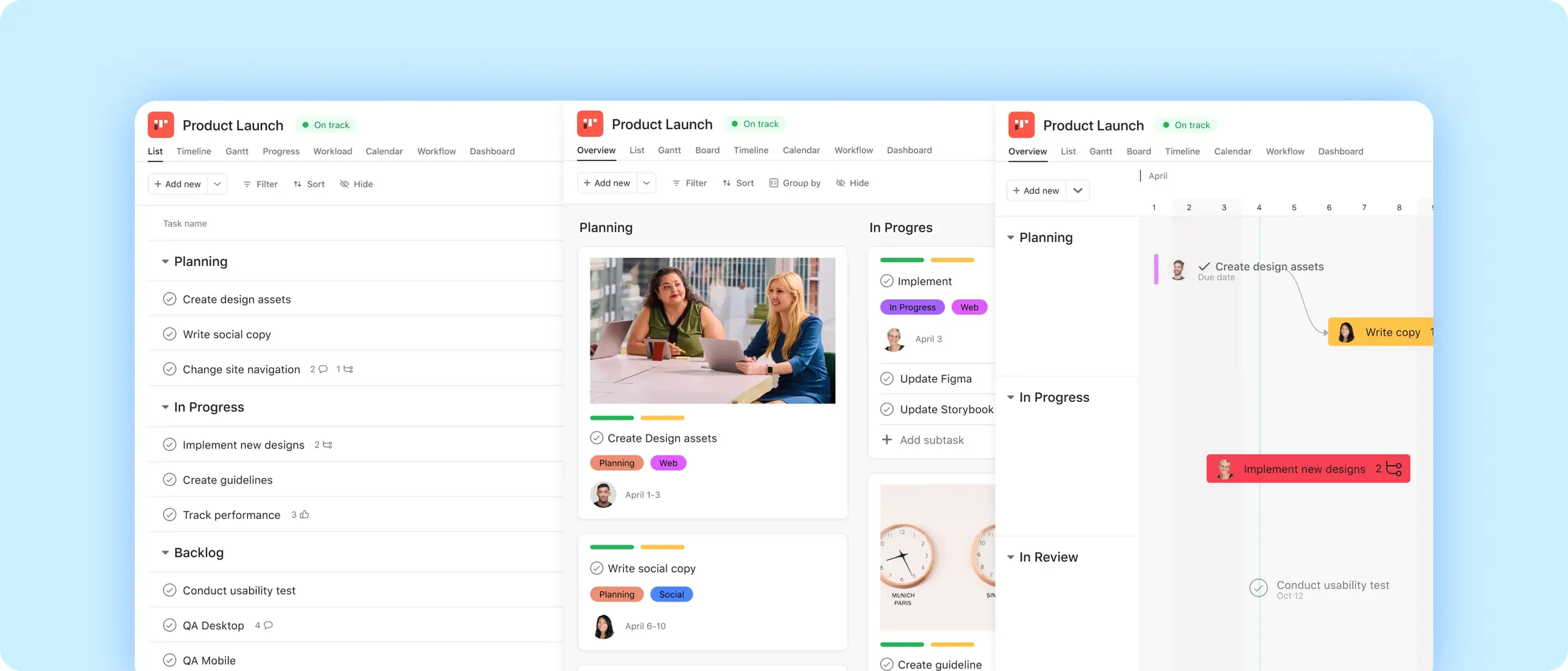
Asana review: quick verdict
| Best for | Organisations coordinating work across many teams that want easy-to-adopt task management connected to goals and portfolios |
| Less suitable for | Teams that need detailed budgeting, financial tracking or complex resource planning, and very small teams wanting advanced features for free |
| Our overall score | 9.0/10, ranked #3 in our top 10 project management tools |
| Price | Free Personal plan (2 users); Starter $10.99 and Advanced $24.99 per user/month billed annually ($13.49 and $30.49 billed monthly); Enterprise and Enterprise+ on quote |
| Free trial | Self-serve Advanced trial, no credit card required |
| Capterra rating | 4.5/5 from 13,731 reviews (checked 7 October 2026) |
| G2 rating | 4.4/5 from 14,008 reviews (checked 5 October 2026) |
Asana is a polished, reliable work management tool that is at its best when many teams need to coordinate work and see how it ladders up to goals. It is one of the easier platforms in its class to roll out. The trade-offs: the free plan is now limited to two users, the features that make Asana distinctive (goals, portfolios, workload, approvals) start on Advanced, AI usage is metered, and reviewers regularly complain about notification volume and occasional performance problems.
Our scores
Scores use our standard review methodology, the same for every tool we review.
What Is Asana?
Asana is cloud-based work management software. It combines task and project management (lists, boards, timelines, dependencies) with the layers organisations need above individual projects: portfolios that group related projects, goals that track objectives, workload views that show who has capacity, and automation and AI that move work along.
Organisations typically use it for:
- Cross-team projects, such as product launches that involve marketing, product, sales and support
- Campaign and content planning, with calendars, timelines and approvals
- Request intake, using forms that turn each submission into a task
- Goals and OKRs, linking company objectives to the projects that deliver them
- Portfolio reporting, giving leaders a status view across many projects
- Repeatable operational workflows, run with templates, rules and AI workflows
Asana runs in the browser, as desktop apps for Mac and Windows, and as mobile apps for iOS and Android. Underneath, Asana describes its data model as the Work Graph: tasks, projects, portfolios and goals are connected, so a task completed in one project can update progress on a portfolio or goal. That connection, rather than any single view, is what separates Asana from a simple to-do list app.
Who Owns Asana?
Asana, Inc. was founded in 2008 by Dustin Moskovitz, a Facebook co-founder, and Justin Rosenstein, and is based in San Francisco. It listed on the New York Stock Exchange (ticker ASAN) through a direct listing in September 2020. Dan Rogers became chief executive in July 2025, succeeding Moskovitz.
For buyers, the practical point is that Asana is a mature, publicly listed company that publishes its financial results, rather than an early-stage start-up.
How Does Asana Work?
Asana organises work in a hierarchy that is easy to grasp:
- Organisation (or workspace) is the company-wide account.
- Teams group people, such as Marketing, IT or a client team.
- Projects hold the work for an initiative or an ongoing process, split into sections (for example Backlog, This week, Done).
- Tasks and subtasks are the individual pieces of work. Each task has one assignee, a due date, optional collaborators, custom fields and dependencies.
- Portfolios group projects so managers can monitor them together, and goals sit above portfolios and projects to show what the work is for.
- My Tasks, Inbox and dashboards give each person and manager their own view of what matters.
A distinctive detail is that one task can live in several projects at once, so a legal review task can sit in both a launch project and the legal team's intake project without being duplicated.
A typical workflow looks like this:
Request submitted via form → task created in the right project → rule assigns an owner → work tracked in list, board or timeline → status update posted → portfolio and goal progress update
For example, a regional sales team submits a request for a customer case study. Asana creates a task in the content team's project, a rule assigns it to the content lead and sets a due date, the writer moves it across the board from Drafting to In review, and the marketing director sees it reflected in the quarterly campaign portfolio without asking for an update.
Asana Key Features
Tasks, Subtasks and My Tasks
Tasks are the core building block. Each one can have subtasks, a single assignee, start and due dates, dependencies, custom fields, attachments, comments and collaborators who follow the task. Recurring tasks handle routine work, and My Tasks gathers everything assigned to a person across all projects into one prioritised list.
Asana's one-assignee-per-task rule is deliberate: every piece of work has exactly one owner. This is a real advantage once several teams contribute to the same project, because it removes the "I thought you were doing that" problem. Teams used to shared ownership sometimes find it restrictive, and work around it with subtasks or collaborators.
Project Views: List, Board and Calendar
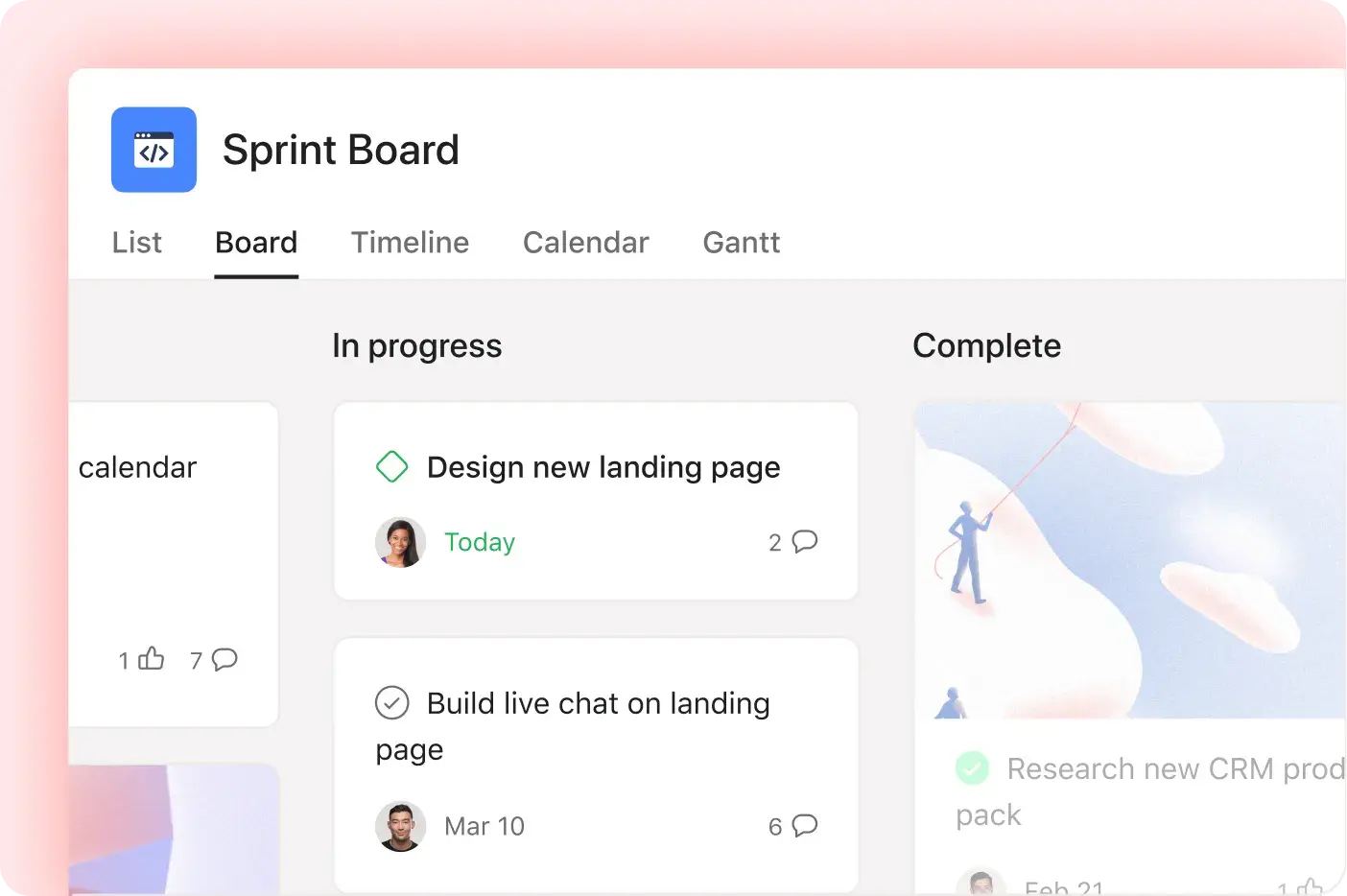
Every project can be switched between views. List view groups tasks into sections and can sum, average or count numeric columns. Board view works as a Kanban board: tasks are cards that you drag between columns such as New, In progress and Complete, with due dates, assignees and subtasks visible on each card. Calendar view shows tasks by day, and dragging a task to a new day changes its due date.
All three views are available on the free Personal plan, so they are a reasonable way to try Asana. If you are not ready for software, our Kanban board template follows the same idea.
Timeline and Gantt Views
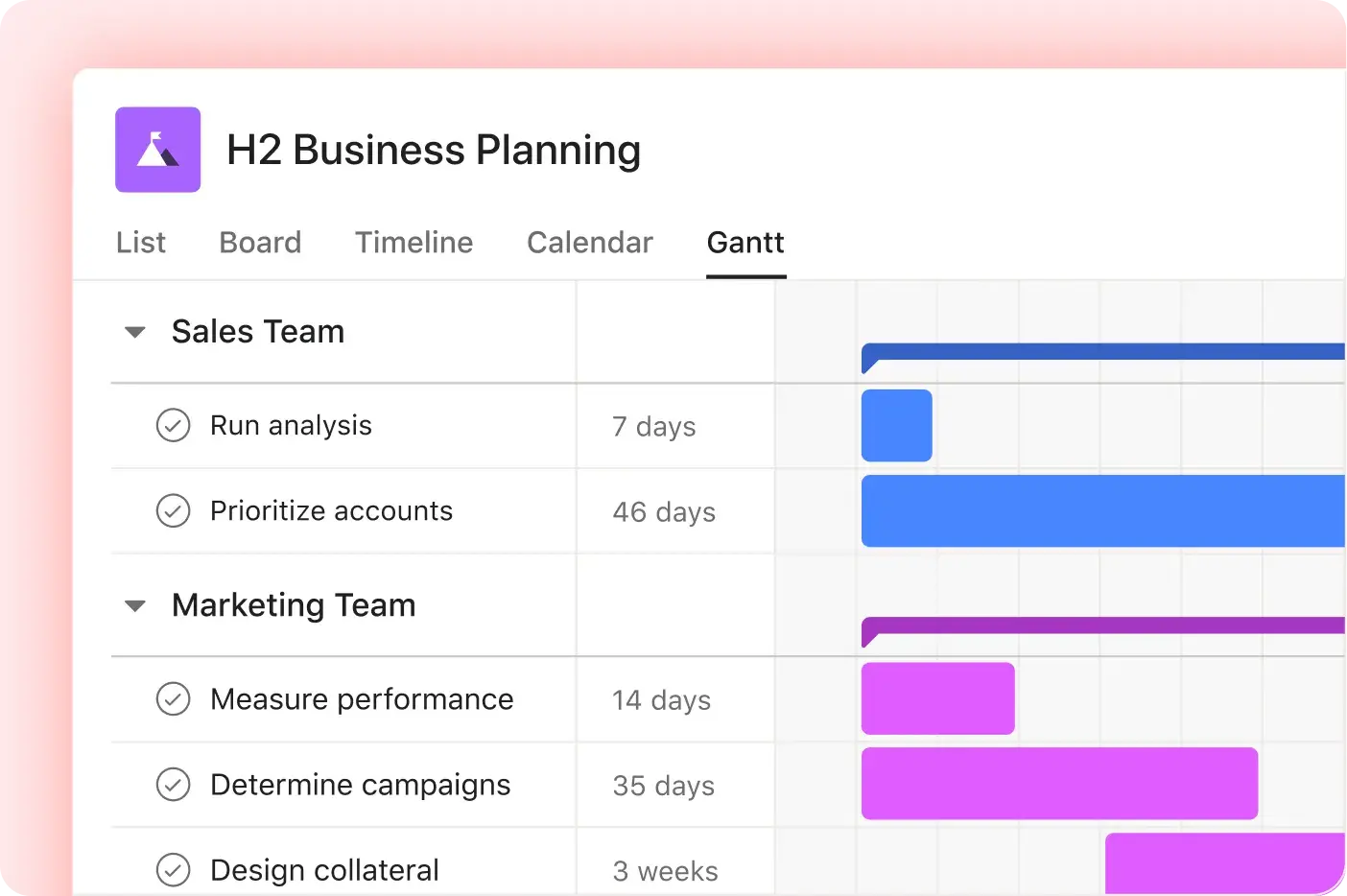
Timeline and Gantt chart views are included from the Starter plan. The timeline shows where work starts, ends and overlaps, lets you mark tasks that cannot start until another finishes, and updates dates when you drag tasks. The Gantt view gives a high-level picture of ongoing and upcoming work, shows task dependencies as chains, and lets you set a target schedule and compare progress against it.
For campaign plans, launches and most cross-team projects this is more than enough. Asana's product pages do not describe critical path analysis, so teams running heavily date-driven schedules where the critical path matters should test this carefully in the trial, or look at a more scheduling-focused tool.
Custom Fields and Templates
Custom fields (from Starter) add the data your team needs to every task, such as priority, channel, budget, effort or client. They power filtering, sorting, rules and dashboards, so a consistent set of fields is what turns a collection of projects into something you can report on. Custom project and task templates, plus workflow bundles that package fields, rules and sections together, help larger organisations keep projects consistent.
Forms
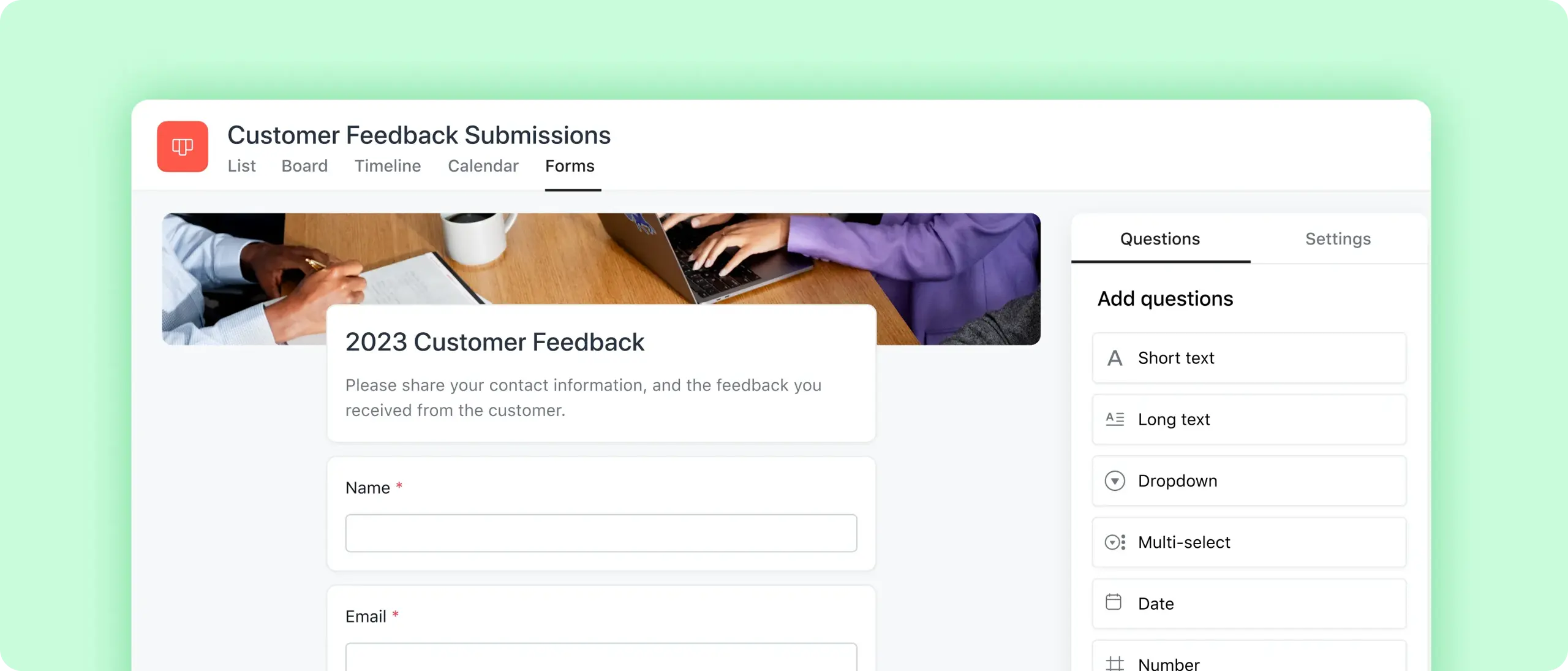
Forms (from Starter) give stakeholders a structured way to request work. You choose question types such as text, numbers, dates and drop-downs, can require attachments like a brief or PDF, and each submission creates a task in the connected project. Forms can be kept internal, shared publicly by link or embedded on a website. On Advanced, forms branching shows different follow-up questions depending on earlier answers.
For example, a creative team can use one form to collect design requests, including deadline, channel, campaign and brief, with a rule that assigns each request to the right designer. Our work request template shows the information worth collecting.
Rules and Automation
Rules pair a trigger with an action: when a form is submitted, a task is added to a project, a due date approaches or a task is unblocked, Asana can reassign work, move the task, request an approval, send a reminder, post to Slack or create a Jira issue. All paid plans include unlimited automations, and Asana provides a library of ready-made rules.
Rules are quick to set up, which is one of Asana's advantages over more configurable tools. For multi-step or judgement-based workflows, Asana points teams to AI Studio, covered below.
Goals
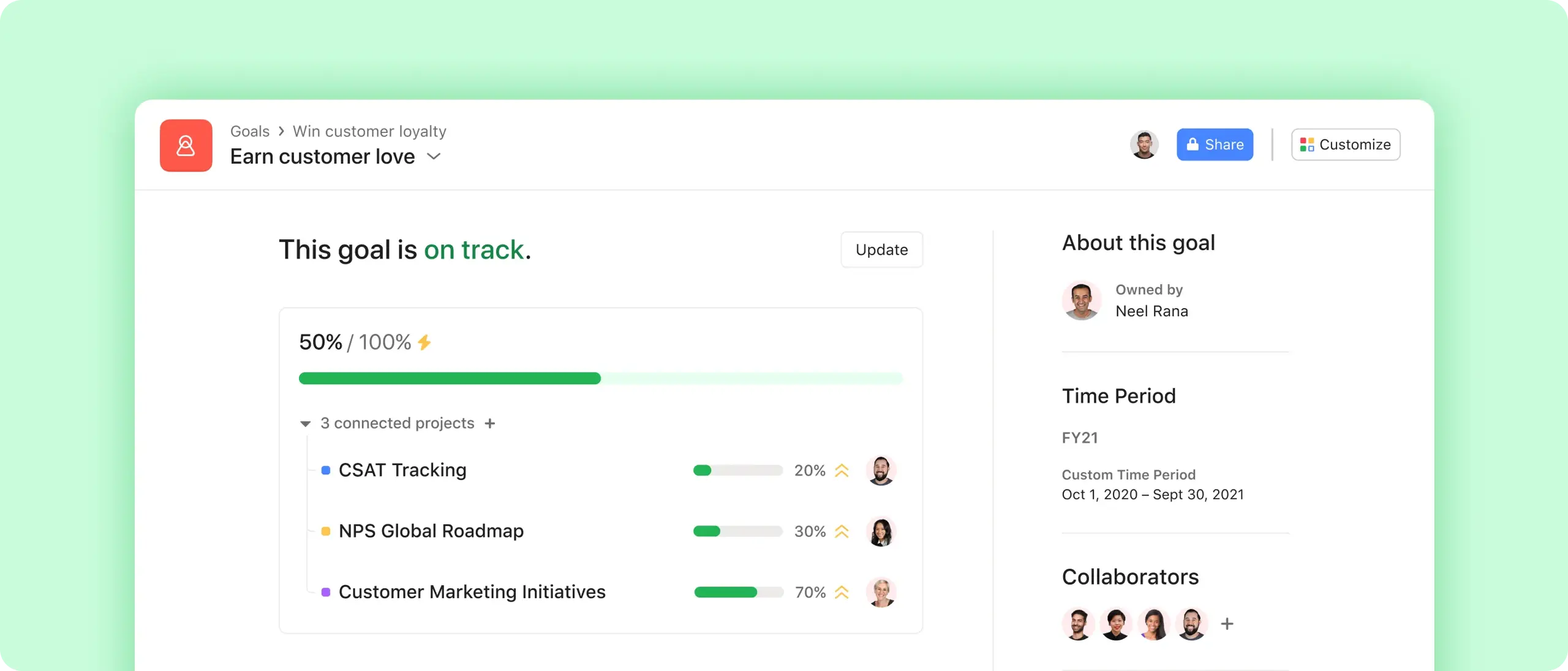
Goals (on Advanced) are one of Asana's most distinctive features. You can set company, team and individual goals, label them as objectives or key results, break them into sub-goals, and choose quarter, half-year, annual or custom timeframes. Progress can be updated manually or automatically from connected projects and sub-goals, or from data in Salesforce, and owners mark goals as on track, at risk or off track.
For organisations that manage by OKRs, this closes the gap between strategy documents and day-to-day work: people can see which goal a project supports. It only works if teams keep projects up to date, so the value depends on discipline as much as the software. Our OKR template is a useful starting point for defining goals before you build them in Asana.
Portfolios
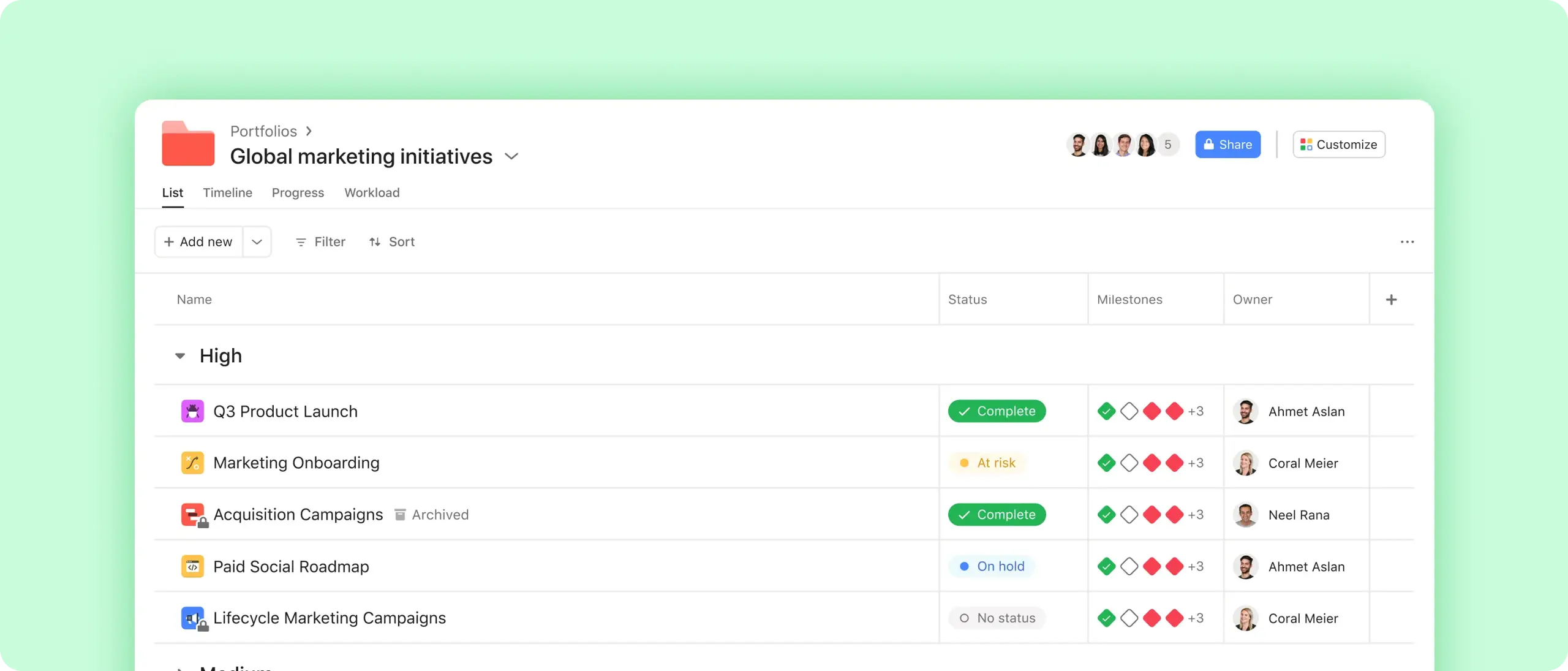
Portfolios (unlimited on Advanced) group related projects so leaders can see the health of every initiative on one screen, drill into details, track metrics such as time and budget, and publish status updates to stakeholders. They are the main way Asana supports managing multiple projects and portfolio management, and they are the reason many mid-sized organisations move from Starter to Advanced.
Approvals and Proofing
On Advanced, approval tasks let reviewers approve, request changes or reject work, and proofing lets them comment directly on images and creative assets inside Asana. For marketing and creative teams this keeps feedback attached to the asset rather than scattered across email, although specialist review tools still go further for video and complex proofing.
Asana AI Features
AI is now central to how Asana positions itself; it describes its approach as "agentic work management", with people and AI agents working from the same plan. There are three main components, all available on paid plans but not on Personal.
AI Teammates
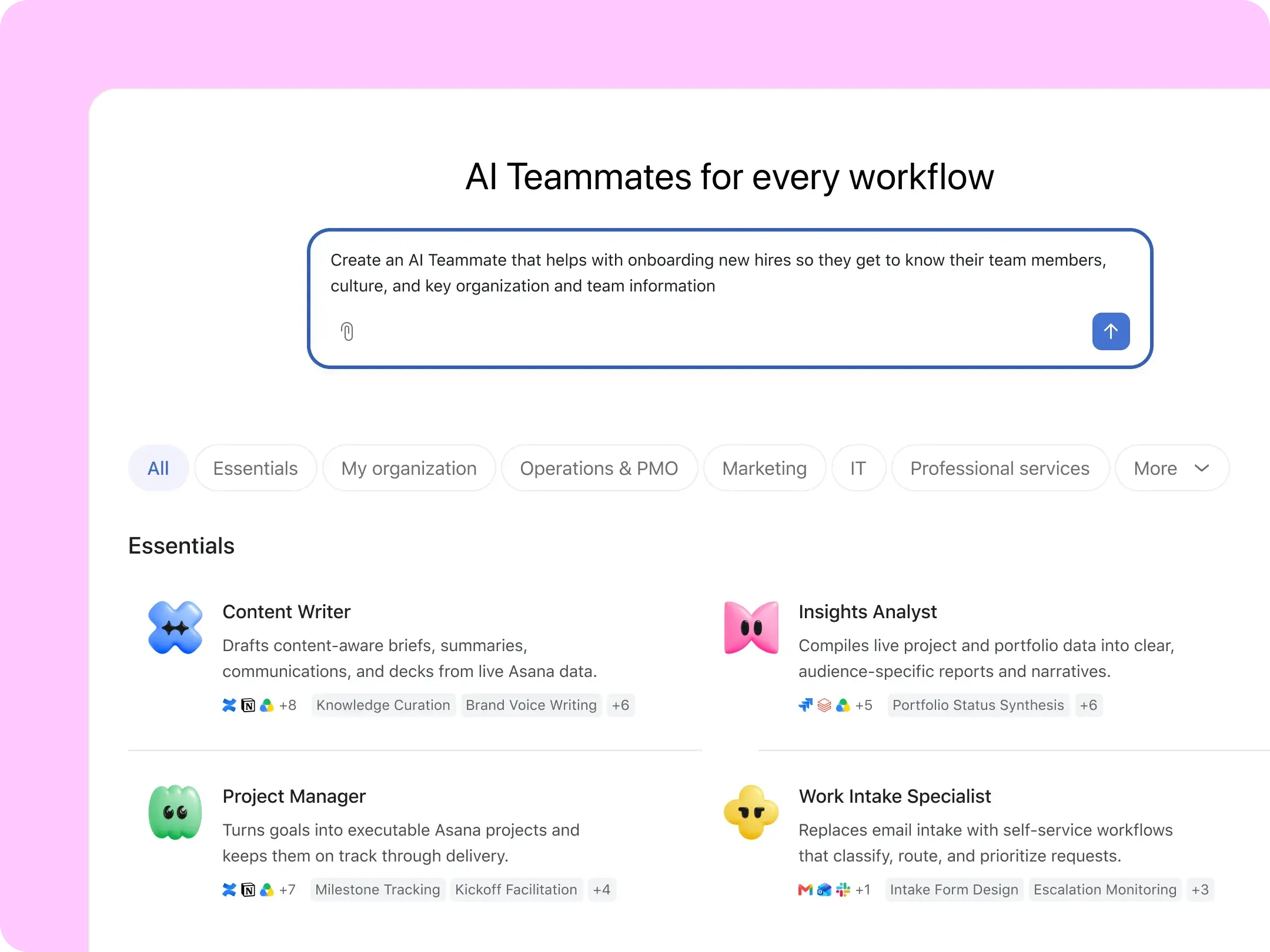
AI Teammates are prebuilt AI agents that work inside Asana projects. Asana says there are more than 30, for areas such as marketing, PMO and strategic operations, IT, and industry teams, and you can build custom ones by defining the role, giving guidance, adding skills and granting access. Examples on Asana's site include a content writer that drafts a launch brief from a project, an insights analyst that pulls a monthly portfolio status report, and a capacity planner that shows who would be overloaded by a new initiative.
Teammates follow existing permissions: they only see projects and work the account allows, and admins control who can create and change them. They are best understood as configurable assistants working on structured data, not autonomous employees; someone still needs to own the process and check the output.
Asana Dash
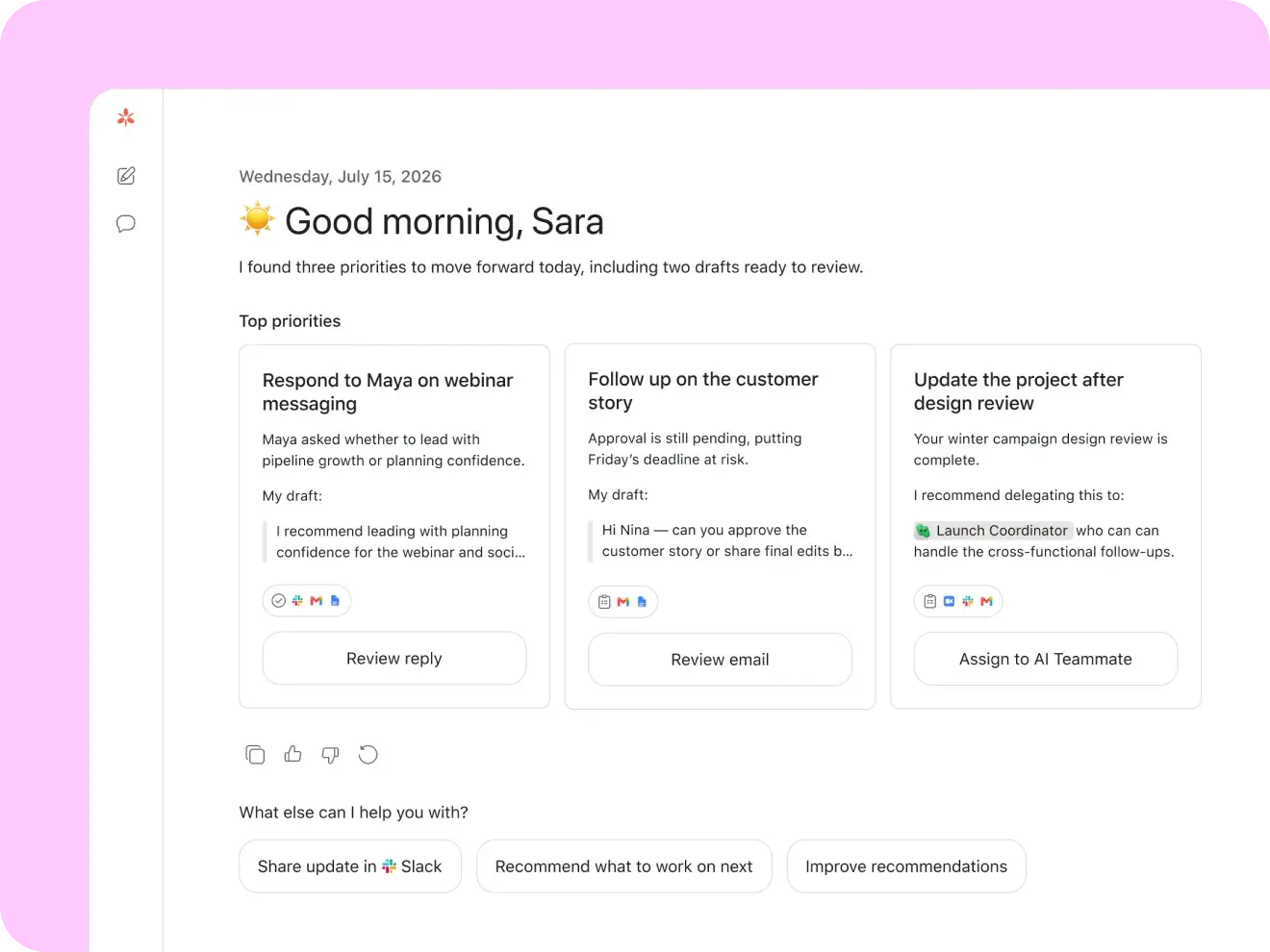
Asana describes Dash as an AI "chief of staff" that produces briefs such as a morning summary of priorities, surfaces next steps from meetings, Slack and email, and routes work to the right AI Teammate.
AI Studio
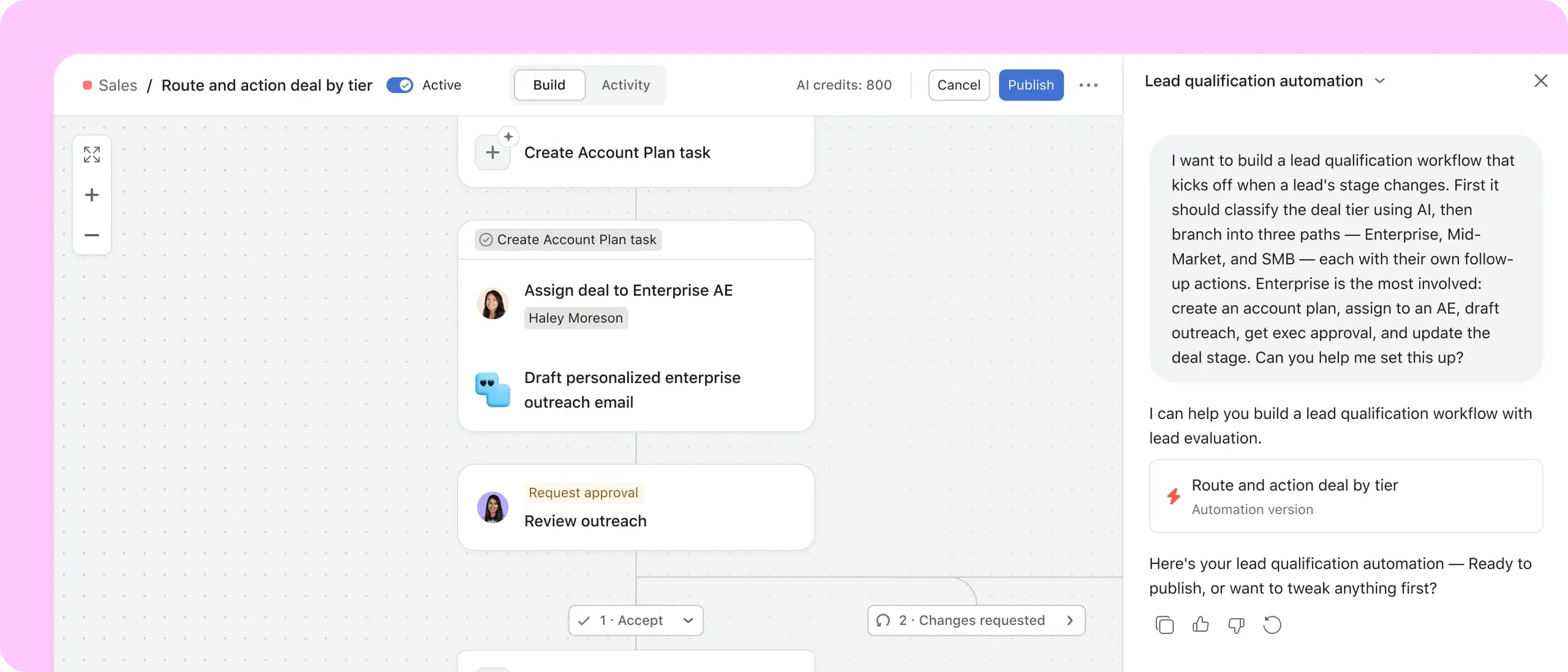
AI Studio is Asana's no-code builder for AI-powered workflows. You choose a trigger, such as a new task or form submission, and describe in plain language what should happen; Asana generates a workflow that can include AI steps, branches, human input and approvals. Typical uses are intake and triage, classification and routing, checking requests for missing information, and drafting content or reports.
AI Allowances and Data
AI use is metered. According to Asana's pricing comparison, AI Teammates and Dash include 5 requests per user per month, capped at 50 requests per account on Starter and Advanced and 250 on Enterprise, and AI Studio includes a monthly credit allowance per billing account that rises by plan (50,000, 75,000 and 200,000 credits). Extra usage is available as prepaid packs at $0.50 per request or pay-as-you-go at $0.60 per request, with a monthly spend cap. Heavy AI users should model these costs before committing.
Asana also offers AI connectors, including MCP support, so tools such as ChatGPT, Claude, Gemini and Microsoft Copilot can work with Asana data. Asana states that its AI partners do not use customer data to train their models.
Asana Collaboration Features
Collaboration happens on the work itself: comments and @mentions on tasks, collaborators who follow a task, file attachments, project messages, status updates and an Inbox that collects updates on everything you follow. Paid plans include unlimited free guests, which makes it straightforward to work with clients, agencies and freelancers in the same projects.
This is where Asana is strongest. Third-party reviewers consistently praise how easy it is to see who is doing what across teams. The downside is notification volume: on Capterra, "overwhelming and excessive notifications" is one of the most discussed topics, with 51% of the 712 reviews mentioning it negative. Agree notification settings, @mention habits and when to use status updates early in a rollout. Our guide to project communication management covers the principles.
Asana Reporting and Dashboards
Reporting works at two levels. Project and team dashboards, from Starter, use chart templates to show tasks by status, overdue work, completion trends and custom-field totals such as cost or revenue, and you can click any chart to see the underlying tasks. Portfolio and goal reporting, on Advanced, rolls status, progress, time and budget up across many projects, with a status update builder for written project status reports.
Advanced also adds Tableau and Power BI integrations for organisations that want Asana data in their BI tools. Capterra reviewers rate Asana's visibility highly: comprehensive real-time project tracking is one of the most discussed topics, with 93% of 1,976 mentions positive. Asana's reporting is easy to use but less configurable than dedicated BI or PMO tools, so teams with complex financial reporting may still export data.
Workload, Capacity and Time Tracking
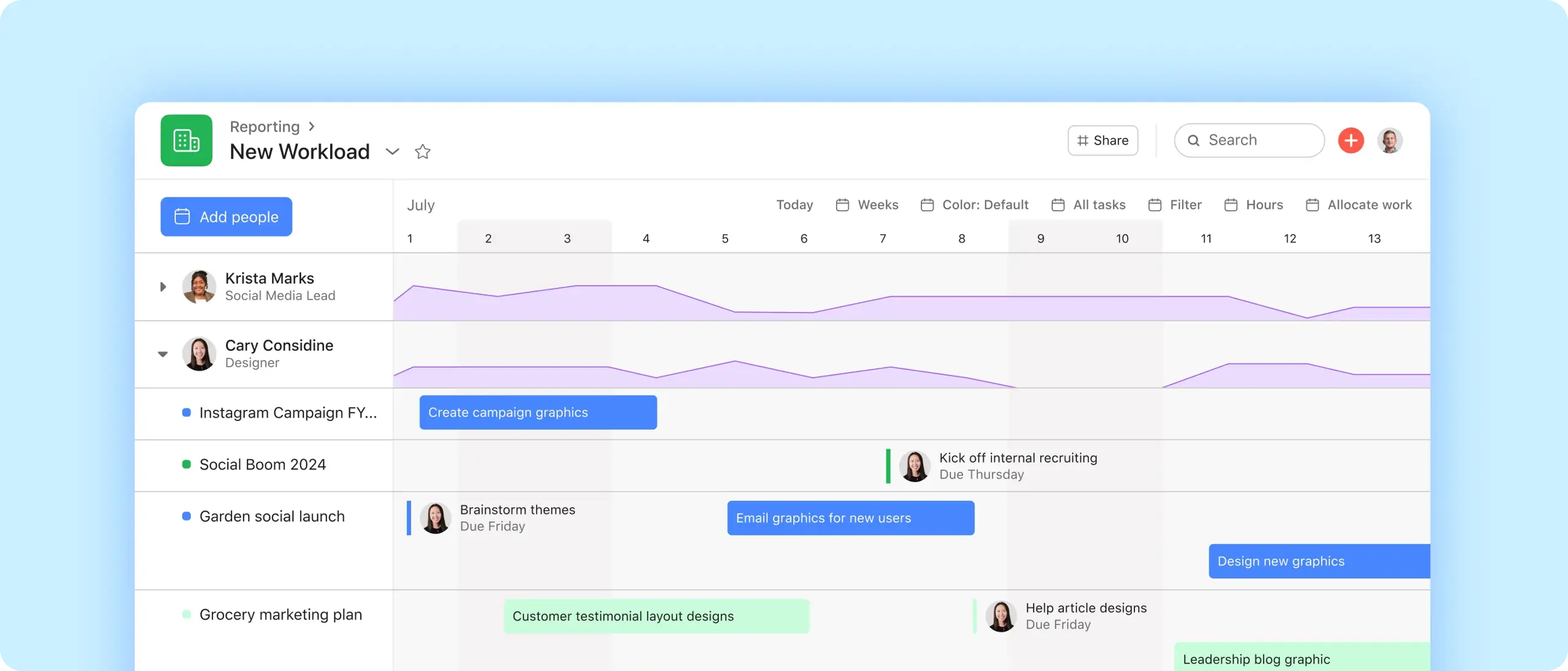
Workload (on Advanced) shows each person's assigned effort across projects in a portfolio, using task counts, hours or points, against a weekly limit you set. Managers can drag tasks to reassign or reschedule them and filter by person or project. Advanced also adds time tracking that compares estimated with actual effort.
Enterprise extends this to universal resource management, balancing workloads across the whole organisation, and capacity planning, where managers allocate people to workstreams by percentage or hours, filter by skills and titles, and view utilisation by person or project. A Timesheets & Budgets add-on is available for Starter, Advanced and Enterprise.
This is solid for most teams, but it is lighter than tools built around resource and financial control, which is the main reason our rankings place Wrike ahead for PMOs and professional services firms.
Asana Integrations
Asana says even its free plan includes more than 100 free integrations. Its directory includes Slack, Microsoft Teams, Outlook, Google Workspace (Drive, Gmail, Calendar, Sheets), Zoom, HubSpot, Jira, GitHub, GitLab, Azure DevOps, Figma, Canva, Dropbox, Box, Zapier and Make. Salesforce, Tableau and Power BI integrations are listed as Advanced features.
The Jira and GitHub integrations let developers stay in their tools while other teams follow the same work in Asana, and a public API supports custom integrations. The main constraint is that some of the most useful business integrations, such as Salesforce, require Advanced.
Asana Ease of Use
Initial Setup
A small team can create a project from a template, invite colleagues and be working the same day. Setting Asana up for a whole organisation takes more thought: agreeing team and project structures, standard custom fields, templates, forms, rules, portfolios and goals. Without that, teams build projects in different ways and reporting becomes unreliable.
Learning Curve
Basic task management is easy to learn, and Asana's ease-of-use score on Capterra (4.4/5) reflects that. Reviewers frequently describe the interface as clean and intuitive. Advanced features, such as portfolios, goals, workload, rules and AI Studio, take more training, mainly because they depend on consistent habits across teams rather than on technical complexity.
Interface
The interface is uncluttered and consistent, with a clear separation between personal views (Home, My Tasks, Inbox) and shared project spaces. On the other side, very large projects can feel slow, and some reviewers report loading delays and glitches, especially in the desktop app: Capterra's "performance and reliability concerns" topic is 60% negative across 490 reviews. Asana is one of the easier tools in its class, but it is not effortless at scale.
Asana Mobile and Desktop Apps
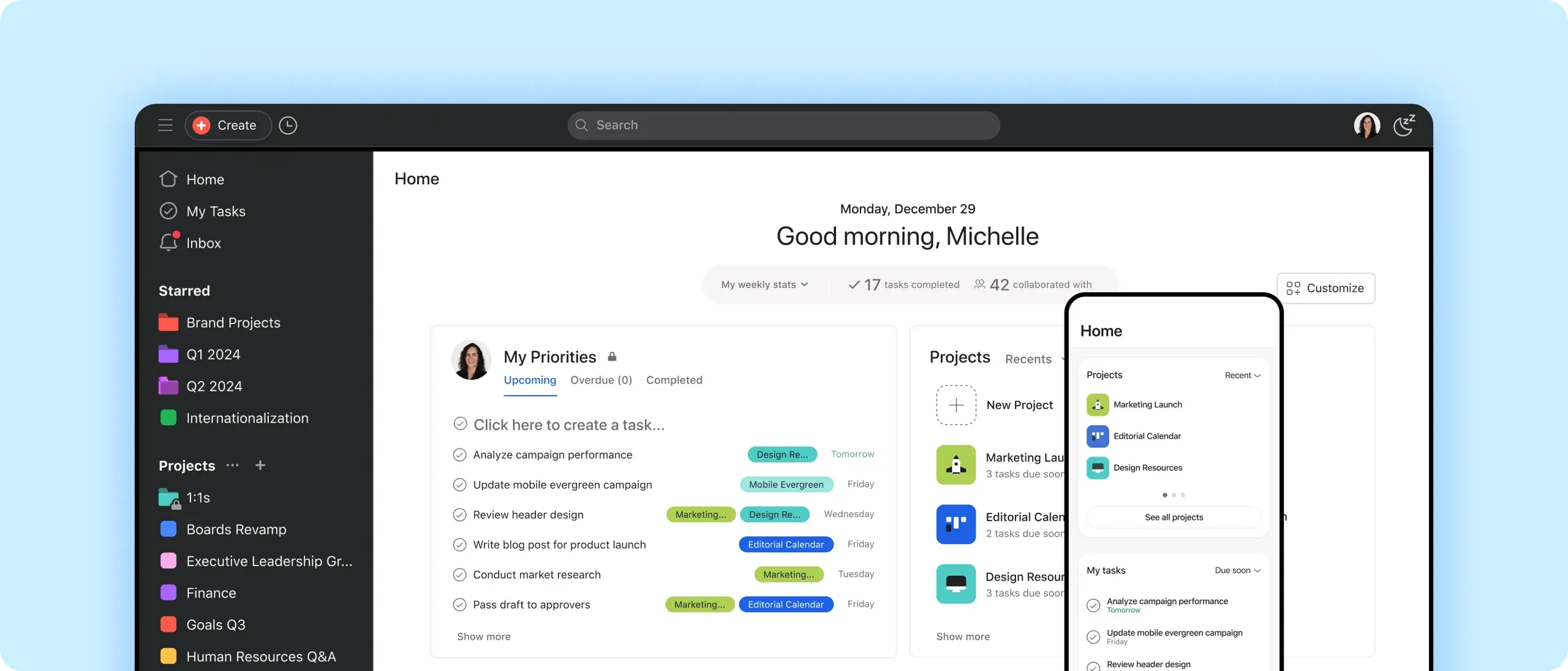
The iOS and Android apps let you capture tasks by voice, photograph notes and turn them into text, triage your inbox by archiving or creating follow-up tasks, receive push notifications, and comment, attach files and @mention colleagues. The Mac and Windows desktop apps add quick access to priority tasks from the menu bar or system tray and a focus timer that pauses notifications.
The mobile apps are frequently praised in Capterra reviews, though planning, portfolio setup and reporting are better done on a larger screen.
Asana Pricing
Asana's published plans are below. Prices are per user per month in US dollars; the annual price is the monthly equivalent billed annually, and Asana says annual billing saves up to 18%.
| Plan | Billed annually | Billed monthly | Best for |
|---|---|---|---|
| Personal | $0 | $0 | One or two people managing personal projects |
| Starter | $10.99/user/month | $13.49/user/month | Teams that need timelines, dashboards, forms and automation |
| Advanced | $24.99/user/month | $30.49/user/month | Organisations needing goals, portfolios, workload and approvals |
| Enterprise | Contact sales | Contact sales | Large organisations needing SAML, SCIM and capacity planning |
| Enterprise+ | Contact sales | Contact sales | Regulated organisations needing advanced compliance and governance |
Add-ons include Timesheets & Budgets (Starter, Advanced and Enterprise), Compliance management and Permissions management (Enterprise only), and extra AI usage. Pricing checked on Asana's pricing page on 7 October 2026; always confirm before buying, as prices may vary by region.
Asana Personal (Free) Plan
Personal costs $0 and includes unlimited tasks and projects, list, board and calendar views, status updates, time tracking through integrations and more than 100 free integrations. It is now limited to 2 seats per project and team, so it suits individuals, freelancers and pairs rather than teams. Timelines, dashboards, forms, rules and AI all require a paid plan.
Asana Starter Plan
At $10.99 per user/month billed annually ($13.49 monthly), Starter adds timeline and Gantt views, reporting dashboards, unlimited automations, forms, custom fields and templates, unlimited free guests, AI Teammates, Dash and AI Studio. Asana states there are no user seat limits on paid plans. This is the right starting point for most small and mid-sized teams that run projects together.
Asana Advanced Plan
At $24.99 per user/month billed annually ($30.49 monthly), Advanced adds unlimited portfolios, goals, resource management (workload within a portfolio), approvals and proofing, forms branching, time tracking with estimated versus actual effort, scaled security, and Salesforce, Tableau and Power BI integrations. Because these are the features that set Asana apart, many organisations that choose Asana for strategic alignment will need Advanced.
Asana Enterprise and Enterprise+
Enterprise is quote-based and adds SAML single sign-on, SCIM user provisioning, universal resource management, capacity planning, service accounts, view-only licences, guest invitation permissions and project admin controls. Enterprise+ adds security, compliance and governance features such as SIEM integrations, data residency, audit logs and managed workspaces. These plans are aimed at large and regulated organisations, not small businesses.
Asana Free Trial
Asana's help centre says you can start a free Advanced trial from the pricing page, with no credit card required and no commitment to pay. The pricing page does not state the trial length; Asana's referral page describes a 30-day trial. Use the trial to rebuild one real cross-team project, ideally with a portfolio and a goal attached, so you can judge whether Advanced is worth the step up from Starter.
Asana Pros and Cons
Pros
- Clean, intuitive interface that most people learn quickly
- Excellent cross-team task coordination and clear ownership
- Goals connect daily work to company objectives
- Portfolios give leaders a status view across projects
- Unlimited free guests on paid plans
- Unlimited automations and forms from Starter
- Mature integrations, including Slack, Teams, Jira and Salesforce
- Capable AI Teammates and AI Studio included on paid plans
- Strong security credentials and enterprise controls
Cons
- Free plan now limited to 2 seats per project and team
- Goals, portfolios, workload and approvals require Advanced
- Lighter resource and financial management than Wrike
- Notification volume can be high without careful settings
- Some reviewers report slow loading and glitches
- AI usage is metered, with paid top-ups
- Permissions not granular enough for some large or sensitive projects
- One assignee per task can feel restrictive
- No critical path analysis described for its Gantt view
This matches what users report: people value Asana's clarity, visibility and ease of adoption, while notifications, performance and the cost of unlocking its higher-level features are the most common drawbacks.
What Do Asana Customers Say?
- Ease of use: 4.4/5
- Features: 4.4/5
- Customer service: 4.3/5
- Value for money: 4.4/5
What G2 reviewers like most
- User-friendly interface
- Effective task management
- Workflow features
Most common G2 complaints
- Some essential features missing on lower tiers
- Learning curve
- Powerful tools restricted to higher pricing tiers
Ratings and review themes as published on G2 and Capterra on 5 October 2026; summarised in our own words. Visit the links above for full, verified user reviews.
On Capterra, Asana is rated 4.5/5 from 13,731 reviews, with sub-scores of 4.4 for ease of use, 4.4 for features, 4.4 for value for money and 4.3 for customer service (checked 7 October 2026). On G2, it is rated 4.4/5 from 14,008 reviews (checked 5 October 2026). The themes below summarise these third-party reviews in our own words, not Asana's testimonials.
Positive themes. Reviewers most often praise real-time visibility into projects and workloads, clear organisation of tasks and priorities, easy deadline tracking, the clean interface and the mobile apps. In Capterra's topic summaries, comprehensive real-time project tracking (93% positive), versatile work organisation (92% positive) and effective deadline management (91% positive) stand out.
Negative themes. The most common complaints are excessive notifications, especially by email (51% negative), performance and reliability problems such as slow loading and occasional crashes (60% negative), permissions that are not granular enough for sensitive projects, useful features limited to paid plans, and the need for external tools for accounting and invoicing.
Many recent reviews on Capterra are labelled as vendor-referred with an incentive offered. Both Capterra and G2 label these, and filtering for non-incentivised reviews from companies of your size gives a more cautious picture than the headline score.
Asana Customer Support
Asana provides a help centre with guides and troubleshooting articles, the Asana Academy for courses and webinars, and an active community forum. Larger and Enterprise customers can get more hands-on onboarding and customer success support, and Asana works with partners for complex rollouts.
Support experience in third-party reviews is generally positive but not outstanding: Capterra's customer service sub-score of 4.3/5 is Asana's lowest sub-score. For an organisation-wide rollout, ask during the sales process exactly what onboarding and support response times your plan includes.
Asana Security
Asana's trust centre lists SOC 2 Type 2 and SOC 3 reports, ISO/IEC 27001, 27017, 27018 and 27701 certifications, CSA STAR Level 1, and support for HIPAA (opt-in) and GDPR compliance. Data is encrypted in transit and at rest, and Enterprise Key Management lets customers use their own encryption key. Data residency options include data centres in Europe, Australia and Japan.
Identity and admin controls scale by plan: SAML single sign-on and SCIM provisioning are Enterprise features, and Enterprise+ adds SIEM integrations, audit logs and managed workspaces, with Compliance and Permissions management sold as Enterprise add-ons. Note that a minority of Capterra reviewers criticise permissions controls as too coarse, so test your sharing model in the trial. Confirm current certifications and their scope in Asana's trust documentation as part of procurement.
Asana for Different Types of Teams
Asana for Marketing and Creative Teams
Marketing is one of Asana's strongest fits: campaign timelines and calendars, forms for creative requests, approvals and proofing on Advanced, and portfolios for a campaign programme. AI Teammates for briefs and content add further value.
Asana for Operations Teams and PMOs
Operations teams benefit from forms, rules, templates and AI Studio for repeatable processes. A PMO gets portfolios, goals and status updates on Advanced, and capacity planning on Enterprise. PMOs that need detailed budgets, baselines and financial tracking may find Asana lighter than they need.
Asana for Agencies
Agencies can run each client in its own team or project, invite clients as free guests, and track delivery in portfolios. Time tracking and budgets need Advanced or the Timesheets & Budgets add-on, and invoicing still requires separate tools.
Asana for Software and Product Teams
Product managers often use Asana for roadmaps, launches and cross-functional coordination, with the Jira or GitHub integrations linking to engineering work. Asana supports boards and sprint-style projects, but teams that need backlogs, story points and Agile reporting will find dedicated tools stronger; see our guide to Scrum software tools.
Asana for Small Businesses
Asana is easy for a small business to adopt, and Starter is reasonably priced for a team that needs timelines, forms and automation. The free plan's two-seat limit means most teams will pay from the start, and the most distinctive features require Advanced.
Asana for Enterprises
Large organisations benefit from goals, portfolios, unlimited guests, enterprise identity controls, data residency and strong security credentials. Asana's ease of use helps adoption across non-technical departments, which is often the hardest part of enterprise project management.
Who Should Use Asana?
Great for
- Cross-functional teams in mid-size and large organisations
- Companies that manage by goals and OKRs
- Marketing and operations teams
Look elsewhere if
- Teams needing detailed budgeting and financial tracking
- Very small teams on a tight budget needing advanced features
Asana Feature Checklist
| Feature | Asana |
|---|---|
| Free plan | ✓ Yes |
| Gantt / timeline | ✓ Yes |
| Kanban boards | ✓ Yes |
| Time tracking | ✓ Yes |
| Resource & workload management | ✓ Yes |
| Portfolio management | ✓ Yes |
| Docs & wiki | ◐ Partial |
| Automations | ✓ Yes |
| Agile / sprint tools | ◐ Partial |
| Proofing & approvals | ✓ Yes |
| Built-in AI | ✓ Yes |
| Guest / client access | ✓ Yes |
| Flat (non per-user) pricing | ✕ No |
Asana Alternatives and Comparisons
Asana fits teams of almost any size, from small teams organising their first projects to large organisations connecting work to company goals. It is easy to adopt, even for beginners: new users can start with templates and simple list and board views, then add timelines, goals, portfolios and automation as their work grows. If you would like to see how it stacks up, we compare Asana with Wrike, monday.com, ClickUp, Jira and others on pricing, features and use cases on dedicated pages:
- Wrike: choose it for more advanced resource and portfolio management. Compare Asana vs Wrike.
- monday.com: choose it for a more visual, customisable interface. Compare Asana vs monday.com.
- ClickUp: choose it for more features at lower prices. Compare Asana vs ClickUp.
- Notion: choose it for docs and projects in one workspace. Compare Asana vs Notion.
- Trello: choose it for simple boards at low cost. Compare Asana vs Trello.
Asana comparisons
Is Asana Worth It?
Asana is likely worth it if you:
- Coordinate work across several teams or departments.
- Want a tool most people can learn quickly, including non-technical staff.
- Manage by goals or OKRs and want work linked to them.
- Need portfolio-level status reporting for leaders.
- Work with many clients, freelancers or partners who can join as free guests.
- Want built-in AI agents and AI workflows inside your project tool.
It may not be worth it if:
- You need detailed budgeting, financial tracking or advanced resource planning.
- You rely on critical path scheduling for complex, date-driven projects.
- You are a small team that wants advanced features on a free plan.
- You only need simple boards for a handful of projects.
- Your organisation needs dedicated Agile tooling for software development.
Our verdict: Asana's strength is making cross-team work clear and easy to follow, and its goals and portfolios connect that work to strategy better than most tools. Its limitations are the price of unlocking those features on Advanced and lighter resource and financial control than PMO-focused platforms. That balance is why it ranks third in our project management software review.
Frequently asked questions
Is Asana good project management software?
Yes, for the right team. Asana offers clean, dependable task and project management, strong cross-team visibility, and goals and portfolios that link work to strategy, and it rates 4.5/5 on Capterra. The trade-offs are that key features require the Advanced plan and its resource and financial tools are lighter than PMO-focused platforms.
Is Asana free?
Yes. Asana's Personal plan costs $0 and includes unlimited tasks and projects, list, board and calendar views, and more than 100 integrations. It is limited to 2 seats per project and team, and timelines, dashboards, forms, rules and AI require a paid plan.
How much does Asana cost?
Asana costs $0 on Personal, $10.99 per user/month on Starter and $24.99 per user/month on Advanced when billed annually, or $13.49 and $30.49 billed monthly. Enterprise and Enterprise+ are priced on request (checked 7 October 2026).
Does Asana have a free trial?
Yes. Asana lets you start a free Advanced trial from its pricing page, and its help centre states that no credit card is required. Use the trial to run a real cross-team project with a portfolio and goal attached.
Is Asana easy to use?
Mostly. Asana is one of the easier work management tools to learn, with a 4.4/5 ease-of-use score on Capterra. Basic task management is quick to pick up; portfolios, goals, workload, rules and AI Studio need more planning and consistent habits across teams.
What is Asana best used for?
Asana is best for coordinating cross-team projects, marketing and creative workflows, request intake, goal and OKR tracking, portfolio status reporting and repeatable operational processes.
Is Asana better than monday.com?
Neither is universally better. Asana suits teams that want structured task management linked to goals and portfolios; monday.com suits teams that want a more visual, highly customisable interface. See our Asana vs monday.com comparison.
Is Asana better than ClickUp?
It depends on priorities. Asana is cleaner and easier to adopt across non-technical teams; ClickUp offers more features, including docs and whiteboards, at lower prices but with more complexity. See our Asana vs ClickUp comparison.
Does Asana have Gantt charts?
Yes. Timeline and Gantt views are included from the Starter plan. They show dependencies, let you drag tasks to reschedule, and allow you to compare progress against a target schedule.
Does Asana have Kanban boards?
Yes. Asana's board view works as a Kanban board, with tasks as cards that move between columns, and it is available on every plan, including the free Personal plan.
Does Asana have AI?
Yes. Paid plans include AI Teammates (prebuilt and custom AI agents), Asana Dash (AI briefs and next steps) and AI Studio (no-code AI workflows). Usage is metered by plan, with extra requests available as prepaid packs or pay-as-you-go.
Can Asana track goals and OKRs?
Yes. Goals on the Advanced plan let you set company, team and individual goals, break them into sub-goals, and update progress automatically from connected projects or Salesforce data.
What are the main disadvantages of Asana?
The main disadvantages are that goals, portfolios, workload and approvals require Advanced, the free plan is limited to two seats, notifications can be excessive, some users report performance issues, and its resource and financial management is lighter than PMO-focused tools.
Does Asana integrate with Slack and Microsoft Teams?
Yes. Asana integrates with Slack and Microsoft Teams, along with Outlook, Google Workspace, Zoom, Jira, GitHub, Figma and Zapier. Salesforce, Tableau and Power BI integrations are listed on the Advanced plan.
Is Asana suitable for small businesses?
Yes, especially on Starter, which adds timelines, forms, dashboards and automation at a moderate price. The free plan's two-seat limit means most small teams will pay from the start, and the most distinctive features require Advanced.
Product screenshots are © Asana, Inc. and shown for the purpose of review, with links to their source pages.