Project management tools · #5 of 10 · Best for spreadsheet-style enterprise planning
Smartsheet Review 2026: Is It Worth It?
Smartsheet is a spreadsheet-style work and project management platform: its sheets look like Excel, but behave like project plans, with dependencies, Gantt charts, forms, automation, reports and dashboards built in. Its biggest strength is that familiar grid combined with serious scheduling, roll-up reporting and enterprise governance; its main trade-offs are a less visual interface than board-first tools, no free plan, and quote-based pricing for its most powerful portfolio features. This review covers pricing, planning, collaboration, automation, AI, integrations, ease of use, reporting, security and overall value.
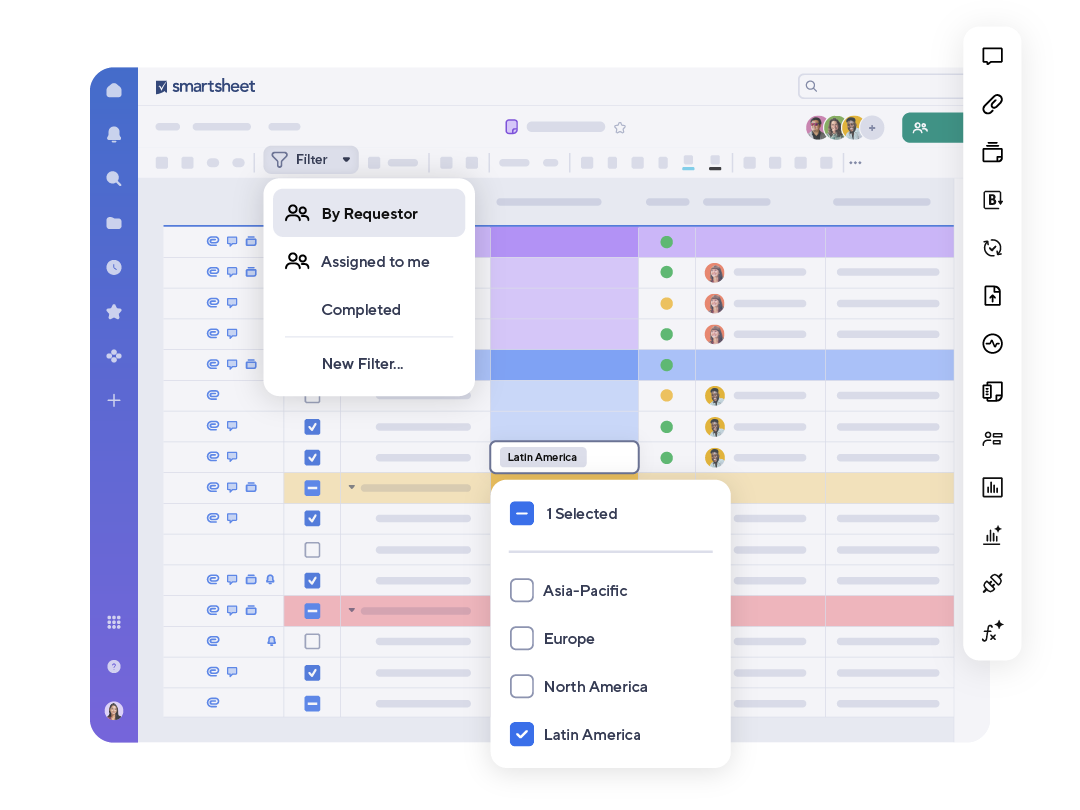
Smartsheet review: quick verdict
| Best for | Organisations comfortable with spreadsheets that need structured project plans, roll-up reporting and enterprise governance |
| Less suitable for | Small teams that want a free plan, and creative or Agile teams that prefer a visual, board-first tool |
| Our overall score | 8.6/10, ranked #5 in our top 10 project management tools |
| Price | No free plan; Pro $9 and Business $19 per member/month (billed yearly); Enterprise and Advanced Work Management on quote |
| Free trial | 30 days on the Business plan, no credit card required |
| Capterra rating | 4.5/5 from 3,559 reviews (checked 7 October 2026) |
| G2 rating | 4.4/5 from 22,766 reviews (checked 5 October 2026) |
Smartsheet is a strong choice for spreadsheet-minded organisations that want to turn scattered Excel trackers into connected, governed project plans, and it scales further than most rivals into enterprise portfolio management. The trade-offs are real: there is no free plan, per-member pricing and premium add-ons push costs up, the interface is less visual than board-first tools, and advanced formulas and cross-sheet designs take time to learn. Users also report performance concerns on very large solutions.
Our scores
Scores use our standard review methodology, the same for every tool we review.
What Is Smartsheet?
Smartsheet is cloud-based work and project management software built around the sheet: a grid of rows and columns that feels like a spreadsheet, but where each row can be a task with an owner, dates, dependencies, a status and a discussion thread. On top of sheets, Smartsheet adds the things a spreadsheet cannot do well on its own: Gantt charts, forms, automated workflows, cross-sheet reports and dashboards.
Organisations use it to manage:
- Project plans and schedules, with phases, dependencies and milestones
- Trackers and registers, such as issue logs, risk registers and asset lists
- Intake and requests, collected through forms
- Approvals and process workflows, driven by automation
- Resource and workload planning, on higher plans and add-ons
- Portfolio reporting, rolling up many projects into reports and dashboards
The same sheet can be shown as a grid, Gantt chart, board, calendar, timeline or table, and Smartsheet runs in the browser and on iOS and Android. It is not simply an online spreadsheet: its value comes from structured columns, automation and roll-up reporting across many sheets.
Who Owns Smartsheet?
Smartsheet was developed in 2005 and launched publicly in 2006; it is based in Bellevue, Washington. After several years as a listed company, it was taken private by Blackstone and Vista Equity Partners in a deal worth about $8.4 billion that completed on 22 January 2025, and its shares were delisted from the New York Stock Exchange. Smartsheet says its platform is used by over 85% of the 2024 Fortune 500.
For buyers, the practical point is that Smartsheet is a mature, enterprise-focused product with a long track record. Private-equity ownership is common in this market (Wrike is in a similar position), but it is worth watching pricing and packaging changes at renewal.
How Does Smartsheet Work?
Smartsheet organises work in a straightforward structure:
- Workspaces hold everything for a team, department or programme, and control who has access.
- Folders group related sheets, reports and dashboards inside a workspace.
- Sheets are the core item: each row is a task or record and each column is a field with a type, such as text, date, dropdown, checkbox, contact or duration.
- Row hierarchy (indenting rows under a parent) turns a flat list into phases and subtasks, and parent rows can roll up dates and progress.
- Reports pull matching rows from many sheets into one view, such as "all overdue tasks across every project".
- Dashboards visualise sheets and reports with charts, metrics and widgets for stakeholders.
A typical workflow looks like this:
Request submitted via form → row created in an intake sheet → automation assigns an owner and notifies them → owner updates status and dates → report rolls up work across sheets → dashboard shows progress to stakeholders
For example, an operations team uses a form to collect facilities requests. Each submission becomes a row; an automated workflow routes it to the right coordinator based on location; the coordinator updates the status column; and a weekly report of open requests feeds a dashboard that the operations director checks without opening any individual sheet.
Smartsheet Key Features
Grid View and Formulas
The grid is where most Smartsheet users spend their time. It supports sorting, filtering and grouping, typed columns, conditional formatting, formulas and links between cells in different sheets. For anyone moving from Excel, this is the main attraction: the layout is instantly familiar, but the data is shared, permissioned and live.
Formulas and cross-sheet references are powerful, and they are how experienced users build trackers, scoring models and roll-ups. They also have limits: on Capterra, limited advanced formula capabilities is one of the recurring criticisms, particularly from heavy Excel users who expect the full spreadsheet function library.
Gantt Charts and Dependencies
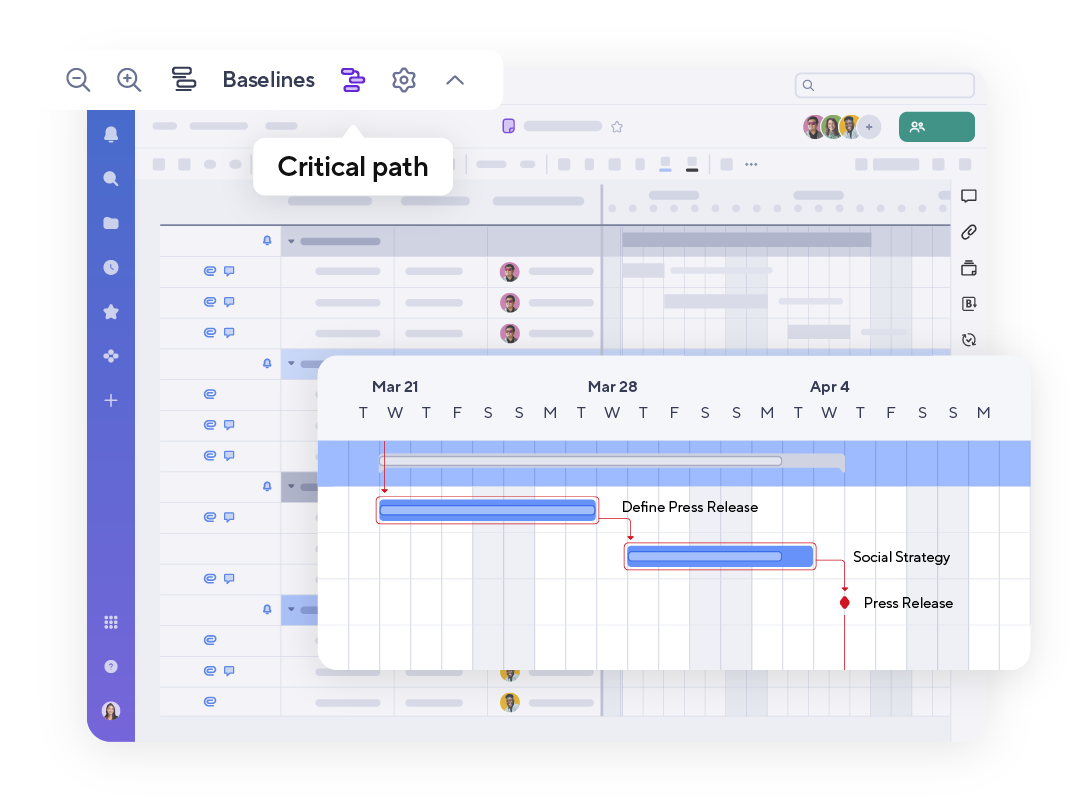
Smartsheet's Gantt view is available on all plans. Task bars reflect start date, end date and duration; you can set task dependencies between rows, drag bars to change dates, highlight milestones and identify the critical path. Because the Gantt chart sits on the same rows as the grid, editing a date in either place updates both.
For date-driven projects, such as construction programmes, system implementations, events or product launches, this is one of Smartsheet's strongest areas and a key reason PMOs choose it. For simple task tracking it is more than you need, and a board or list will be quicker. Our free Gantt chart template shows the same structure if you want to sketch a plan first.
Board, Calendar, Timeline and Table Views

Board view shows rows as cards in lanes that can represent a stage, team or sprint, with drag-and-drop and up to 14 fields per card. It works well as a simple Kanban board, though it is a view on a sheet rather than a board-first experience. Calendar view lays out dated rows by day, week or month. Timeline view, available from the Business plan, groups date-based work into lanes such as team or region. The newer table view modernises the grid with live co-editing, a formula editor with column-name autocomplete and an editing side panel.
Forms
Forms let anyone submit structured information straight into a sheet. They can be branded, use conditional logic to show follow-up questions, and be shared by link or embedded on a website; Smartsheet says they also work on mobile in low-connectivity areas. For intake processes this removes much of the email back-and-forth. Our work request template follows the same idea if you are not ready for software.
Automation
Smartsheet's no-code automated workflows combine triggers, conditions and actions: send reminders and notifications (including via Slack and Microsoft Teams), request approvals, update or move rows, create recurring tasks, and generate documents such as PDFs and contracts, with DocuSign signing for customers that hold an enterprise DocuSign licence.
Automation is practical and widely used, but plan limits matter. The Pro plan includes 250 automations per month, which a busy team can exhaust; Business and above have unlimited automations.
Proofing and Approvals
Proofing, on the Business plan and above, lets reviewers pin comments to specific areas of images and documents, with version control and an audit history. Combined with approval workflows, it covers straightforward marketing and document review. It is serviceable rather than specialist: creative teams with heavy review cycles may prefer tools built around proofing.
Reports
Reports combine and filter rows from many sheets into a single view, such as every at-risk task owned by one person across ten projects. They can be shared, exported or added to dashboards, and they are what turns a collection of individual sheets into a manageable portfolio. Pro includes unlimited sheets, forms and reports.
Smartsheet AI Features
Smartsheet has expanded its AI substantially, and its pricing page lists the core AI tools on all four plans. According to Smartsheet's AI feature page, the main capabilities are:
Smart Assist
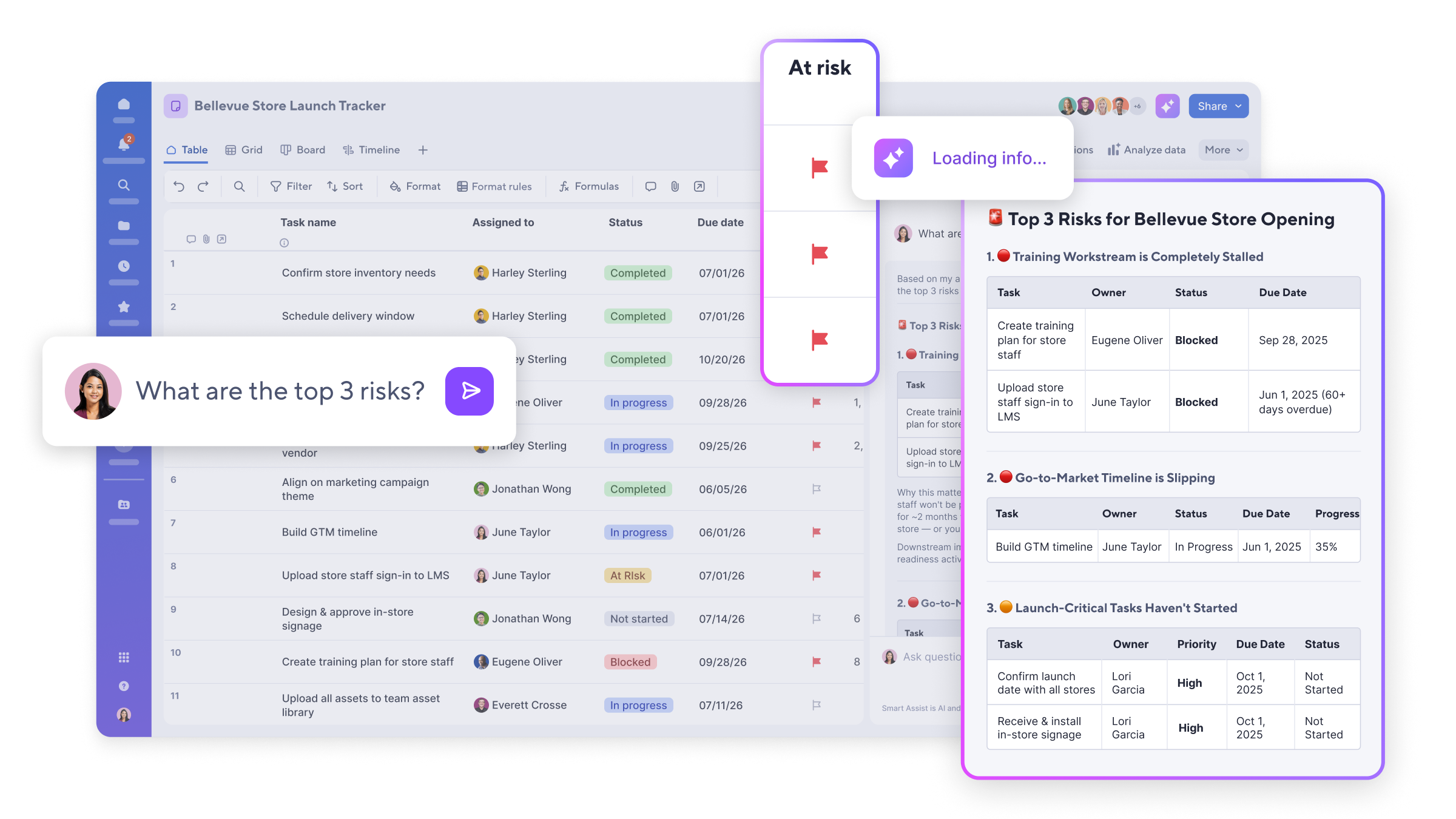
Smart Assist is a built-in assistant that can summarise a sheet or workspace, run a project health check that flags risks and dependency problems, and take actions such as creating sheets, workspaces and folders, bulk-updating rows, managing columns and reassigning tasks. It can also draft stakeholder emails, Slack updates and stand-up preparation from project data. The vendor describes it as new; treat the action features as something to test carefully on a copy of a real sheet before trusting it with bulk changes.
Smart Columns
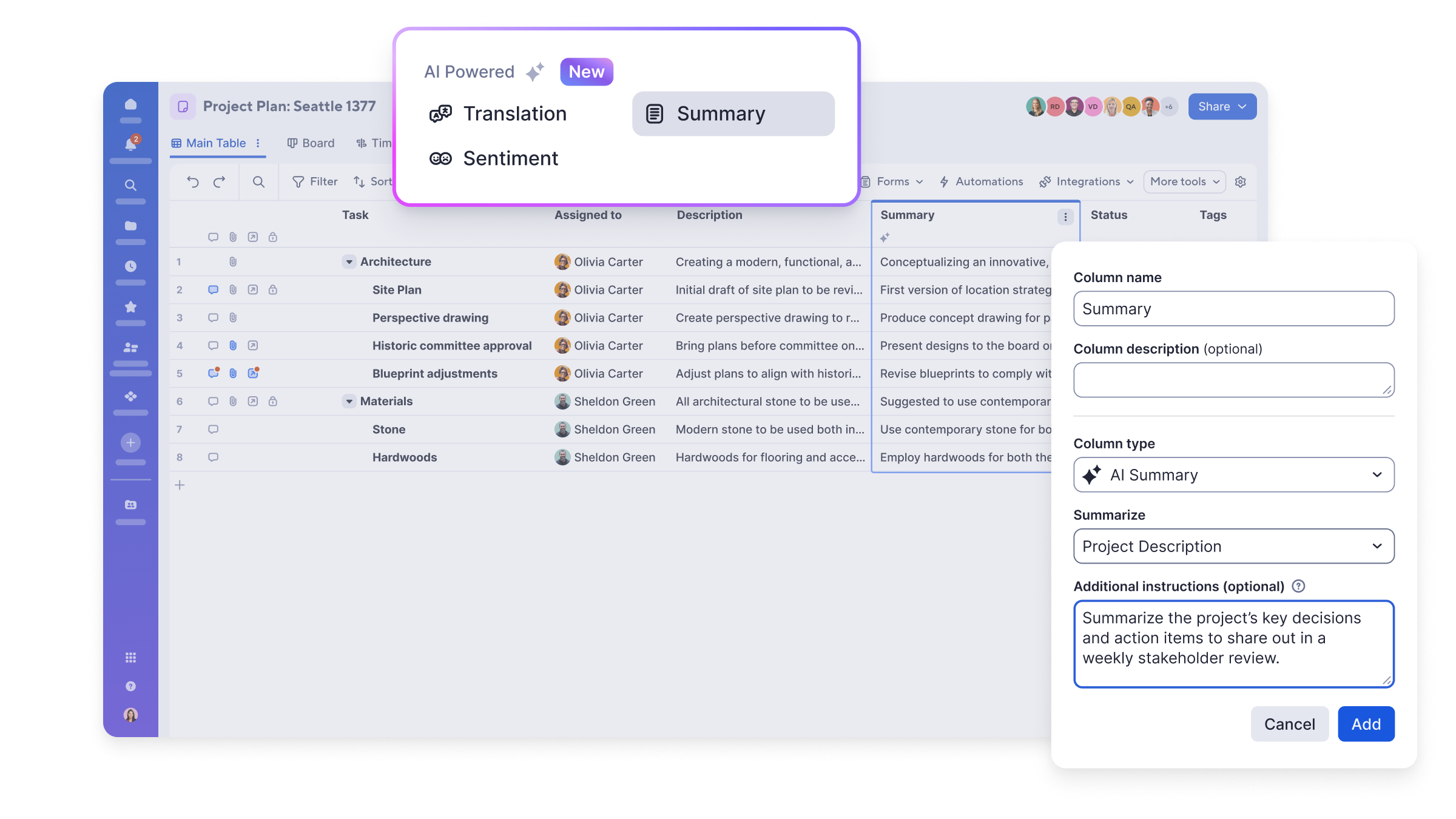
Smart Columns add an AI-powered column that processes every row as data changes, for example summarising long text, translating content or analysing sentiment, with custom instructions for tone, length and format. This is a genuinely useful idea for intake sheets and feedback logs, where it can condense long free-text answers into something a manager can scan.
Dashboards, Formulas and Data Analysis
The AI dashboard builder creates a dashboard from a description and selected data sources, which you then edit. Generate formulas converts plain-language requests into working formulas, which directly addresses one of Smartsheet's learning-curve problems. Analyse data produces charts and metrics from typed questions, intelligent form fill maps spoken answers to form fields, and new trial users get AI-guided project setup.
MCP and External AI Assistants
Smartsheet also offers an MCP server that connects sheets to Claude, ChatGPT, Microsoft Copilot, Gemini and other MCP-compatible assistants, so they can read live project data and take actions such as checking overdue tasks or updating statuses. The pricing page lists connecting external AI tools through MCP from the Business plan upwards.
Our assessment: Smartsheet's AI is most valuable for summarising and querying structured data, which is exactly what sheets hold. It does not remove the need for a well-designed sheet, and its quality depends on clean, consistent columns.
Smartsheet Collaboration Features
Collaboration in Smartsheet happens on rows and sheets: conversations and comments, @mentions, attachments (Smartsheet says up to 100 files at once), a file library, proofing, and notifications in-app, on mobile and by email. Sheets can be shared with internal colleagues and external partners, and everything is private by default until shared.
The user model is worth understanding because it affects both collaboration and cost. Members are paid users who create and manage items. Contributors are free users who can view shared work and, with commenter permissions, comment and add attachments. Guests are free external users, available on Business and above, who can view or edit items shared with them. Internal users who start editing may become Provisional Members, with full access for a limited period before an administrator decides whether to assign a paid seat.
Collaboration is strongest when sheets become the single source of truth. The downside is governance: as sheets multiply, sharing, permissions and seat assignments need active management, or administrators lose track of who can see and edit what. Compared with board-first tools, collaboration also feels more like editing a shared document than working in a social, card-based workspace.
Smartsheet Reporting and Dashboards
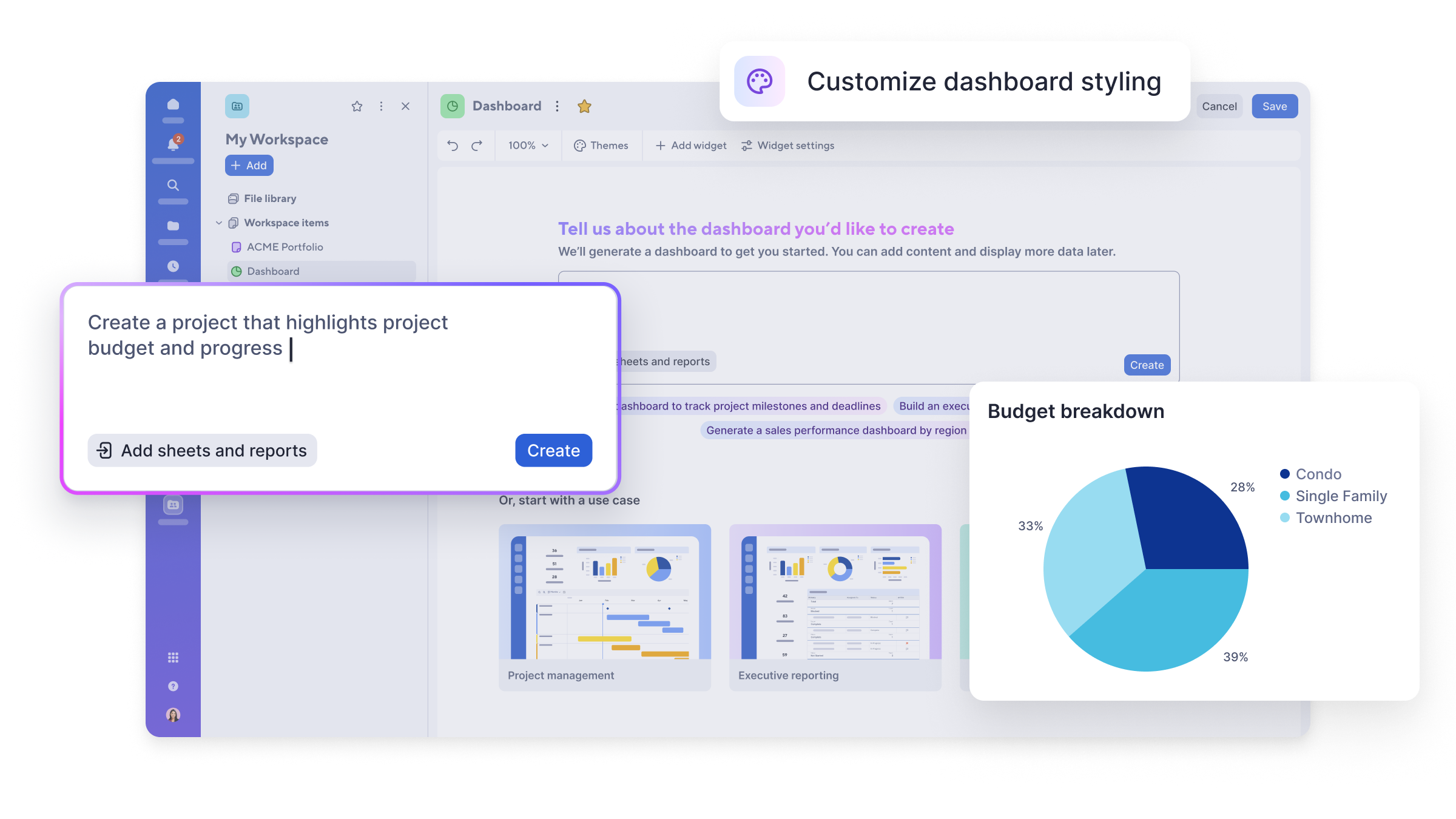
Reporting works at three levels. Reports roll up rows across sheets. Dashboards present charts, metrics, reports and links to stakeholders; Pro limits each dashboard to 10 widgets, while higher plans allow more. Portfolio-level reporting comes through Portfolios on Enterprise and Control Center on Advanced Work Management, and data can be pushed into Power BI or Tableau for deeper analysis.
This roll-up model is one of Smartsheet's real strengths: well-designed sheets feed consistent project status reports without anyone copying data by hand. It depends on discipline, though: if every project manager builds sheets differently, reports become hard to maintain. On Capterra, project tracking is one of the most consistently praised areas.
Resource Management and Workload
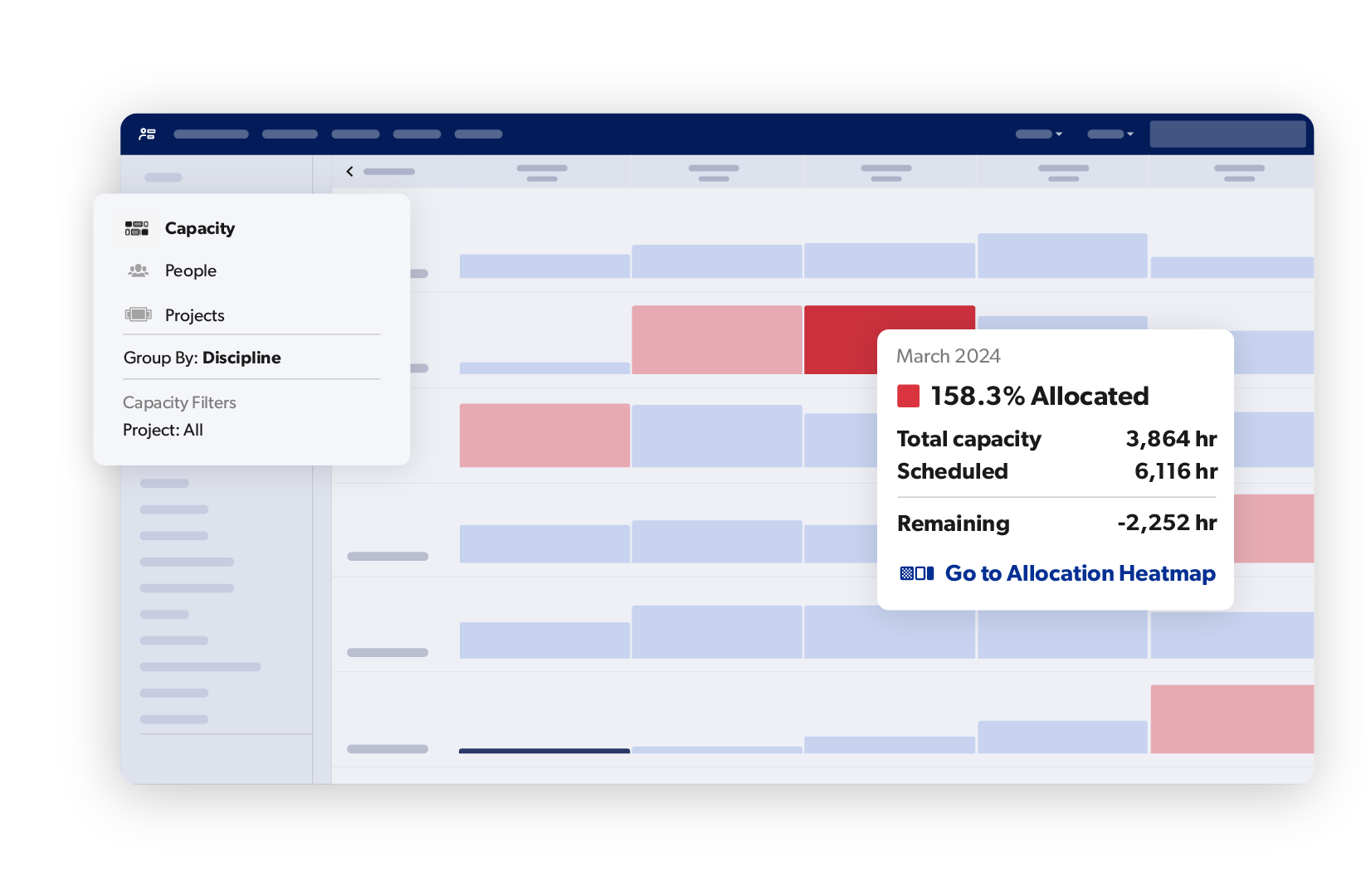
Resource features are split across plans and products:
- Workload tracking (Business and above) shows each person's capacity and task load and flags over-allocation so work can be rebalanced.
- Scenario Planning (Enterprise) lets you view timelines alongside capacity and test what-if changes without affecting live plans.
- Resource Management (a premium add-on) covers capacity planning, time tracking, demand management, role- and skill-based assignments and project budgets.
Basic workload visibility is enough for many teams. Firms that bill for time or plan staff across many projects, such as professional services and PMOs, will need the Resource Management add-on, which adds cost and a separate set-up exercise. Our guides to capacity planning and resource allocation explain the underlying techniques.
Portfolio Management: Portfolios and Control Center
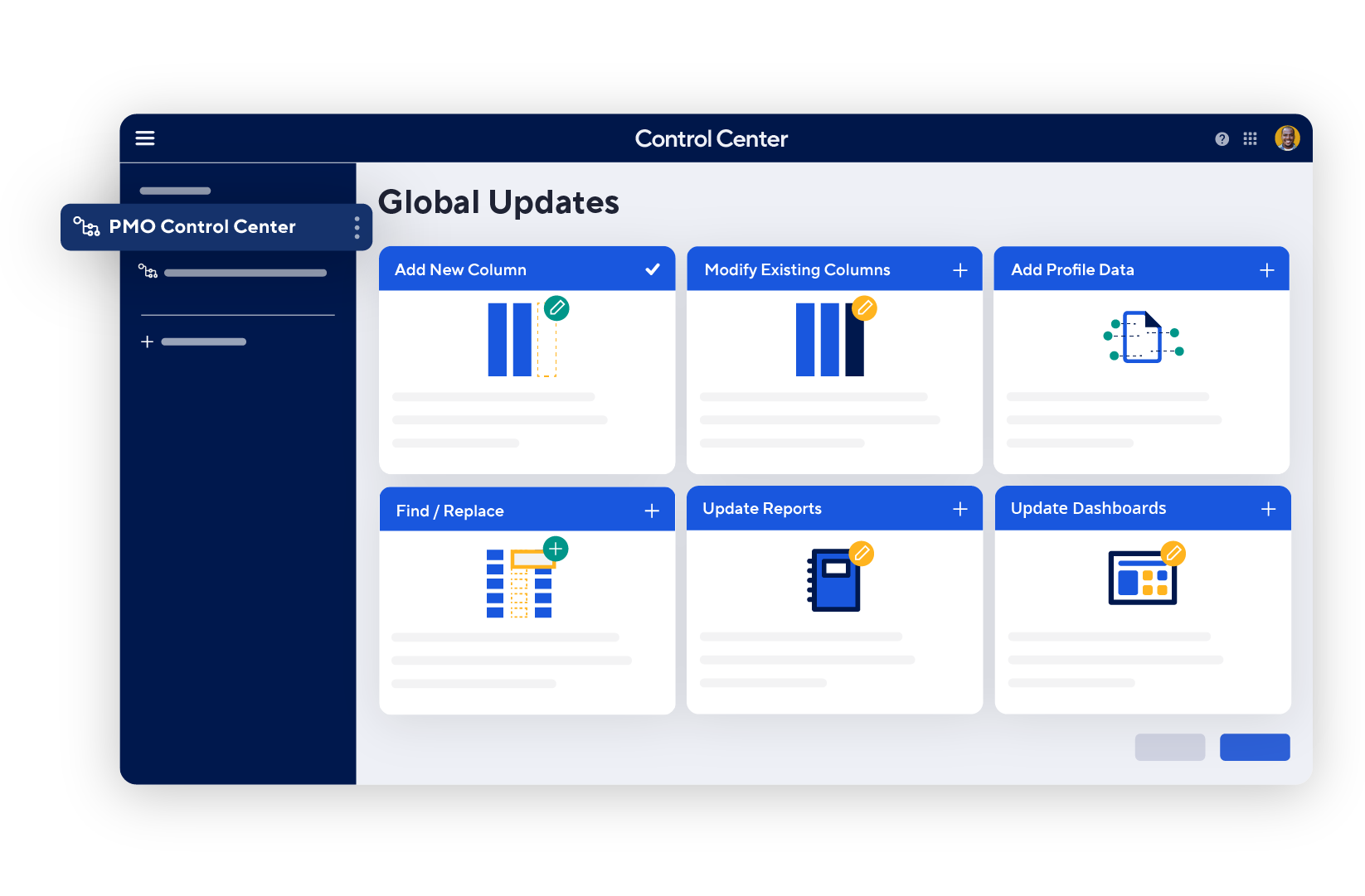
This is where Smartsheet separates itself from most rivals. Portfolios, included in Enterprise plans with no extra licence, gives a standardised, central view of related projects with out-of-the-box set-up. Control Center, included in Advanced Work Management or sold as a premium add-on, goes further: project "blueprints" define a standard set of sheets, reports and dashboards, new projects are provisioned automatically from intake, changes can be pushed across every existing project at once, and portfolio reporting rolls everything up.
Related premium apps extend this: Dynamic View shares only the rows and columns a person needs (useful for secure request management), Data Shuttle automates imports and exports between external systems and Smartsheet, and DataMesh and the Pivot App handle data mapping and summary tables.
For a PMO that wants every project built the same way, Control Center is a strong reason to choose Smartsheet. It is not plug-and-play, though: designing good blueprints takes time, and many organisations use Smartsheet's professional services or a partner to set it up. Our guide to program vs project vs portfolio management explains when portfolio tooling becomes worthwhile.
Smartsheet Integrations
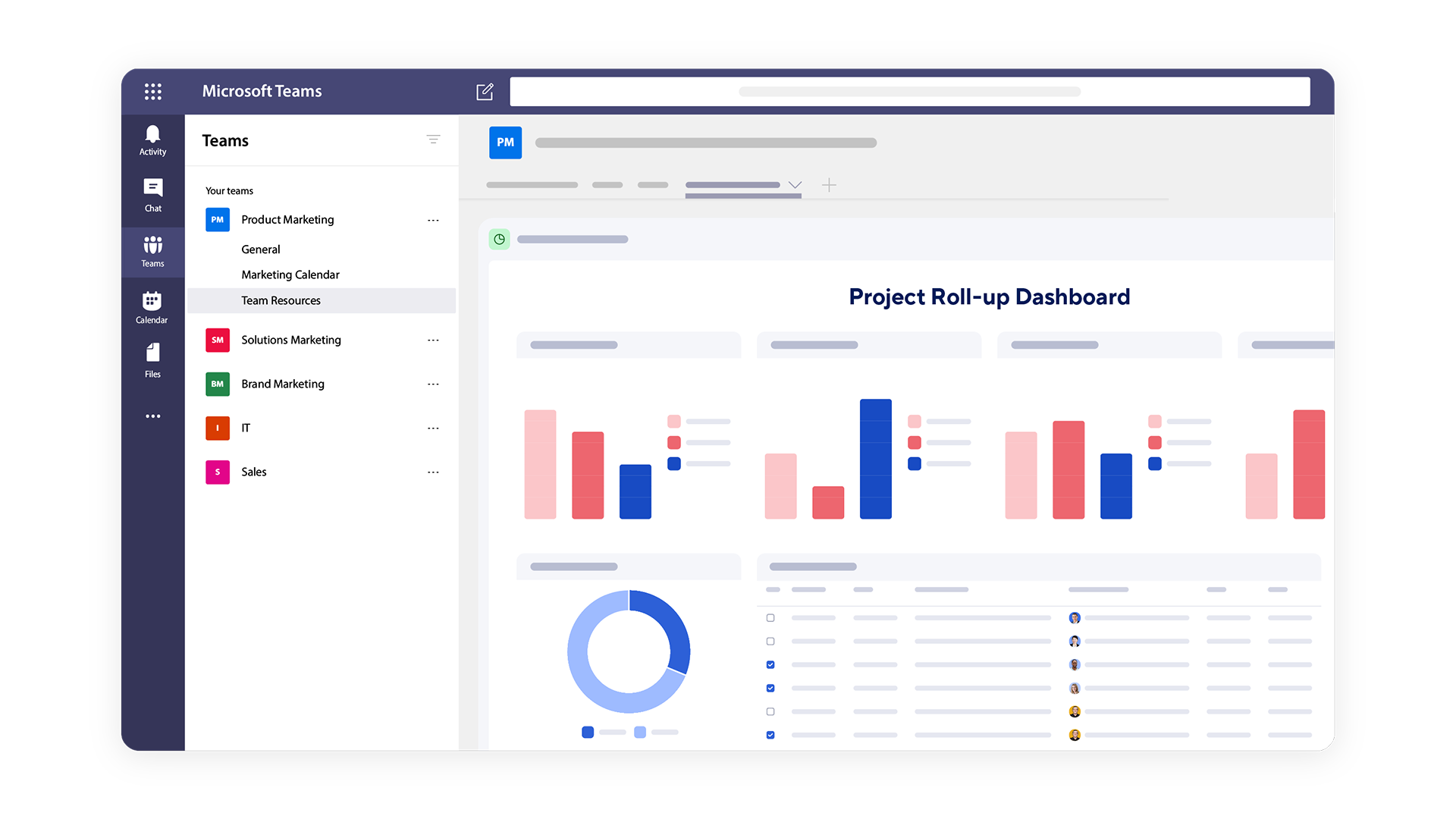
Smartsheet says it has over 175 integrations. Examples include Microsoft Teams (alerts and Smartsheet content in channel tabs), Outlook, Slack, Google Drive, Calendar and Gmail, Salesforce, Jira, DocuSign, Power BI and Tableau, plus MCP-based connections for Claude, ChatGPT and Microsoft Copilot. Some integrations are included in Business and Enterprise plans, while others are paid add-ons, so check the specific connector you need.
Bridge by Smartsheet
Bridge is Smartsheet's low-code tool for building workflows that span other systems, using pre-built connections, APIs and JavaScript. It suits organisations with technical administrators who want to automate cross-system processes without a separate integration platform.
API and Data Connectors
The Smartsheet API is free for licensed users on Business plans or higher, and Data Shuttle and Connectors (on Advanced Work Management or as add-ons) handle scheduled data movement. Smartsheet's integration strength is in the enterprise stack, Microsoft, Salesforce, BI tools and Jira, rather than in a long tail of small-business apps.
Smartsheet Ease of Use
Initial Setup
A single sheet can be running in minutes, especially if you import an Excel file or start from Smartsheet's template gallery. A well-designed solution takes longer: column types, row hierarchy, dependencies, cross-sheet formulas, automations, reports, dashboards and sharing all need thought. For enterprise rollouts with Control Center, set-up is a project in its own right.
Learning Curve
For anyone comfortable with spreadsheets, basic Smartsheet use is quick to pick up, and this is one of its main advantages over tools with an unfamiliar model. Advanced use is harder: cross-sheet references, complex formulas, report logic and permission design all require training. G2 reviewers summarise this well, citing ease of use for spreadsheet users alongside a steep learning curve for advanced use. AI formula generation helps, but does not remove the need for someone who understands the design.
Interface
The interface is functional, dense and familiar. Its strengths are information density and precision: you can see and edit a lot of data quickly. Its weaknesses are that it is less visual and less inviting than board-first tools, which can slow adoption among non-spreadsheet users, and that large, formula-heavy sheets can feel slow. On Capterra, performance and reliability concerns are among the recurring criticisms. The newer table view is a step towards a more modern experience.
Smartsheet Mobile App
Smartsheet's iOS and Android apps let you view and update sheets, submit forms, respond to conversations and notifications, and check dashboards while away from a desk. Forms are designed to work in low-connectivity areas, which matters for field teams in construction, facilities and inspections, and enterprises can manage the app through Microsoft Intune.
Our assessment: a wide grid is inherently awkward on a phone, so the mobile app works best as a companion for updates, approvals and data capture. Do planning, sheet design and reporting on desktop.
Smartsheet Pricing
Smartsheet's published plans are below. Prices are per member per month; paid Members are charged, while Contributors (and Guests on Business and above) are free. Pricing checked on Smartsheet's pricing page on 7 October 2026; always confirm before buying.
| Plan | Published price | Members | Best for |
|---|---|---|---|
| Pro | $9/member/month billed yearly ($12 billed monthly) | 1–10 | Small teams needing Gantt, forms and basic automation |
| Business | $19/member/month billed yearly ($24 billed monthly) | 3 or more | Teams needing timeline, workload, unlimited automation and guests |
| Enterprise | Contact sales | 10 or more | Organisations needing Portfolios, Scenario Planning and SAML SSO |
| Advanced Work Management | Contact sales | Custom | Enterprises scaling portfolios with Control Center and premium apps |
Is There a Smartsheet Free Plan?
No. Smartsheet's pricing page does not list a free plan; the cheapest option is Pro. Free Contributors can view and comment on shared work, which helps keep costs down for stakeholders, but anyone who needs to create and manage work needs a paid seat. If a free tier is essential, look at the options in our Smartsheet alternatives guide.
Smartsheet Pro Plan
At $9 per member/month billed yearly ($12 monthly), Pro supports 1 to 10 members with unlimited free Contributors. It includes Gantt, table, board and calendar views, formulas, unlimited sheets, forms and reports, 250 automations per month, 20 GB of storage and dashboards of up to 10 widgets. It does not include timeline view, workload tracking, proofing, Guests or Portfolios. It suits a small team moving off spreadsheets, but the 10-member cap and automation limit mean growing teams will move to Business.
Smartsheet Business Plan
At $19 per member/month billed yearly ($24 monthly), with a minimum of 3 members, Business adds timeline view, workload tracking, unlimited automations, unlimited free Guests, proofing, publishing, admin capabilities, API access, 1 TB of attachment storage and MCP connections to external AI tools. This is the plan most departments should evaluate first, and it is the plan used for the free trial.
Smartsheet Enterprise Plan
Enterprise is quote-based, for 10 or more members, and adds Portfolios, Scenario Planning, SAML-based single sign-on, Enterprise Plan Manager, directory integrations and unlimited attachment storage. It suits organisations that need governance across many teams.
Advanced Work Management
Advanced Work Management is also quote-based. It adds Control Center, Dynamic View, Data Shuttle, Connectors, DataMesh, Calendar App, Pivot App and Premium Support on top of Enterprise. It is designed for PMOs and enterprises running standardised portfolios at scale, not for small teams.
Smartsheet Add-ons
Several capabilities are sold separately. The pricing page lists Resource Management (Business and Enterprise), Brandfolder digital asset management (all plans), Dynamic View from about $125 per month and Data Shuttle from about $100 per month (Business and Enterprise), and a Premium Support package. Budget for these early, as they can change the total cost noticeably.
Smartsheet Free Trial
Smartsheet offers a 30-day free trial with no credit card required, and its help centre says the trial gives access to a Business plan. After the trial, sheets become read-only and are later deleted unless you subscribe, so export anything you want to keep. Use the trial to rebuild one real project plan or tracker, including the report and dashboard your stakeholders would actually use.
Smartsheet Pros and Cons
Pros
- Familiar spreadsheet grid that Excel users pick up quickly
- Strong Gantt charts with dependencies and critical path
- Powerful cross-sheet reports and roll-up dashboards
- Enterprise-grade governance, security and compliance
- Portfolios and Control Center for standardised PMOs
- Forms and no-code automation built in
- Free Contributors, and free Guests from Business
- Broad enterprise integrations, including MCP for AI assistants
- Growing AI tools for summaries, risks and formulas
Cons
- No free plan; the cheapest option is paid
- Per-member pricing and premium add-ons raise total cost
- Portfolio and premium apps are quote-based
- Less visual than board-first tools
- Learning curve for advanced formulas and cross-sheet design
- Performance concerns reported on large, complex sheets
- Pro is capped at 10 members and 250 automations per month
- Limited Agile and sprint tooling compared with Jira
This balance matches what users report: people value Smartsheet's familiarity, tracking and collaboration, while cost, licensing and performance are its most common drawbacks.
What Do Smartsheet Customers Say?
- Features: 4.4/5
- Customer service: 4.3/5
- Value for money: 4.4/5
What G2 reviewers like most
- Ease of use for spreadsheet users
- Streamlined collaboration and automation
- Real-time collaboration
Most common G2 complaints
- Steep learning curve for advanced use
- Missing features
- Not always intuitive
Ratings and review themes as published on G2 and Capterra on 5 October 2026; summarised in our own words. Visit the links above for full, verified user reviews.
On Capterra, Smartsheet is rated 4.5/5 from 3,559 reviews, with sub-scores of 4.4 for features, 4.4 for value for money and 4.3 for customer service (checked 7 October 2026). On G2, it is rated 4.4/5 from 22,766 reviews (checked 5 October 2026). The themes below summarise these third-party reviews in our own words, not Smartsheet's testimonials.
Positive themes. Reviewers most often praise real-time team collaboration (about 98% positive in Capterra's topic summary), versatile project tracking (about 96% positive) and comprehensive task and data tracking (about 95% positive). The familiar spreadsheet layout, Gantt charts, forms and dashboards come up repeatedly as reasons teams adopted it.
Negative themes. The most common complaints are cost and licensing (about 46% of reviews discussing it are negative), performance and reliability (about 61% negative), and limited advanced formula capabilities (about 60% negative). Others mention the learning curve for advanced features and a less modern, less visual interface than newer tools.
When reading reviews yourself, check whether a review was invited or incentivised by the vendor. Capterra and G2 both label these, and filtering for non-incentivised reviews from organisations of your size gives a more reliable picture than the headline score.
Smartsheet Customer Support
Smartsheet provides a searchable help centre, structured learning tracks from beginner to advanced, recorded and live webinars, instructor-led training, Pro Desk coaching, a user Community and Smartsheet University, which leads to official certification. Support requests are made through the help centre.
A Premium Support package, included in Advanced Work Management and available as an add-on for Business and Enterprise, adds 24x7 live chat and one-to-one coaching sessions. Professional services are available for complex rollouts such as Control Center. Capterra's customer service sub-score is a solid 4.3/5, but individual experiences vary, so confirm what support is included in your plan during the sales process.
Smartsheet Security
Smartsheet's Trust Center lists SOC 2, ISO 27001, GDPR, FedRAMP and HIPAA (with a Business Associate Agreement), and says ISO 42001 certification for AI management is in progress. Data is encrypted with AES-256 at rest and TLS 1.2 and 1.3 in transit. Identity controls include SSO through SAML or OAuth 2.0 (SAML on Enterprise and above), admin-enforced multi-factor authentication and SCIM directory sync with Okta, Entra ID, Google Workspace and Apple.
Enterprise customers can add customer-managed encryption keys, choose data regions, apply granular data egress and retention policies through Smartsheet Safeguard, and use activity logs and event reporting covering more than 100 event types. These are strong controls for regulated industries and government, but certifications and their scope change over time, so confirm current status and plan availability in Smartsheet's trust documentation as part of procurement. Good permission design and project governance still matter.
Smartsheet for Different Types of Teams
Smartsheet for PMOs and Enterprise Portfolios
This is Smartsheet's strongest use case: standardised project templates, Gantt charts with critical path, cross-sheet reporting, Portfolios and Control Center for provisioning and governing hundreds of projects.
Smartsheet for Operations and Finance Teams
Teams that already run processes in spreadsheets, such as budgets, trackers, registers and approvals, often find Smartsheet the most natural step up, because their data model barely changes while gaining automation, forms and dashboards. Our project tracker template shows a typical starting structure.
Smartsheet for IT Teams
IT teams use Smartsheet for implementation plans, infrastructure projects, intake and portfolio reporting, often with the Jira integration so developers stay in Jira while the PMO tracks milestones in Smartsheet.
Smartsheet for Construction and Engineering
Date-driven schedules with dependencies, mobile forms for field data capture and roll-up reporting make Smartsheet a common choice in construction and engineering.
Smartsheet for Marketing Teams
Marketing teams can manage campaign calendars, content plans, intake forms and proofing, and Brandfolder adds digital asset management. Teams that prefer visual, board-first workflows may find other tools more natural.
Smartsheet for Small Businesses
Smartsheet can work for small businesses that think in spreadsheets and need proper scheduling, but the absence of a free plan, the 10-member Pro cap and the 250-automation limit make it less economical than some rivals for very small teams.
Who Should Use Smartsheet?
Great for
- Enterprises and PMOs standardising project portfolios
- Operations and finance teams who think in spreadsheets
Look elsewhere if
- Small teams wanting a free plan
- Creative teams wanting a visual, board-first tool
Smartsheet Feature Checklist
| Feature | Smartsheet |
|---|---|
| Free plan | ✕ No |
| Gantt / timeline | ✓ Yes |
| Kanban boards | ✓ Yes |
| Time tracking | ◐ Partial |
| Resource & workload management | ✓ Yes |
| Portfolio management | ✓ Yes |
| Docs & wiki | ✕ No |
| Automations | ✓ Yes |
| Agile / sprint tools | ◐ Partial |
| Proofing & approvals | ✓ Yes |
| Built-in AI | ✓ Yes |
| Guest / client access | ✓ Yes |
| Flat (non per-user) pricing | ✕ No |
Smartsheet Alternatives and Comparisons
Smartsheet fits teams of almost any size, from small teams getting started to large organisations running portfolios of projects. Anyone who has used a spreadsheet will feel at home: beginners can start with a familiar grid and a ready-made template, then add Gantt charts, dashboards, automation and Control Center as their projects grow. If you would like to see how it stacks up, we compare Smartsheet with Wrike, monday.com, Asana, ClickUp and others on pricing, features and use cases on dedicated pages:
- Wrike: choose it for a more collaborative all-in-one platform. Compare Smartsheet vs Wrike.
- monday.com: choose it for a more visual interface. Compare Smartsheet vs monday.com.
- Microsoft Planner: choose it for Microsoft 365 integration. Compare Smartsheet vs Microsoft Planner.
- Asana: choose it for simpler task coordination. Compare Smartsheet vs Asana.
- ClickUp: choose it for lower prices. Compare Smartsheet vs ClickUp.
See all Smartsheet alternatives
Smartsheet comparisons
Is Smartsheet Worth It?
Smartsheet is likely worth it if you:
- Already run projects and processes in spreadsheets and want them connected, shared and governed.
- Manage date-driven schedules with dependencies and milestones.
- Need reports and dashboards that roll up many projects automatically.
- Want a PMO to standardise how projects are set up and reported.
- Need enterprise security, compliance and administration.
- Are willing to invest time in sheet design and training.
It may not be worth it if:
- You need a free plan or have a very tight budget.
- Your team prefers visual, card-based boards over grids.
- You run Agile software teams that need sprints and backlogs.
- You only need a shared to-do list.
- You need advanced resource management but cannot budget for add-ons.
Our verdict: Smartsheet's spreadsheet DNA is both its biggest advantage and its main limitation. For organisations that think in rows and columns and need structured plans, roll-up reporting and governance at scale, it is one of the most capable options available, which is why it ranks in the top five of our project management software review. For small or highly visual teams, the lack of a free plan, the add-on costs and the grid-first interface are harder to justify. Use the 30-day trial on a real project before committing, and read our guide on how to choose project management software.
Frequently asked questions
Is Smartsheet good project management software?
Yes, for the right team. Smartsheet combines a familiar spreadsheet grid with Gantt charts, dependencies, automation, cross-sheet reports and enterprise portfolio tools, and it rates 4.5/5 on Capterra. The trade-offs are no free plan, add-on costs and a learning curve for advanced design, so it suits structured, spreadsheet-minded organisations more than small visual teams.
Is Smartsheet free?
No. Smartsheet does not list a free plan on its pricing page; the cheapest plan is Pro at $9 per member/month billed yearly. Free Contributors can view and comment on shared work, and Guests are free on Business and above, but anyone creating and managing work needs a paid seat.
How much does Smartsheet cost?
Smartsheet Pro costs $9 per member/month billed yearly ($12 monthly) and Business costs $19 per member/month billed yearly ($24 monthly). Enterprise and Advanced Work Management are priced on request, and Resource Management, Dynamic View, Data Shuttle and Premium Support are add-ons (checked 7 October 2026).
Does Smartsheet have a free trial?
Yes. Smartsheet offers a 30-day free trial with no credit card required, and the trial gives access to the Business plan. Sheets become read-only after the trial ends unless you subscribe, so test a real project and export anything you need.
Is Smartsheet easy to use?
Partly. Anyone comfortable with Excel can pick up the basics quickly, which is one of Smartsheet's main advantages. Advanced use, such as cross-sheet formulas, report logic, automation and permission design, takes training, and the grid-based interface is less visual than board-first tools.
What is Smartsheet best used for?
Smartsheet is best for date-driven project plans, trackers and registers, intake and approval workflows, roll-up reporting across many projects, and PMO portfolio management, especially in organisations that already work in spreadsheets.
Is Smartsheet better than Wrike?
Neither is universally better. Smartsheet suits spreadsheet-minded teams that want grid-based plans and strong roll-up reporting; Wrike offers a broader all-in-one platform with stronger collaboration, proofing and resource management. See our Smartsheet vs Wrike comparison.
Is Smartsheet better than monday.com?
It depends on the use case. Smartsheet is stronger for spreadsheet-style scheduling and enterprise portfolio governance; monday.com is more visual and usually easier for non-technical teams to adopt. See our Smartsheet vs monday.com comparison.
Is Smartsheet better than Excel for project management?
For shared project work, usually yes. Smartsheet keeps the familiar grid but adds real-time collaboration, permissions, Gantt charts with dependencies, forms, automation and cross-sheet reports. Excel remains more powerful for complex calculations and modelling, and many teams use both.
Does Smartsheet have Gantt charts?
Yes. Gantt view is available on every plan, with task dependencies, drag-and-drop rescheduling, milestones and critical path highlighting. Timeline view, a separate lane-based view, starts on the Business plan.
Does Smartsheet have Kanban boards?
Yes. Board view displays sheet rows as cards in lanes that can represent stages, teams or sprints, with drag-and-drop and up to 14 fields per card. It is available on all plans, though Smartsheet remains grid-first rather than board-first.
Does Smartsheet have AI?
Yes. Smartsheet lists Smart Assist (summaries, risk checks and actions), Smart Columns, an AI dashboard builder, formula generation, data analysis and intelligent form fill on all plans. From Business, it can also connect to Claude, ChatGPT, Copilot and other assistants through its MCP server.
What is Smartsheet Control Center?
Control Center is a premium Smartsheet app for portfolio management. It uses blueprints to provision standardised project sheets, reports and dashboards automatically, pushes changes across existing projects and rolls up portfolio reporting. It is included in Advanced Work Management or sold as an add-on.
What are the main disadvantages of Smartsheet?
The main disadvantages are the lack of a free plan, the cost of per-member pricing and premium add-ons, a less visual interface than board-first tools, a learning curve for advanced formulas and design, and performance concerns on large, complex sheets.
Does Smartsheet integrate with Microsoft Teams and Slack?
Yes. Smartsheet integrates with Microsoft Teams, Outlook and Slack, and lists over 175 integrations in total, including Salesforce, Jira, DocuSign, Google Workspace apps, Power BI and Tableau.
Product screenshots are © Smartsheet Inc. and shown for the purpose of review, with links to their source pages.