Project management tools · #2 of 10 · Best for ease of use and visual workflows
monday.com Review 2026: Is It Worth It?
monday.com is a board-based work management platform that teams use to plan, track and automate projects, campaigns, requests and everyday processes. Its biggest strengths are how quickly people pick it up, its colourful and flexible boards, and its dashboards and automations. The trade-offs are a pricing model built on seat buckets with a three-seat minimum, monthly limits on automation actions and AI credits, and several important project management features reserved for the Pro and Enterprise plans. This review covers pricing, project management, collaboration, automation, AI, integrations, ease of use, reporting and overall value.
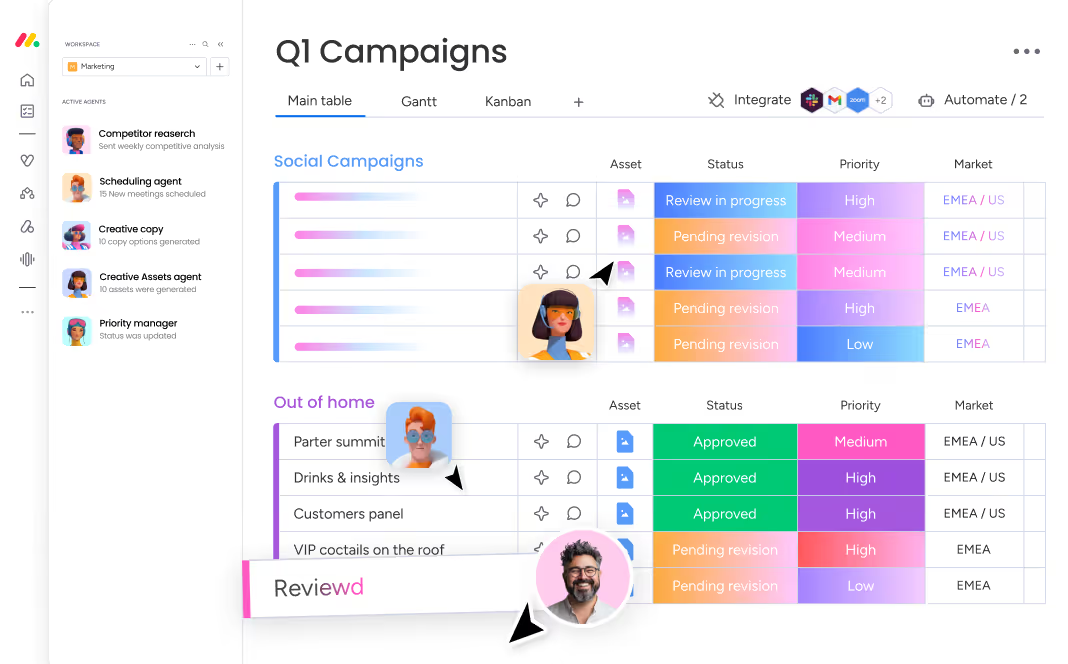
monday.com review: quick verdict
| Best for | Teams that want an intuitive, visual platform they can shape into almost any workflow, with fast adoption across non-technical departments |
| Less suitable for | Very small or cost-sensitive teams (seats are sold in buckets), and teams that need advanced scheduling or resource control on a tight budget |
| Our overall score | 9.1/10, ranked #2 in our top 10 project management tools |
| Price | Free plan for up to 2 seats; Basic $9, Standard $12 and Pro $19 per seat/month (billed annually, minimum 3 seats); Enterprise on quote |
| Free trial | 14-day trial of the Pro plan; monday.com says no credit card is needed |
| Capterra rating | 4.6/5 from 6,120 reviews (checked 7 October 2026) |
| G2 rating | 4.7/5 from 17,248 reviews (checked 5 October 2026) |
monday.com is one of the easiest capable work management platforms to roll out, and it is at its best when many different teams need to build their own workflows without help from IT. The trade-offs are real: the seat buckets and three-seat minimum make it poor value for very small teams, automation actions and AI credits are capped by plan, and time tracking, workload, portfolio and resource management only arrive on Pro or Enterprise. Teams that need deep scheduling and resource control may find more depth elsewhere.
Our scores
Scores use our standard review methodology, the same for every tool we review.
What Is monday.com?
monday.com is cloud-based work management software. Everything is built on boards: flexible, spreadsheet-like tables where each row is a piece of work and each column holds information about it, such as an owner, a status, a date or a budget. The same board can be displayed as a table, a Kanban board, a timeline, a Gantt chart or a calendar, and dashboards pull data from several boards into one view.
Organisations use it to manage:
- Projects, from simple trackers to multi-phase plans with dependencies
- Campaigns and content calendars, with approvals and deadlines
- Requests, collected through WorkForms instead of email
- Operational processes, such as onboarding, procurement or IT requests
- Portfolios and resources, on the Enterprise plan
- Automated workflows, using rules, integrations and AI agents
monday.com sells several products on the same platform: work management, CRM, service and monday dev for software teams. This review focuses on work management, which the vendor now markets as its "AI work platform". It runs in the browser, as desktop apps and on iOS and Android. It is more structured than a to-do list and more connected than a spreadsheet, which is why it suits both plan-driven waterfall projects and looser operational work.
Who Owns monday.com?
monday.com Ltd. was founded in Tel Aviv in 2012 by Roy Mann and Eran Zinman, originally under the name dapulse, and renamed monday.com in 2017. It has been listed on Nasdaq (ticker MNDY) since June 2021, and the two co-founders run it as co-CEOs. The company says its platform is used by around a quarter of a million customers.
For buyers, the practical point is that monday.com is a large, publicly listed vendor with published financial results and a long product track record, not an early-stage start-up.
How Does monday.com Work?
monday.com organises work in a few simple layers:
- Workspaces hold the boards for a team, department or client.
- Boards are the core unit: one board per project, process or tracker.
- Groups split a board into sections, such as phases, sprints or months.
- Items are the rows (tasks, requests, deals or deliverables), and subitems break them down further.
- Columns add structure: status, people, date, timeline, numbers, dependency, files, formula and many more.
- Views show a board as a table, Kanban, timeline, Gantt, calendar or chart, and dashboards combine several boards.
A typical workflow looks like this:
Form submitted → item created on a board → owner assigned automatically → status updated as work progresses → dashboard shows progress → item marked done
For example, a sales team fills in a WorkForm asking for a new case study. The submission creates an item on the content team's board, an automation assigns it to a writer and sets a due date, and the item moves through statuses such as Drafting, In review and Published. Comments and files stay on the item, and the content lead sees everything on a dashboard without sending a chasing email.
monday.com Key Features
Boards, Items and Columns
Boards are monday.com's main strength. Adding a column takes seconds, and the colour-coded status labels make a board readable at a glance, which is a big part of why non-technical teams adopt it so quickly. Each item has a clear owner, a status and a date, so accountability is visible to everyone on the board.
The flexibility has a cost: because anyone can build a board, large accounts can end up with dozens of slightly different boards for the same process. Agree a few standard boards and column sets early, or cross-team reporting becomes hard later. Our free project tracker template shows the core columns most project boards need.
Board Views and Kanban

The same data can be shown in several views. The table is the default; the Kanban view groups items into columns by status so you can drag them along; the calendar shows dated work; and the timeline and Gantt views (from Standard) show work over time. Filters, sorting and grouping work across views, and each person can save the views they use most.
Kanban works well for content, creative and support-style work where the flow matters more than the dates.
Timeline and Gantt Charts
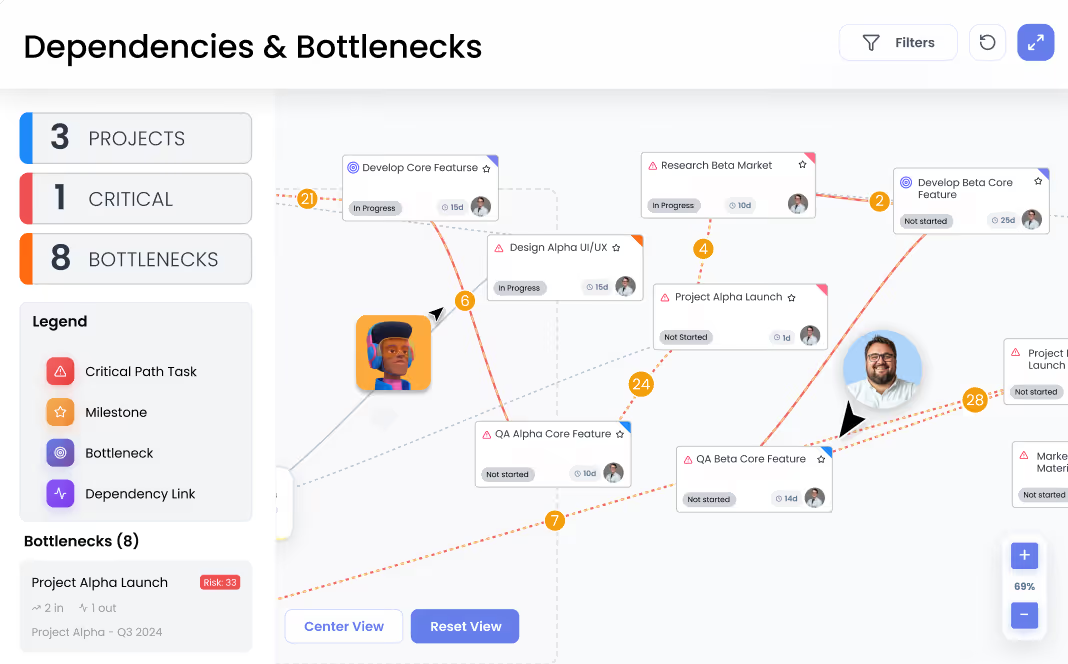
Timeline and Gantt chart views start on the Standard plan. You can set task dependencies with a dependency column, drag bars to reschedule, and add a Gantt widget to a dashboard. According to monday.com's plan documentation, Pro adds milestones and the critical path, and its Gantt feature page also lists baselines.
For most marketing, operations and client projects this is enough. Teams running large, tightly sequenced schedules with many dependencies, such as construction or engineering programmes, may find dedicated scheduling tools or Wrike's Gantt charts more thorough.
Dashboards
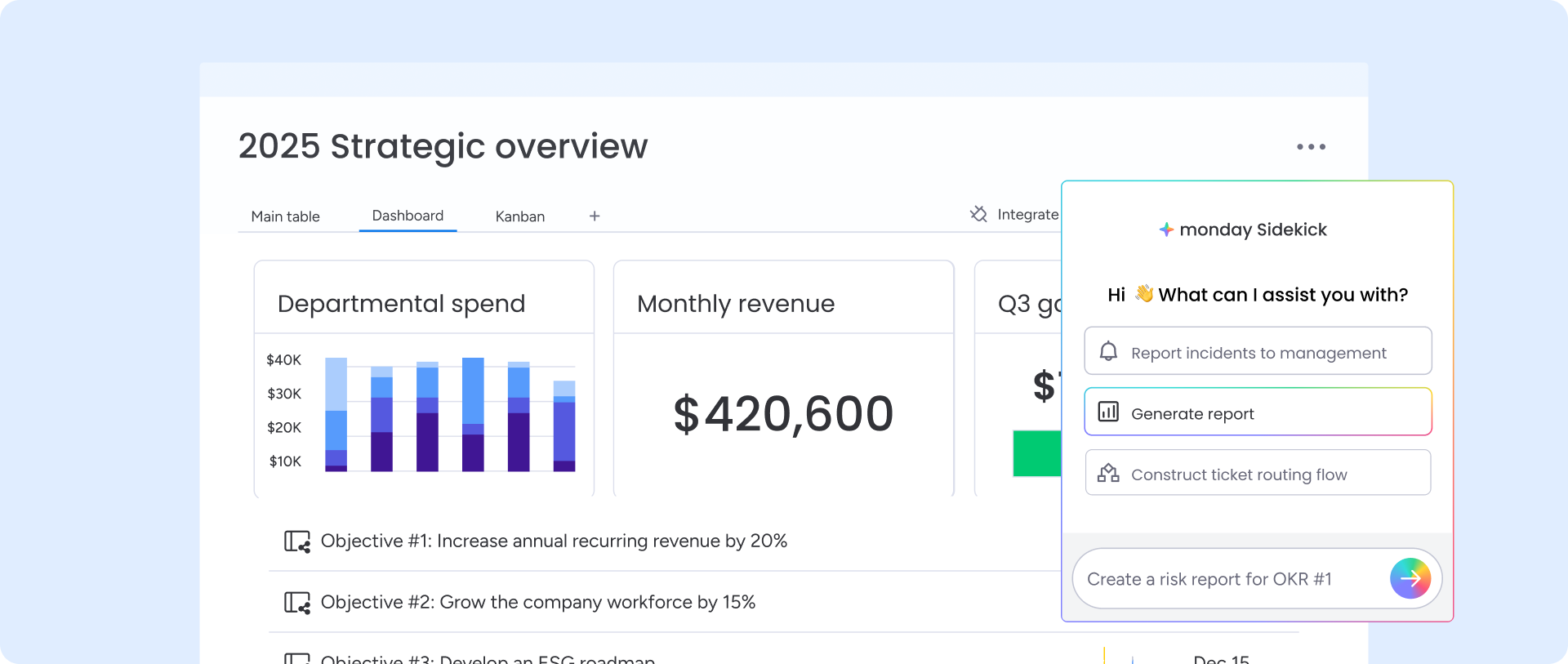
Dashboards turn board data into charts, numbers, battery (progress) widgets, Gantt widgets and workload views, so managers can see status across projects without opening each board. monday.com also offers scheduled reports and AI-written summaries on dashboards.
The key limit is how many boards one dashboard can combine: 1 board on Free and Basic, 5 on Standard, 20 on Pro and 50 on Enterprise, according to monday.com's plan documentation. A team running a dozen projects on separate boards will therefore need Pro for a single cross-project dashboard.
WorkForms and Request Intake
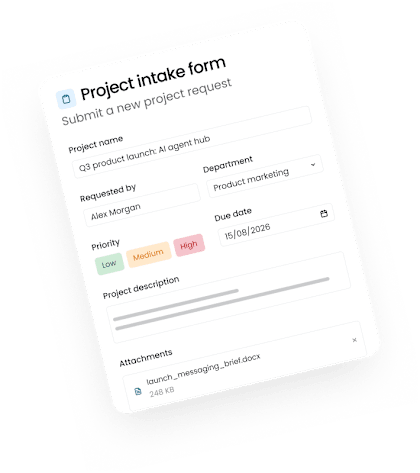
WorkForms collect requests from colleagues or external people and turn each submission into an item on a board, which can then trigger automations and integrations. Forms support conditional questions, branding (colours, fonts, logo, welcome and thank-you pages) and editable responses, and monday.com offers an AI form builder that drafts a form from a prompt.
For example, a marketing team can use one form to collect design requests, including the deadline, channel, campaign, brief and attachments. Every request then arrives complete and in the right place, rather than half-specified in a chat message. If you are not ready for software, our free work request template follows the same idea.
Automations and Workflows
Automations follow a "when this happens, do that" pattern: when a status changes, notify the owner; when a date arrives, send a reminder; when an item is created, assign it and add subitems. There are ready-made automation recipes and a custom builder, and integrations use the same approach to sync with tools such as Gmail or Google Calendar.
Automations and integrations are metered. Standard includes 250 automation actions and 250 integration actions a month, Pro 25,000 of each, and Enterprise up to 250,000 combined actions a month. 250 actions disappears quickly in a busy team, so in practice serious automation starts on Pro. The newer AI-powered workflows are capped separately at 3 active workflows on Standard, 20 on Pro and 250 on Enterprise.
Docs, Templates and Time Tracking
monday docs are collaborative documents that can embed and update board items, useful for briefs, meeting notes and plans. The template centre offers more than 200 templates, which is a quick way to start a board for a campaign, event or content calendar.
Time tracking and formula columns are Pro features. Teams that bill by the hour or need to compare estimates with actual effort should budget for Pro from the start.
monday.com AI Features
AI is now central to how monday.com describes its product. For accounts that joined from May 2026, AI use draws on a monthly pool of AI credits shared across the account: at least 1,000 a month on Basic, 2,000 on Standard and 3,000 on Pro, with larger buckets available to buy and custom amounts on Enterprise. Different actions use different amounts: monday.com's documentation says a sidekick message uses roughly 10 to 150 or more credits, an agent run roughly 10 to 250 or more, an AI block action 8 credits, and the Notetaker 120 credits per meeting hour. Admins are alerted at 80% and 100% of usage.
That means AI costs are usage-based in practice. A team that leans heavily on agents and meeting notes will need a bigger credit bucket, so test real usage during the trial.
monday sidekick
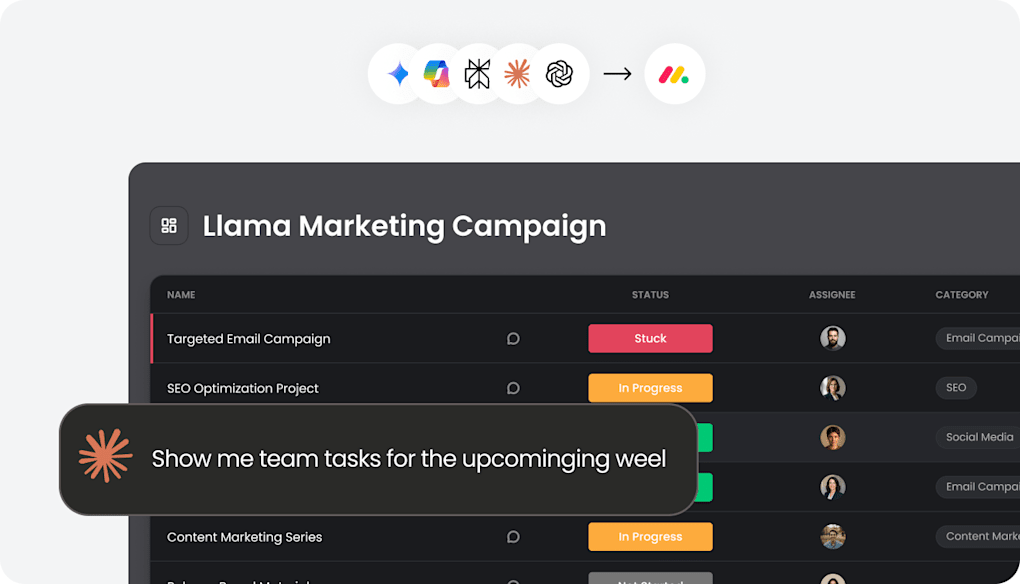
monday sidekick is the built-in AI assistant. The vendor says it uses context from your boards, docs and connected apps such as Slack, Gmail and Google Calendar to summarise updates, draft content and project plans, update tasks and timelines, analyse data, and create automations, dashboards and forms. It follows existing permissions and asks for approval before acting, and scheduled "Routines" can run regular AI tasks. It is available on paid plans and uses AI credits.
AI Agents
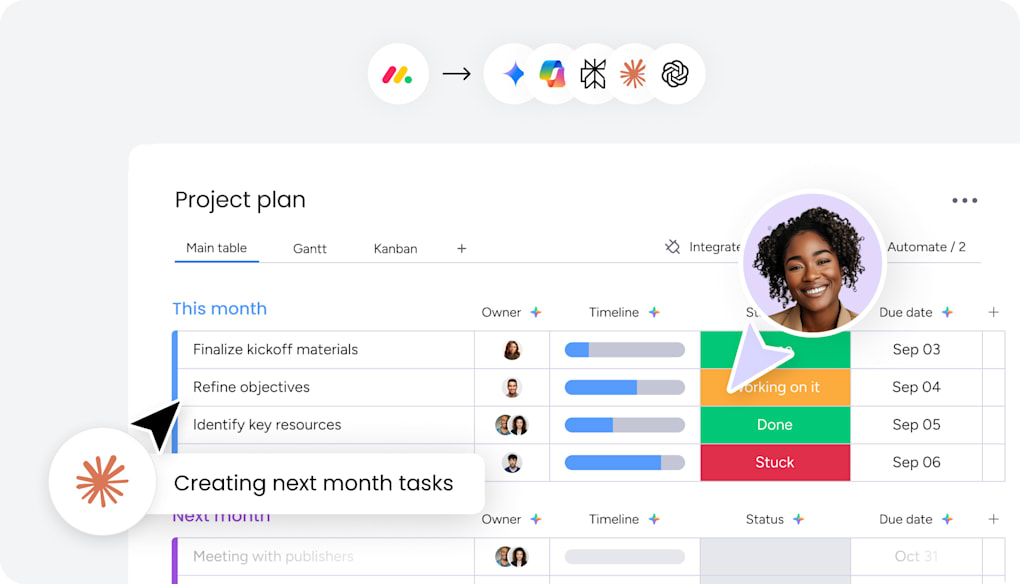
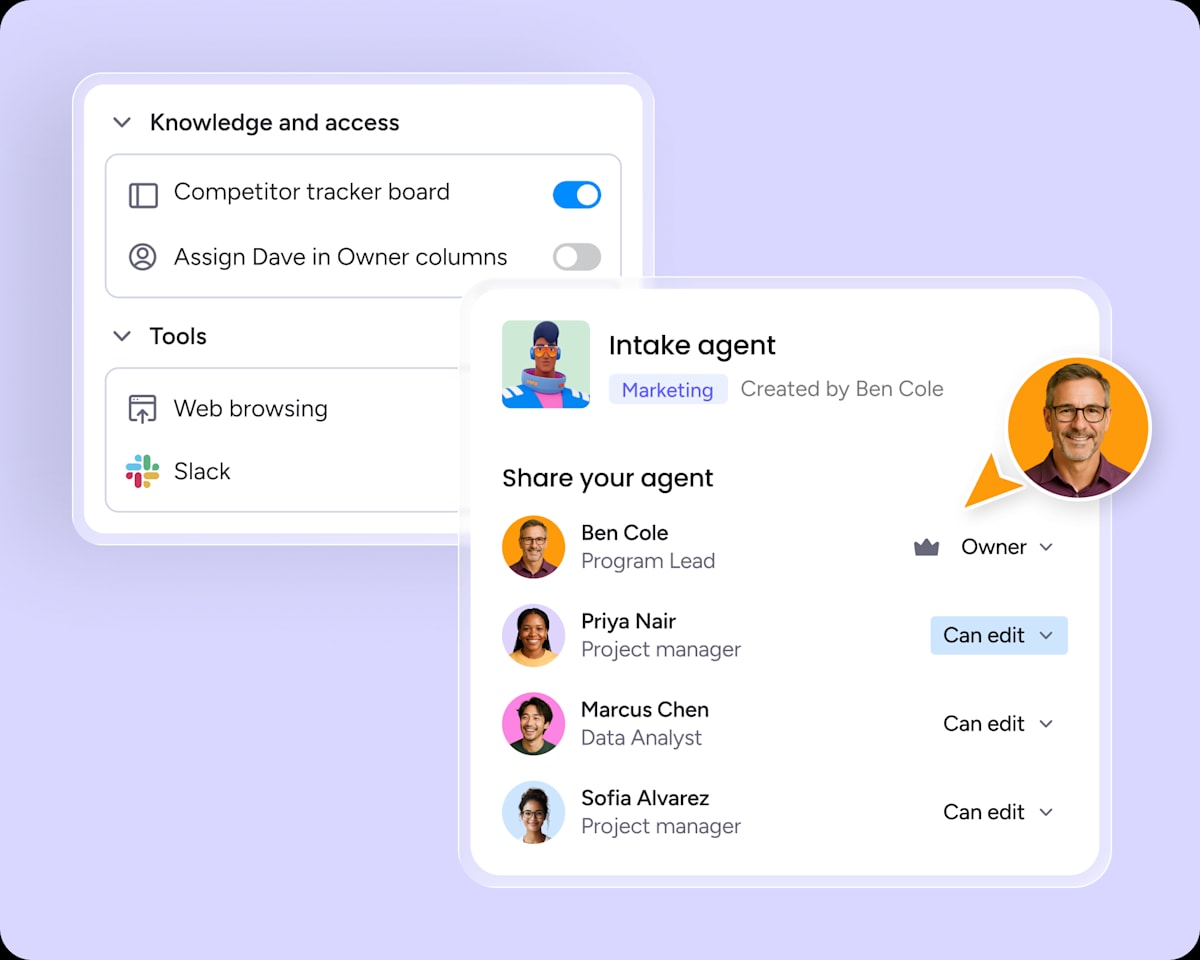
monday.com offers prebuilt agents for departments such as marketing, IT, HR and the PMO, including project intake, project planning, status reporting, risk analysis and portfolio health, plus a builder for custom agents where you define the goal, rules and expected results. The vendor lists governance controls including agent permissions, activity logs, a simulation mode for human review and an AI cost centre that tracks usage by team.
Treat agents as configurable automation, not as autonomous staff. They act within the permissions you give them, every run uses credits, and someone still needs to own and review the process. The Basic plan's agent access is marked "limited" on the pricing page.
AI Blocks, Notetaker and AI Workflows
AI blocks add AI steps to boards, such as categorising requests, extracting information or summarising long text. The Notetaker (from Standard) records meetings and produces summaries and action items, and Pro adds an AI workflow builder. monday.com states that customer data is not used to train AI models; check the AI security documentation if that matters for your organisation.
monday.com Collaboration Features
Each item has an updates thread for comments, @mentions, files and replies, so the conversation stays with the work. Docs can be edited together, boards can be shared with guests (external users who only see the boards they are invited to) from the Standard plan, and all paid plans include unlimited free viewers with read-only access, which is useful for executives and clients who only need to look.
Collaboration is strongest when monday.com becomes the single place where work is discussed. The downside, echoed in Capterra reviews, is notification overload: in an active account, updates, mentions and automation notifications pile up quickly. Agree notification habits early, and use automations to notify the right person rather than everyone.
monday.com Reporting and Analytics
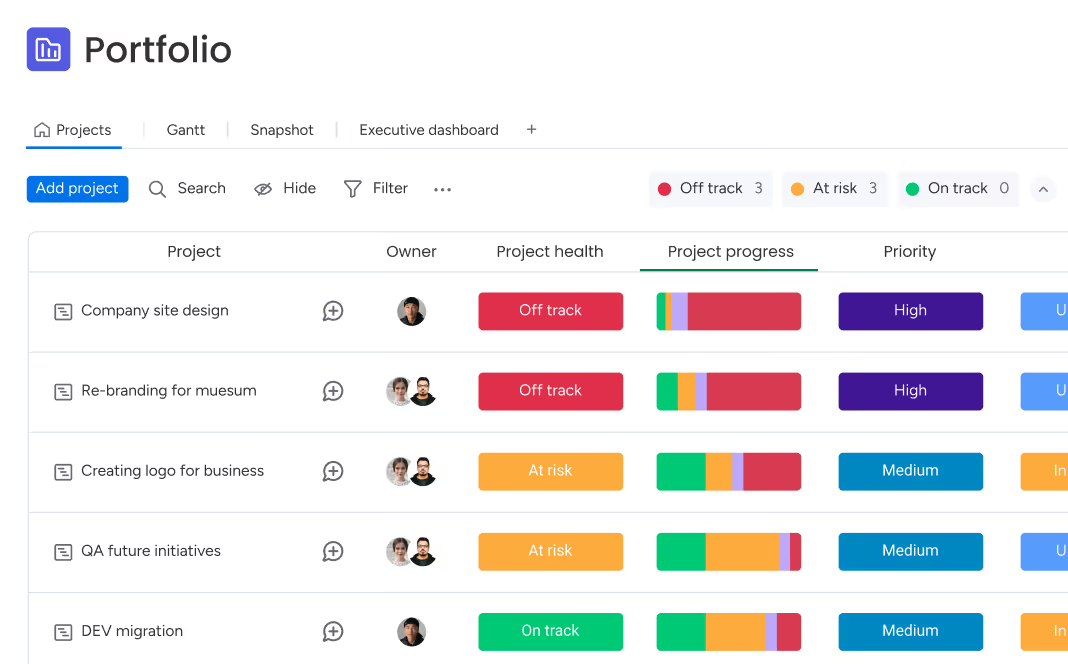
Reporting works at two levels. Board-level reporting uses the chart view and dashboard widgets to show status, workload, totals and progress, and is what most teams use daily. Cross-board and portfolio reporting depends on your plan, because the number of boards a dashboard can combine rises from 1 on Basic to 50 on Enterprise, and full portfolio management is an Enterprise feature.
Capterra reviewers rate monday.com's project tracking highly, but some mention needing workarounds for reporting across many boards. If cross-project reporting is a priority, model your board structure and dashboard needs during the trial, and see our guide to project status reports for what to include.
Portfolio and Resource Management
On Pro, the workload view shows how much work is assigned to each person, so managers can spot who is overloaded and rebalance. Time tracking is also on Pro. monday.com's pricing page lists portfolio management and resource management as Enterprise features, along with multi-level permissions.
For small and mid-sized teams, the Pro workload view is often enough for basic capacity planning. PMOs that need formal resource allocation, portfolio roll-ups and standardised project templates across the organisation will be looking at Enterprise pricing, so ask for a quote early rather than assuming Pro will cover it.
monday.com Integrations
monday.com's integrations page advertises more than 850 integrations and apps, counting its marketplace. Named examples include Slack, Microsoft Teams, Gmail, Outlook, Google Calendar, Zoom, Jira, GitHub, GitLab, Salesforce, HubSpot, Zendesk, Mailchimp, Dropbox, OneDrive, Zapier and Make. Developers can use the API and SDKs, and the monday MCP server lets AI assistants such as Claude, ChatGPT and Copilot work with monday.com data.
Two practical points. First, integration actions are metered in the same way as automations (250 a month on Standard, 25,000 on Pro), so a busy two-way sync can hit the Standard limit fast. Second, some marketplace apps are sold separately by third parties, so check whether an app you need carries its own cost.
monday.com Ease of Use
Getting Started
Ease of adoption is monday.com's best-known advantage. A new user can understand a board in minutes, templates give a working starting point, and the visual design makes status obvious without training. Small teams can be running real work on the first day.
Learning Curve
Basic use is simple; advanced use is not. Building good automations, connecting boards, designing dashboards that span many boards and setting permissions all take thought. G2 reviewers list a learning curve for advanced setups among monday.com's cons, and organisations rolling out across many departments benefit from an administrator who owns board standards. Compared with tools such as Wrike or Jira, though, the curve starts lower.
Performance at Scale
One recurring theme in Capterra's review summaries is slower performance with very large boards and accounts, which about two-thirds of reviewers who mention it describe negatively. Bugs and glitches are another mixed theme. These are not universal experiences, but if you plan to run boards with thousands of items, test a realistic volume during the trial.
monday.com Mobile App
The iOS and Android apps let you view and update items, reply to updates and @mentions, receive notifications, check dashboards and use forms on the move. monday sidekick also has a mobile experience, including voice input, according to the vendor.
Some Capterra reviewers describe the mobile app as weaker than the desktop experience. Treat it as a companion for keeping up with work and making quick updates, and do board design, automation and reporting on desktop.
monday.com Pricing
monday.com's published work management plans are below. Prices are per seat per month, billed annually, and every paid plan has a minimum of 3 seats. monday.com says yearly billing includes an 18% discount compared with monthly billing, and it asks teams of more than 40 users to request a quote.
| Plan | Published price | Key inclusions |
|---|---|---|
| Free | $0 | Up to 2 seats, 3 boards, 3 docs, 200+ templates, 8 column types |
| Basic | $9/seat/month | Unlimited items and free viewers, 1,000 AI credits/month |
| Standard | $12/seat/month | Timeline, Gantt and calendar views, guest access, 250 automation and 250 integration actions/month, 2,000 AI credits |
| Pro | $19/seat/month | Private boards and docs, time tracking, advanced columns, 25,000 automation and 25,000 integration actions/month, 3,000 AI credits |
| Enterprise | Contact sales | Portfolio and resource management, enterprise security and governance, up to 250,000 combined actions/month, custom AI credits |
Pricing checked on monday.com's pricing page on 7 October 2026. monday.com also offers discounted pricing for qualifying nonprofits. Always confirm the current price for your seat count before buying.
Seat Minimums and Buckets
This is the part of monday.com's pricing that most often surprises buyers. According to monday.com's support documentation, paid plans are sold in groups of seats, starting at 3 and then rising in multiples of 5. A team of 4 pays for 5 seats, and a team of 6 pays for 10. On Pro billed annually, that means a six-person team pays for ten seats, or $190 a month instead of $114. Free viewers do not use a seat, but anyone who edits does.
monday.com Free Plan
The Free plan costs $0 for up to 2 seats, with up to 3 boards and 3 docs, 200+ templates and 8 column types, plus the mobile apps. It is fine for an individual or a pair trying the product, but it has no timeline or Gantt view, no automations and only single-board dashboards, so it is not a realistic long-term option for a team.
monday.com Basic Plan
At $9 per seat/month billed annually, Basic removes the item and board limits, adds unlimited free viewers and includes 1,000 AI credits a month. It works for simple task tracking, but without timeline, Gantt, guests or automations it is light for project management.
monday.com Standard Plan
At $12 per seat/month billed annually, Standard adds timeline, Gantt and calendar views, guest access, automations and integrations (250 actions a month each), dashboards that combine up to 5 boards and 2,000 AI credits. It is the entry point for real project work, but the action limits are tight for busy teams.
monday.com Pro Plan
At $19 per seat/month billed annually, Pro adds private boards and docs, time tracking, formula and other advanced columns, the workload and chart views, 25,000 automation and integration actions a month, dashboards combining up to 20 boards and 3,000 AI credits. monday.com labels it the most popular plan, and for most teams managing several projects it is the plan to evaluate.
monday.com Enterprise Plan
Enterprise is quote-based and adds portfolio and resource management, enterprise-grade security and governance (such as SAML single sign-on, SCIM, audit logs and IP restrictions, per monday.com's plan documentation), multi-level permissions, dashboards combining up to 50 boards, custom AI credits, 24/7 enterprise support and a 99.9% uptime SLA. It is aimed at large organisations and PMOs, and requires at least a 12-month term.
monday.com Free Trial
New sign-ups get a 14-day trial of the Pro plan, and monday.com says no credit card is needed. Its support documentation states that trials cannot be extended; at the end you choose a paid plan or drop to Free. Use the two weeks to rebuild one real workflow, including the automations and dashboards you would rely on, with the people who will use it.
monday.com Pros and Cons
Pros
- Very easy to learn and adopt, even for non-technical teams
- Flexible boards that fit almost any workflow
- Clear, colourful interface that makes status obvious
- Strong dashboards, with cross-board views on higher plans
- Useful automation recipes and WorkForms intake
- Large integration library, API and MCP access
- Unlimited free viewers on paid plans
- Over 200 templates for a fast start
Cons
- Seats sold in buckets with a 3-seat minimum
- Automation and integration actions capped by plan
- Time tracking, workload and private boards need Pro
- Portfolio and resource management only on Enterprise
- AI usage metered through monthly credits
- Can slow down with very large boards
- Mobile app less capable than desktop
- Boards can sprawl without governance
This balance matches what users report: people value monday.com's ease of use, flexibility and visibility, while pricing structure, plan limits and performance at scale are the most common complaints.
What Do monday.com Customers Say?
- Features: 4.5/5
- Customer service: 4.4/5
- Value for money: 4.3/5
What G2 reviewers like most
- Ease of use
- Team collaboration features
- Easy project management
Most common G2 complaints
- Missing features
- Learning curve for advanced setups
- Some features limited to higher plans
Ratings and review themes as published on G2 and Capterra on 5 October 2026; summarised in our own words. Visit the links above for full, verified user reviews.
On Capterra, monday.com is rated 4.6/5 from 6,120 reviews, with published sub-scores of 4.5 for features, 4.3 for value for money and 4.4 for customer service (checked 7 October 2026). On G2, it is rated 4.7/5 from 17,248 reviews (checked 5 October 2026). The themes below summarise these third-party reviews in our own words, not monday.com's testimonials.
Positive themes. Reviewers most often praise project and task tracking, dashboards and visibility, how customisable the boards and workflows are, how easily non-technical colleagues adopt it, and the automations and integrations. In Capterra's topic summaries, project tracking tools (about 96% positive), customisable workflow management (about 96% positive) and platform adaptability (about 94% positive) stand out.
Negative themes. The most common complaint is pricing: Capterra groups 913 reviews under a high and complex pricing structure, about 54% of them negative, with seat minimums and features locked to higher tiers mentioned often. Other themes are bugs and glitches (about 53% negative), sluggish performance at scale (about 67% negative), a weaker mobile app, notification overload and workarounds for cross-board reporting.
When reading reviews yourself, check whether a review was invited or incentivised by the vendor. Both Capterra and G2 label these. Read the critical reviews from companies of a similar size to yours, not just the five-star ones.
monday.com Customer Support
monday.com provides a help centre with detailed articles and tutorials, a community forum, and support that the vendor describes as available 24/7. Enterprise accounts get 24/7 enterprise support and, depending on account size, tailored onboarding, implementation help and account management.
Capterra's customer service sub-score of 4.4/5 suggests most reviewers are satisfied, although individual experiences vary. For large deployments, confirm during the sales process exactly which onboarding and support your plan includes.
monday.com Security
monday.com's trust centre lists SOC 1 Type II, SOC 2 Type II and SOC 3 reports, ISO/IEC 27001, 27017, 27018, 27032 and 27701 certifications, CSA STAR and TX-RAMP. It also describes GDPR and UK GDPR, CCPA and other privacy programmes, and a HIPAA Business Associate Agreement (an agreement rather than a certification, available on Enterprise).
Access controls grow with the plan. Pro adds private boards and docs, board and column permissions and Google sign-in; Enterprise adds SAML single sign-on (Okta, OneLogin or custom SAML), SCIM provisioning, an audit log, IP restrictions, closed workspaces and granular permissions. Confirm current certifications, their scope and data residency options in monday.com's trust documentation as part of procurement. If you use AI agents, review the permissions each agent is given, as you would for a new team member. Permissions and governance on your side matter as much as the vendor's certificates.
monday.com for Different Types of Teams
monday.com for Marketing and Creative Teams
Marketing is one of monday.com's strongest fits: campaign boards, content calendars, WorkForms for creative requests, approvals through statuses and automations, and dashboards for campaign progress. Its visual style suits teams that do not want a heavy project management tool.
monday.com for Agencies
Agencies can run a workspace per client, share boards with clients as guests or viewers, and track deliverables and deadlines on dashboards. Time tracking on Pro supports billing, but resource management across clients is an Enterprise feature.
monday.com for Operations and HR Teams
Operations and HR teams use boards for repeatable processes such as onboarding, procurement and facilities requests, combining forms, automations and checklists. This is where monday.com's flexibility shines.
monday.com for PMOs and Project Managers
Project managers get Gantt charts, dependencies, milestones, workload views and dashboards on Pro, while full portfolio and resource management needs Enterprise. A PMO that wants standardised templates and portfolio roll-ups can do it in monday.com, but should compare Enterprise pricing and depth with dedicated portfolio tools. Our guide to managing multiple projects covers the practices behind it.
monday.com for Software Teams
Software teams can use work management boards for simple sprints, but monday.com sells a separate product, monday dev, for sprints, roadmaps and bug tracking. Teams that need deep Scrum tooling should compare monday dev with Jira.
monday.com for Small Businesses
monday.com is easy enough for any small business to adopt, but the economics need checking. With a 3-seat minimum and seat buckets, a team of 4 or 6 pays for unused seats, and useful features such as automations and Gantt start on Standard. Small teams with simple needs may get better value from cheaper or flat-priced tools.
Who Should Use monday.com?
Great for
- Non-technical teams that need fast adoption
- Marketing, operations and agencies with varied workflows
- Teams that value visual dashboards
Look elsewhere if
- Teams needing advanced scheduling with critical path and baselines on a budget
- Very cost-sensitive small teams
monday.com Feature Checklist
| Feature | monday.com |
|---|---|
| Free plan | ✓ Yes |
| Gantt / timeline | ✓ Yes |
| Kanban boards | ✓ Yes |
| Time tracking | ✓ Yes |
| Resource & workload management | ◐ Partial |
| Portfolio management | ✓ Yes |
| Docs & wiki | ✓ Yes |
| Automations | ✓ Yes |
| Agile / sprint tools | ◐ Partial |
| Proofing & approvals | ◐ Partial |
| Built-in AI | ✓ Yes |
| Guest / client access | ✓ Yes |
| Flat (non per-user) pricing | ✕ No |
monday.com Alternatives and Comparisons
monday.com fits teams of almost any size, from small teams getting started to large organisations running many projects at once. It is one of the easiest tools to adopt, even for beginners: colourful boards, ready-made templates and no-code automations make it quick to get going, with dashboards and portfolio views available as you grow. If you would like to see how it stacks up, we compare monday.com with Asana, ClickUp, Wrike, Smartsheet and others on pricing, features and use cases on dedicated pages:
- Wrike: choose it for deeper resource, portfolio and approval features. Compare monday.com vs Wrike.
- Asana: choose it for simpler task-first collaboration. Compare monday.com vs Asana.
- ClickUp: choose it for more features per dollar. Compare monday.com vs ClickUp.
- Trello: choose it for a simpler, cheaper Kanban board. Compare monday.com vs Trello.
- Smartsheet: choose it for spreadsheet-style planning. Compare monday.com vs Smartsheet.
See all monday.com alternatives
monday.com comparisons
Is monday.com Worth It?
monday.com is likely worth it if you:
- Need a tool that non-technical colleagues will actually use.
- Run varied workflows across several departments.
- Want visual boards and dashboards that make status obvious.
- Need structured request intake and automated handoffs.
- Have a team size that fits the seat buckets well (3, 5, 10, 15 and so on).
- Are prepared to pay for Pro to get time tracking, workload and serious automation.
It may not be worth it if:
- You are a team of one or two who has outgrown the Free plan.
- Your headcount falls awkwardly between seat buckets and budget is tight.
- You need advanced scheduling, resource levelling or portfolio control without Enterprise pricing.
- Your software team needs deep Scrum tooling in the core product.
- You expect heavy AI use but do not want usage-based costs.
Our verdict: monday.com's ease of use and flexibility are its biggest advantages, and they are why it ranks second in our project management software review. Its pricing structure and plan limits are its biggest drawbacks, so the real question is not whether monday.com is good but whether the plan you need is good value for your team size. Use the Pro trial on a real workflow, and read our guide on how to choose project management software before you commit.
Frequently asked questions
Is monday.com good for project management?
Yes, for most teams. monday.com offers boards, Kanban, timeline and Gantt views, dependencies, dashboards, automations and request forms, and it is rated 4.6/5 on Capterra. It is easier to adopt than most rivals. The limits are that time tracking and workload need Pro, and portfolio and resource management need Enterprise.
Is monday.com free?
Yes. monday.com has a Free plan at $0 for up to 2 seats, with up to 3 boards and 3 docs, 200+ templates and the mobile apps. It has no timeline or Gantt view and no automations, so it suits individuals or pairs trying the product rather than growing teams.
How much does monday.com cost?
monday.com costs $0 on Free, $9 per seat/month on Basic, $12 on Standard and $19 on Pro, billed annually, with Enterprise priced on request. Paid plans start at 3 seats, and monthly billing costs more than annual, according to monday.com (checked 7 October 2026).
Why does monday.com have a 3-seat minimum?
monday.com sells paid plans in seat groups that start at 3 seats and then rise in multiples of 5. That means a team of 4 pays for 5 seats and a team of 6 pays for 10. Free viewers do not count as seats, but everyone who edits does.
Does monday.com have a free trial?
Yes. New sign-ups get a 14-day trial of the Pro plan, and monday.com says no credit card is needed. Trials cannot be extended; afterwards you choose a paid plan or move to the Free plan.
Is monday.com easy to use?
Yes, for everyday work it is one of the easiest work management tools to learn, with a clear visual interface and many templates. Advanced setups, such as connected boards, cross-board dashboards, complex automations and permissions, take more planning and benefit from an administrator.
Does monday.com have Gantt charts?
Yes. Timeline and Gantt views are included from the Standard plan, with dependencies and drag-and-drop rescheduling. According to monday.com's plan documentation, milestones and the critical path are added on Pro.
Does monday.com have time tracking?
Yes, but only on the Pro and Enterprise plans. The time tracking column records time against items and can feed dashboards, which is useful for agencies and teams comparing estimates with actual effort.
Does monday.com have AI?
Yes. Paid plans include monday sidekick (an AI assistant), AI agents, AI blocks and, from Standard, the Notetaker. AI use draws on a shared monthly credit pool: at least 1,000 credits on Basic, 2,000 on Standard and 3,000 on Pro, with custom amounts on Enterprise and extra credits available to buy.
Is monday.com better than Asana?
Neither is universally better. monday.com is more visual and flexible for building custom workflows; Asana is more task-focused, with strong goals and cross-team coordination. See our monday.com vs Asana comparison.
Is monday.com better than Wrike?
It depends on the use case. monday.com is usually easier to adopt and more visual; Wrike offers more project management depth, resource control and reporting for complex, multi-project work. See our Wrike vs monday.com comparison.
Does monday.com integrate with Slack and Microsoft Teams?
Yes. monday.com integrates with Slack and Microsoft Teams, along with Gmail, Outlook, Zoom, Jira, GitHub, Salesforce, HubSpot, Zapier and many others. Integration actions are counted against a monthly limit that depends on your plan.
Is monday.com secure?
monday.com's trust centre lists SOC 1, SOC 2 and SOC 3 reports and several ISO/IEC certifications, including 27001 and 27701, plus GDPR and HIPAA BAA programmes. Advanced controls such as SAML single sign-on, SCIM, audit logs and IP restrictions are on the Enterprise plan.
Is monday.com good for small businesses?
It can be. It is easy to adopt and very flexible, but the 3-seat minimum and seat buckets mean small teams often pay for unused seats, and automations and Gantt charts start on Standard. Compare the real cost for your exact headcount with simpler or flat-priced tools.
What are the main disadvantages of monday.com?
The main disadvantages are seat-bucket pricing with a 3-seat minimum, monthly caps on automation and integration actions, metered AI credits, key features such as time tracking and workload on Pro, portfolio and resource management on Enterprise, and slower performance reported on very large boards.
Product screenshots are © monday.com Ltd. and shown for the purpose of review, with links to their source pages.