Project management tools · #6 of 10 · Best for software and Agile teams
Jira Review 2026: Is It Worth It?
Jira is Atlassian's work management and issue-tracking platform, and for many software organisations it is simply where development work lives: backlogs, sprints, boards, bugs, releases and the links between code and tasks. It now also includes business templates for non-technical teams. Its biggest strength is the depth of its Agile tooling, workflows and query language; the same depth means it needs an administrator, takes time to learn and can feel heavy to casual users. This review covers features, Scrum and Kanban support, JQL, Rovo AI, integrations, pricing, ease of use, reporting and overall value.
.png?cdnVersion=3706)
Jira review: quick verdict
| Best for | Software development, IT and product teams running Scrum or Kanban, especially those already using Confluence, Bitbucket or GitHub |
| Less suitable for | Marketing, creative or business teams that want a simple, visual tool with little setup, and teams with nobody to administer it |
| Our overall score | 8.6/10, ranked #6 in our top 10 project management tools |
| Price | Free for up to 10 users; Standard from about $7.91 and Premium about $14.54 per user/month (monthly billing, small teams, falling with team size); Enterprise on quote |
| Free trial | Yes, for Standard and Premium; no credit card needed to start |
| Capterra rating | 4.4/5 from 15,493 reviews (checked 7 October 2026) |
| G2 rating | 4.3/5 from 7,988 reviews (checked 5 October 2026) |
Jira is the most complete Agile tool for software teams that we review: backlogs, sprints, boards, configurable workflows, JQL and deep developer integrations are all mature, and the free plan is genuinely usable for up to 10 people. The trade-offs are just as clear: it needs someone to design and maintain its configuration, the learning curve is steep, users regularly complain about clutter and slowness on large sites, and advanced planning, the stronger AI allowances and some security controls sit on higher plans or paid add-ons. For company-wide work management beyond engineering, easier tools often get better adoption.
Our scores
Scores use our standard review methodology, the same for every tool we review.
What Is Jira?
Jira is cloud-based software for planning, tracking and releasing work. It started in 2002 as a bug and issue tracker and grew into the default Agile tool for many software organisations. In 2024 Atlassian folded Jira Work Management into Jira, so the same product now offers templates and views for business teams as well as software teams.
Teams use Jira to manage:
- Backlogs and sprints for Scrum teams, and continuous-flow boards for Kanban teams
- Bugs and technical work, with a full history of who changed what
- Feature delivery and releases, linked to branches, commits, pull requests and deployments
- IT and platform work, such as infrastructure changes and internal requests
- Business requests, collected through forms and tracked in list, calendar or board views
- Cross-team planning, using timelines and, on higher plans, multi-team plans with dependencies
The same work can be viewed as a board, backlog, list, timeline, calendar or summary page. Jira Cloud is Atlassian's main product; the self-managed Data Center edition is being retired, with Atlassian giving an end-of-life date of 28 March 2029. Jira Service Management (for service desks), Jira Product Discovery (for product ideas) and Confluence (for documentation) are separate products that work closely with Jira.
Who Owns Jira?
Jira is made by Atlassian, which Mike Cannon-Brookes and Scott Farquhar founded in Sydney in 2002, the same year Jira launched. Atlassian is listed on the Nasdaq stock exchange, and Cannon-Brookes has been sole CEO since Farquhar stepped down as co-CEO in 2024. Its other products include Confluence, Trello, Bitbucket, Loom and Jira Service Management.
For buyers, the practical point is that Jira is a mature product backed by a large public company with a big partner network and app marketplace, so long-term availability is not a realistic concern. The more relevant question is how Atlassian's cloud-first strategy and plan packaging affect your costs.
How Does Jira Work?
Jira's structure looks complicated at first, but the core building blocks are consistent:
- A site is your organisation's Jira instance (for example yourcompany.atlassian.net).
- Spaces (until 2025 called projects) hold the work for a team or product. They are either team-managed, which a team can configure for itself, or company-managed, which administrators configure and share across teams.
- Work items (previously called issues) are the units of work: epics, stories, tasks, bugs and subtasks, each with an assignee, status, priority and fields.
- Workflows define the statuses a work item moves through and the transitions between them.
- Boards and views show work as a Scrum or Kanban board, backlog, list, timeline or calendar.
- Filters written in JQL (Jira Query Language) select work items, and they feed boards, dashboards and reports.
A typical software workflow looks like this:
Idea or bug logged → backlog refined and estimated → sprint planned → work moves across the board → code linked → release shipped → sprint reviewed and reported
For example, a product team keeps its product backlog in Jira, refines and estimates the top items, then drags them into a two-week sprint. Developers move work items from To do to In progress to Done, branches and pull requests appear on each item, and at the end of the sprint the burndown and velocity reports feed the sprint retrospective.
Jira Key Features
Scrum Boards and Backlogs
.png?cdnVersion=3706)
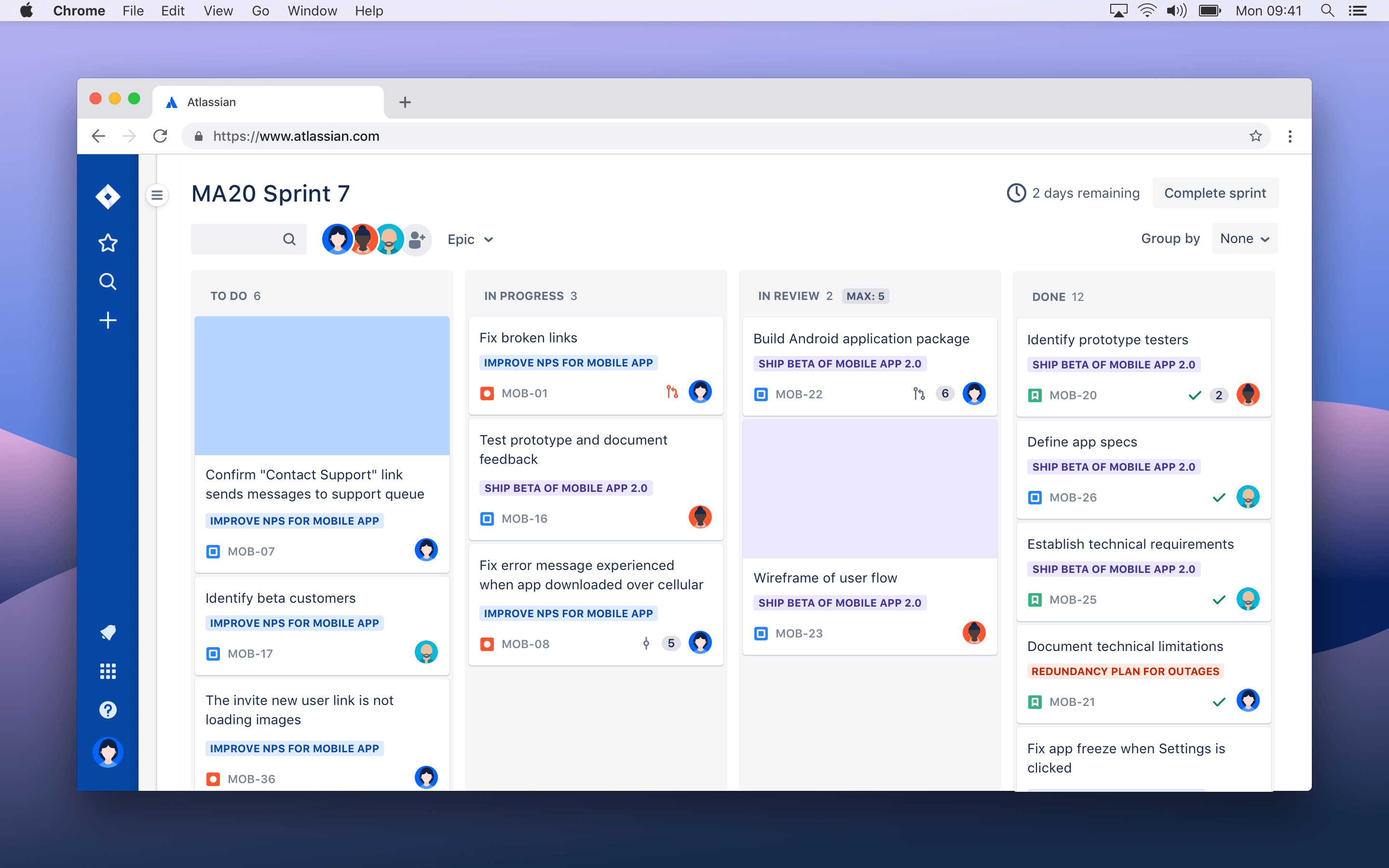
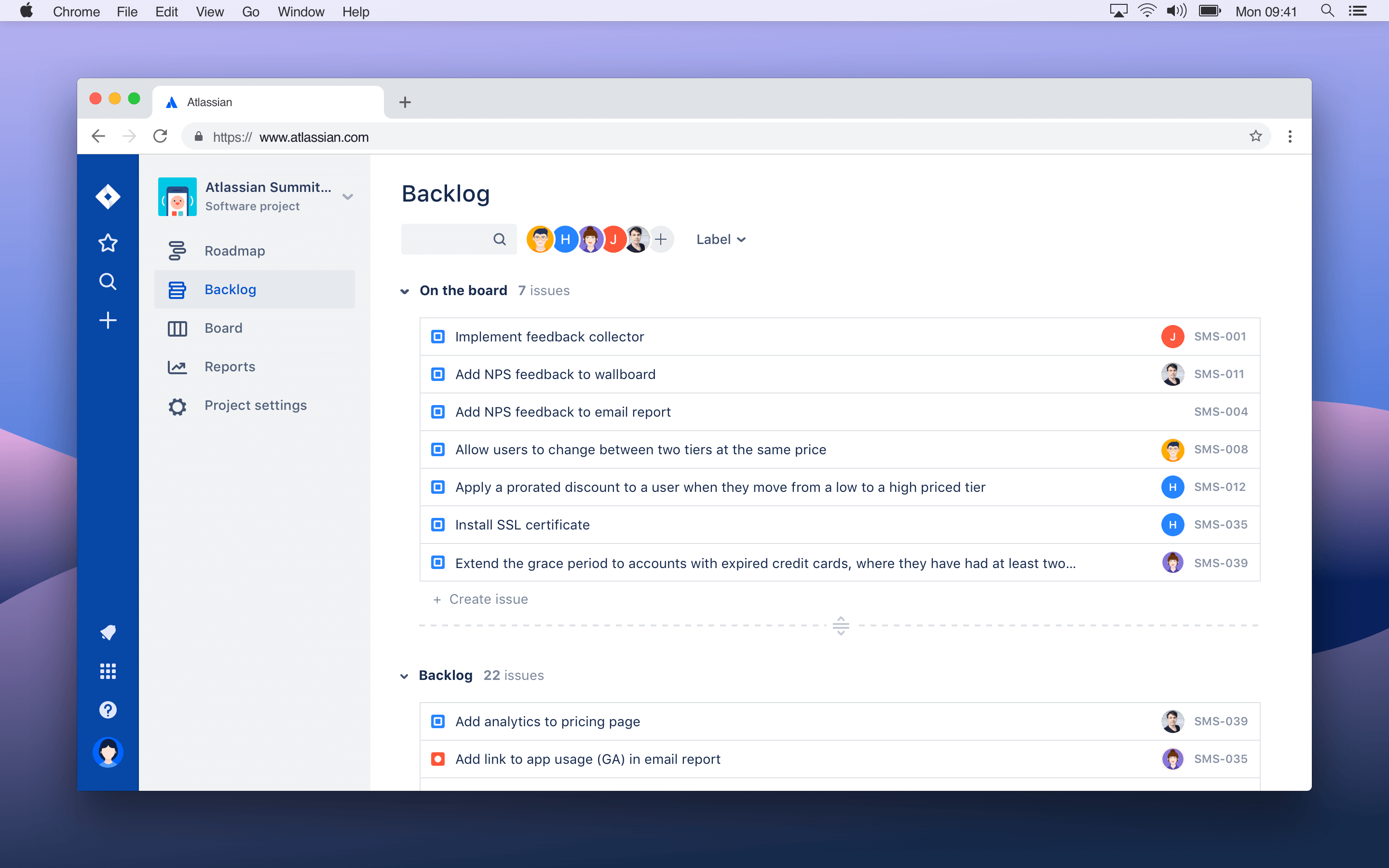
Scrum is where Jira is strongest. The backlog lets product owners rank work items, group them into epics and estimate them with story points. Sprint planning happens by dragging work into a sprint, setting a goal and starting it; at the end, unfinished work can roll into the next sprint or back to the backlog. The Scrum board then shows the sprint's progress column by column.
These features are on every plan, including Free. For a team that runs Scrum by the book, Jira's model maps closely to the Scrum Guide's events and artefacts, which is one reason it remains the default choice for software teams.
Kanban Boards
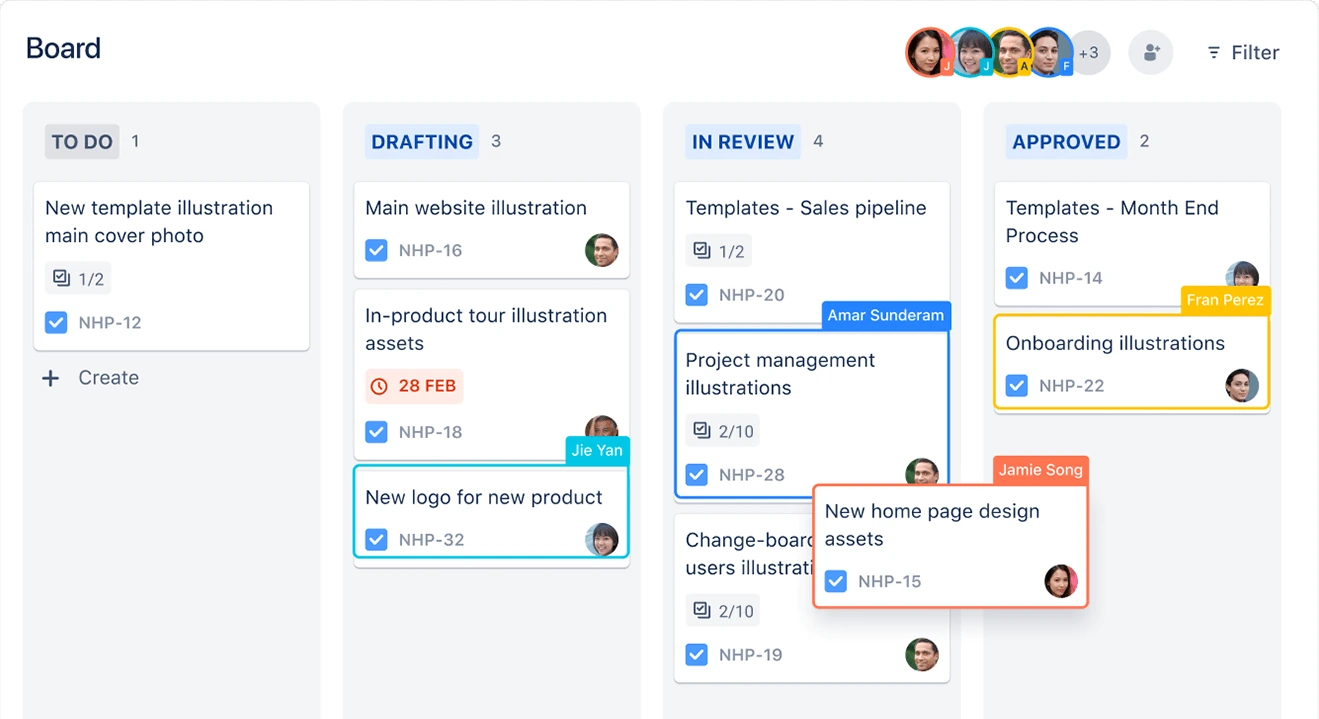
Kanban boards show continuous flow rather than time-boxed sprints. Columns map to workflow statuses, and teams can add WIP limits, swimlanes by assignee, epic or priority, and quick filters. Many support, platform and operations teams prefer Kanban in Jira because work arrives unpredictably.
Work Items, Issue Types and Custom Fields
Jira's work item hierarchy runs from epics down to stories, tasks, bugs and subtasks, and administrators can add further levels above epics, such as initiatives. Each type can have its own fields, screens and workflow, and administrators can add custom fields such as customer, component, severity or environment. This flexibility is what lets one Jira site serve very different teams, but it is also where configurations become messy over time. Our guide to epics vs stories vs tasks explains how to use the levels sensibly.
Custom Workflows
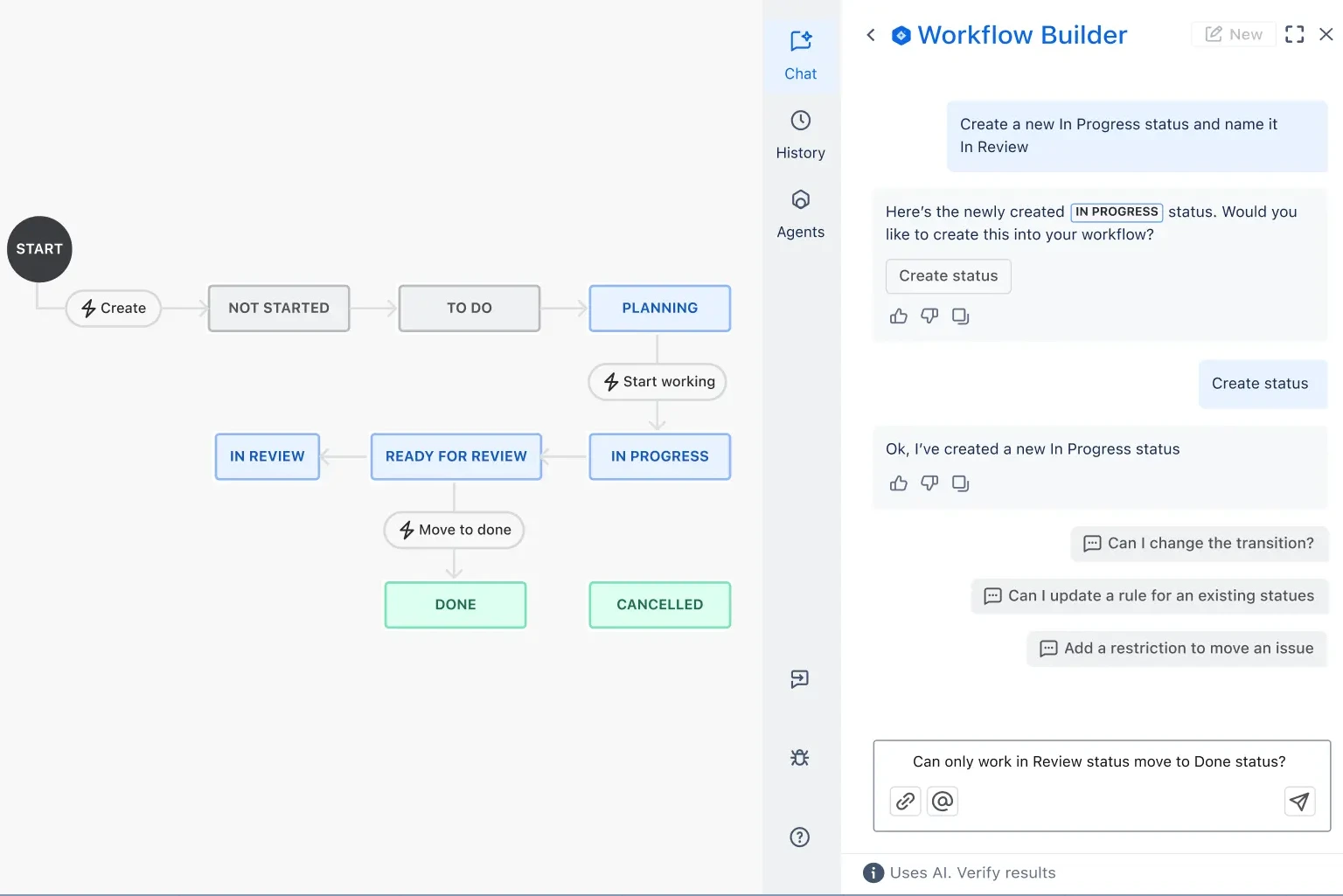
Workflows define statuses (for example To do, In progress, In review, Testing, Done) and the transitions between them. In company-managed spaces administrators can add conditions, validators and post-functions, such as requiring a resolution before closing a bug or limiting who can approve a release. Team-managed spaces offer a simpler editor that teams can change themselves.
This is one of Jira's major strengths and one of its main costs. Well-designed workflows enforce your process; overgrown ones, with dozens of statuses and schemes, are a common reason teams find Jira frustrating. Our Agile workflow guide covers principles that keep them lean.
JQL and Filters
JQL (Jira Query Language) is Jira's search language, for example finding all open bugs in a space assigned to your team that were created in the last 14 days. Saved JQL filters drive boards, dashboards, reports, automation rules and subscriptions, so anyone fluent in JQL can answer almost any question about the work.
JQL is powerful but technical, which is why Atlassian now offers natural-language search through Rovo: you describe what you want in plain English and Rovo converts it into a JQL query, and a JQL error fixer corrects typos and syntax errors. Non-technical users still tend to rely on saved filters built by someone else.
Timeline and Plans
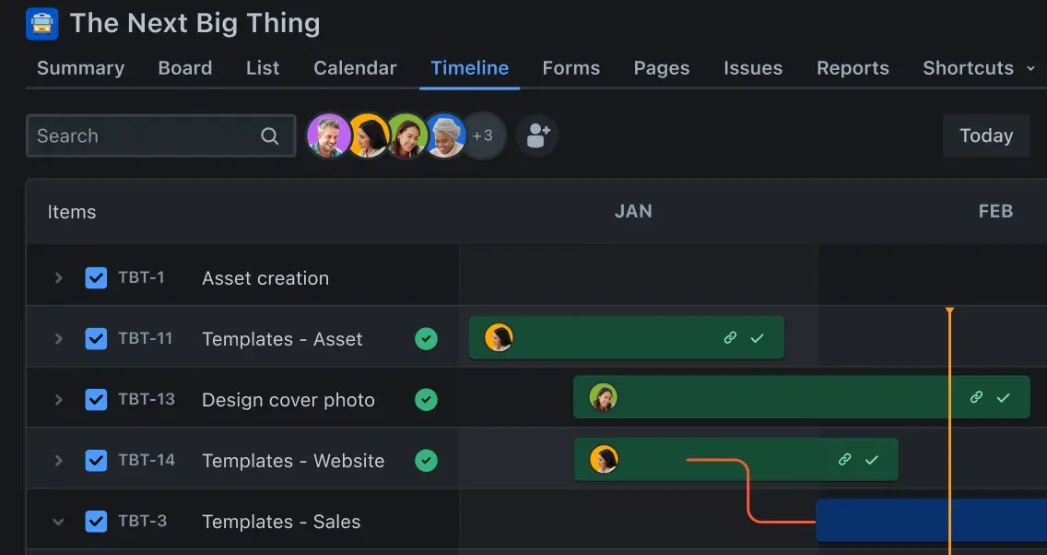
Every plan includes a timeline view that shows epics and their child work on a calendar, with basic dependencies, which is useful for an Agile roadmap of one team. Premium and Enterprise add advanced planning, called Plans (previously Advanced Roadmaps), which spans multiple spaces and teams, maps cross-team dependencies, compares capacity with scheduled work and lets you model scenarios before committing changes.
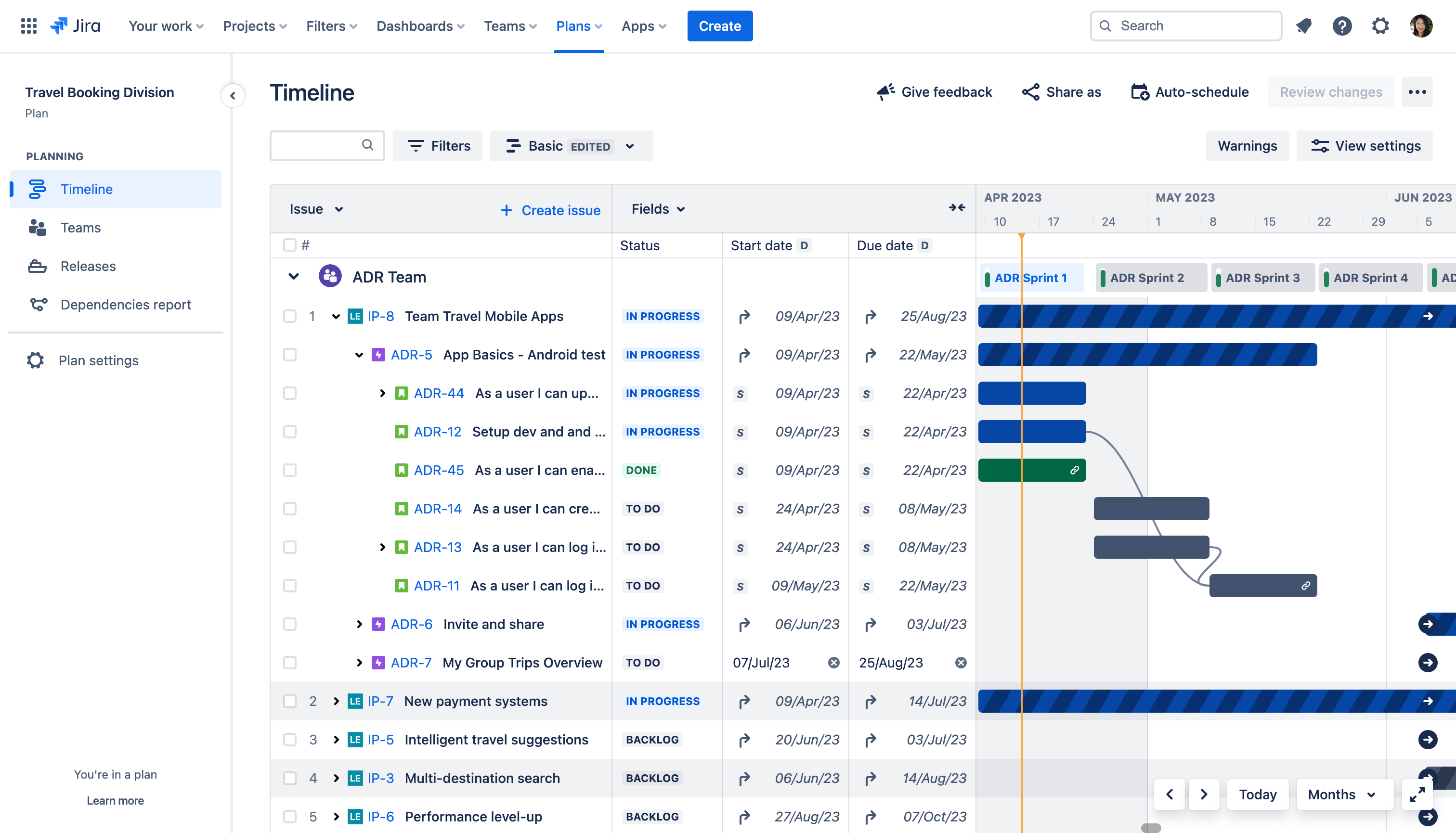
This matters for organisations running release planning or PI planning across several teams. Jira does not offer a classic Gantt chart with critical path and baselines, so plan-driven projects with fixed dates are better served by tools built around Gantt charts.
Release Management
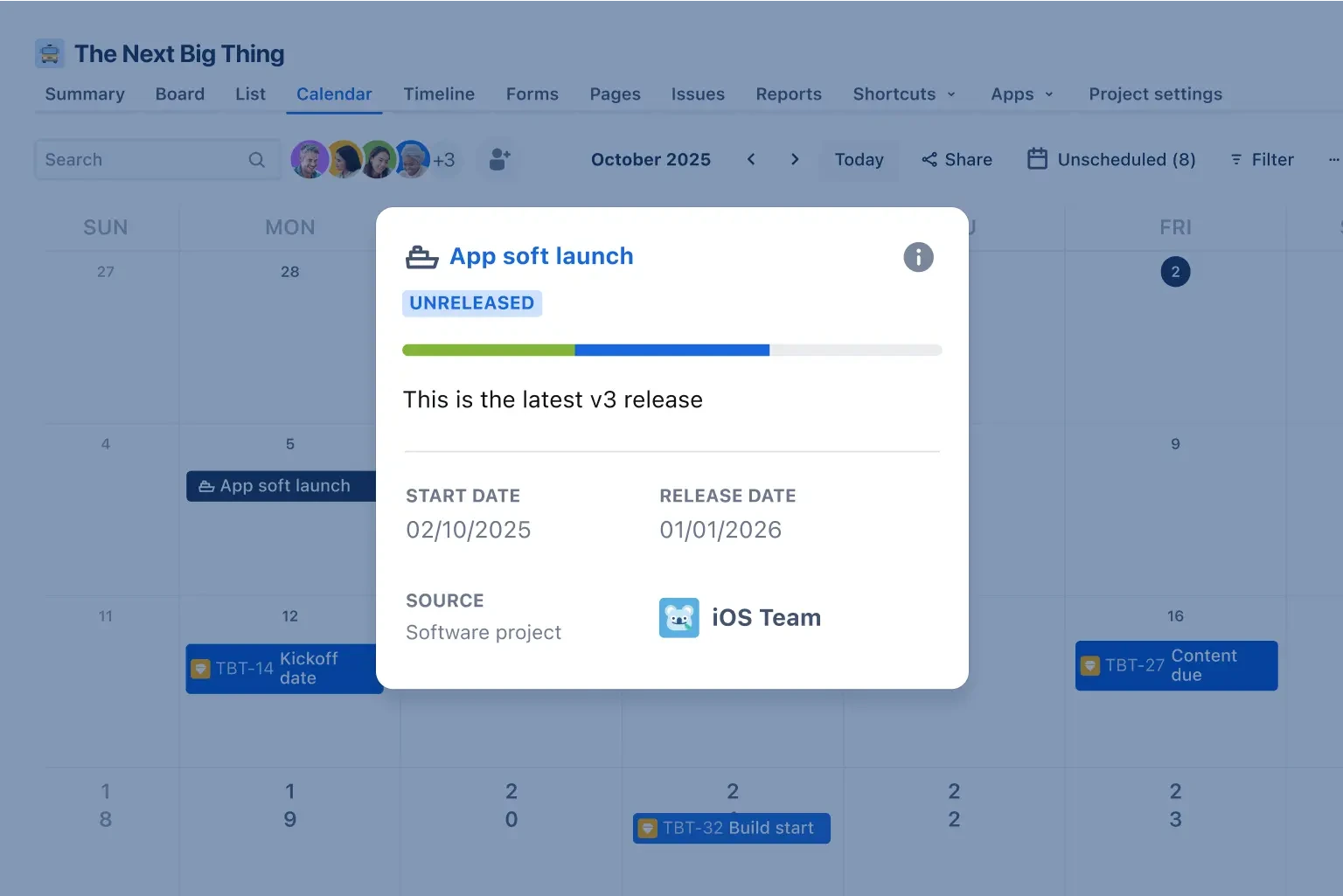
Versions group the work items that ship together. The releases view shows progress for each version, which items are still open, and, when connected to development tools, related commits, builds and deployments. For teams practising continuous delivery, the deployment tracking is more useful than the version list itself.
Forms and Business Templates
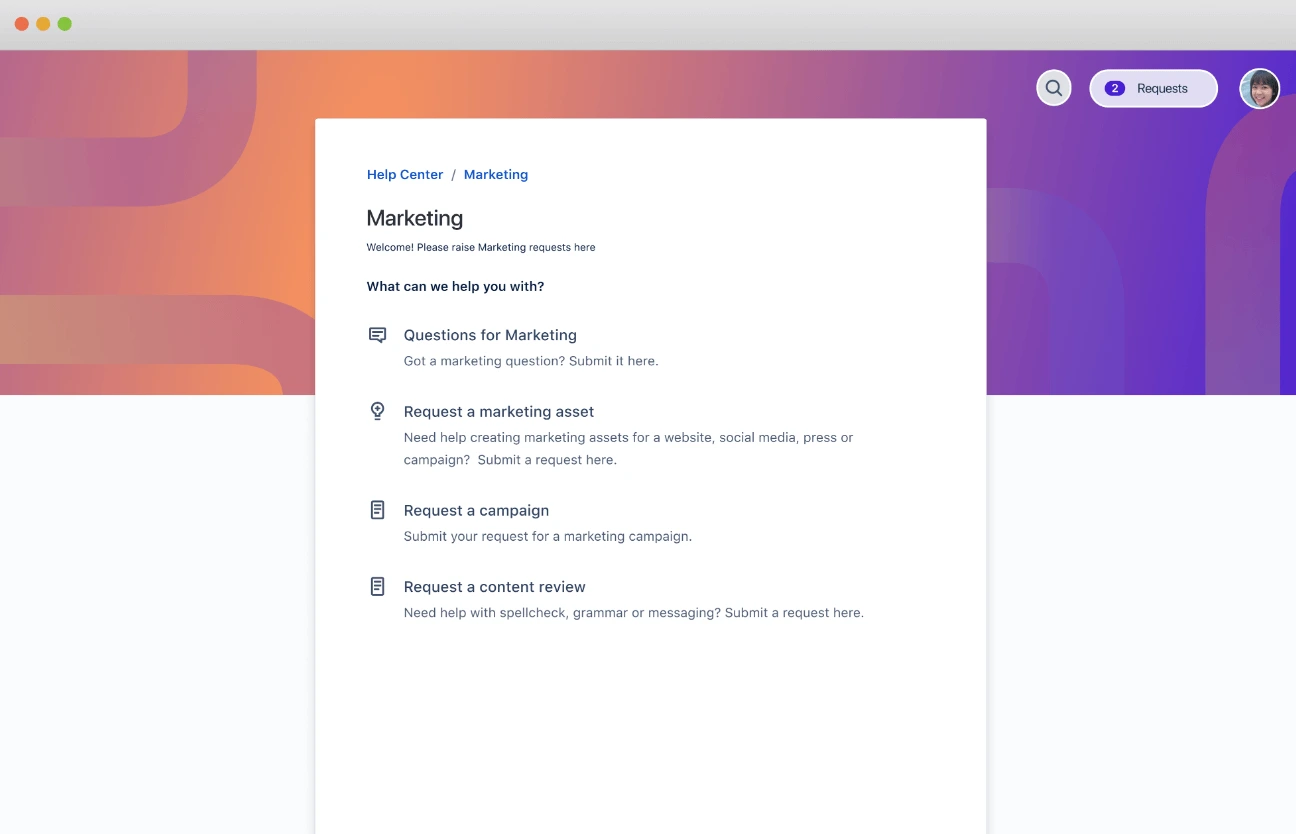
Forms let anyone submit a request that becomes a work item with the right fields filled in, which helps business teams such as marketing, HR or legal take in work without email threads. Business spaces add list and calendar views and templates for campaigns, approvals and similar processes. These are capable, but they sit inside a product still shaped around software terminology, which is why business users often find Jira less natural than tools designed for them. Our free work request template covers the same idea without software.
Jira Automation
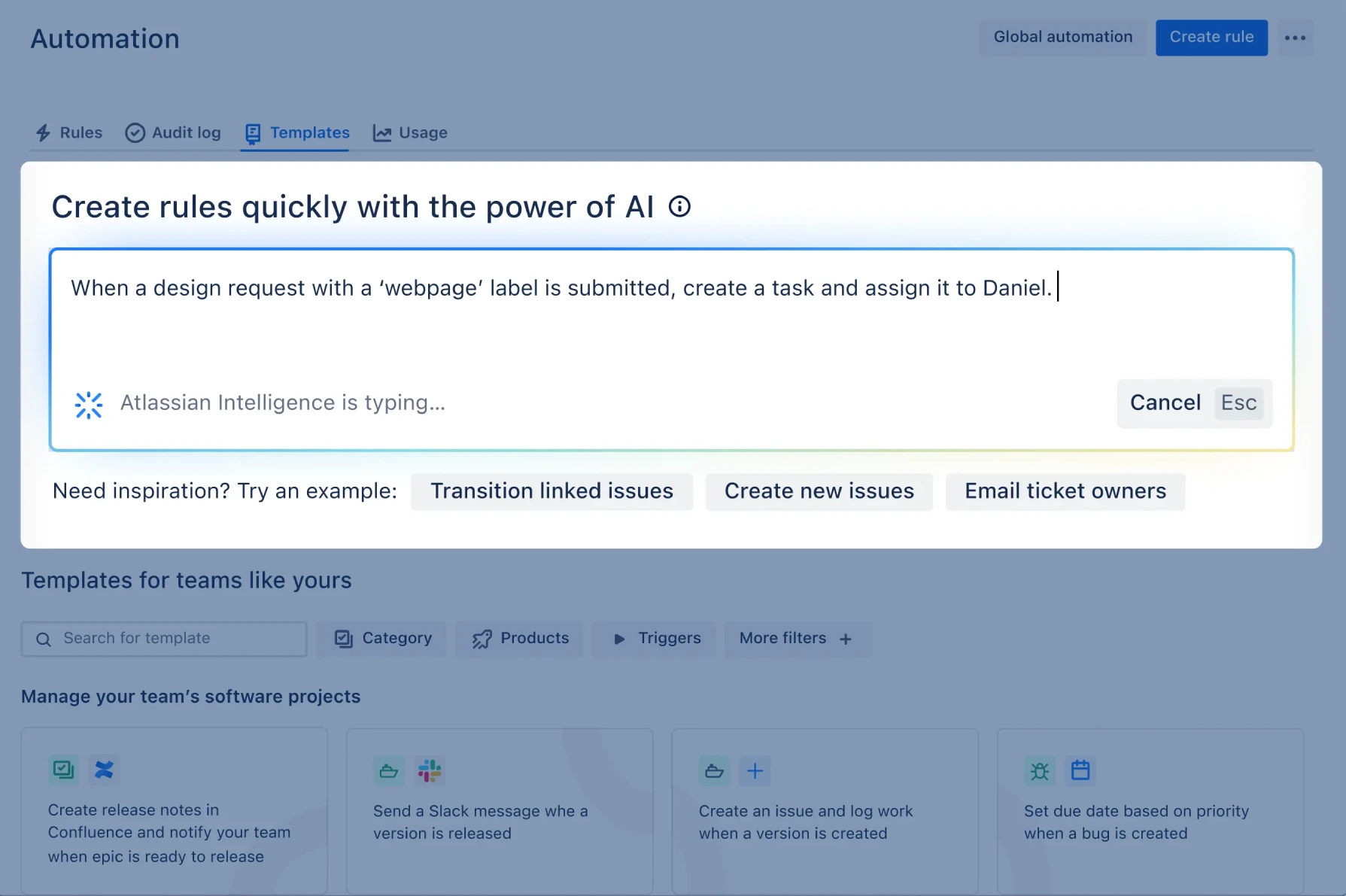
Jira Automation uses no-code rules made of a trigger, conditions and actions: when a pull request is merged, move the work item to Done; when a bug is marked critical, assign it and alert a channel; when all subtasks are done, close the parent. Atlassian provides a library of rule templates, and with Rovo you can describe a rule in plain language and have it drafted for you.
Automation is included on every plan, but usage allowances differ: Free has a small allowance, and paid plans scale with the number of users, rising on Premium and Enterprise. Teams with many cross-space rules should check the allowance in Atlassian's plan comparison before choosing a tier.
Jira AI Features
Atlassian's AI is branded Rovo. According to Atlassian, Rovo is available and switched on automatically for Standard, Premium and Enterprise Cloud plans; it is not listed for the Free plan. Usage is measured in AI credits: Atlassian's Rovo pricing page lists 25 credits per user per month on Standard, 70 on Premium and 150 on Enterprise, shared across Jira and Confluence. Administrators can switch AI features off.
Natural-Language Search and JQL Help
Rovo can turn a plain-language request, such as "bugs assigned to my team that are overdue", into a JQL query, and it can fix broken JQL. It can also write formulas for custom fields (in beta). For teams where only a few people know JQL, this lowers the barrier to self-service reporting.
Writing, Summaries and Work Breakdown
Atlassian's documentation lists AI features for drafting and improving work item descriptions, summarising long comment threads, producing a summary card of a work item's status and next steps, suggesting child work items from a parent epic, predicting field values as you type, detecting likely duplicates and linking similar work items. It can also create work items from Slack or Microsoft Teams conversations and suggest related Confluence pages. These are practical time-savers in day-to-day backlog work rather than headline features.
Rovo Chat, Search and Agents
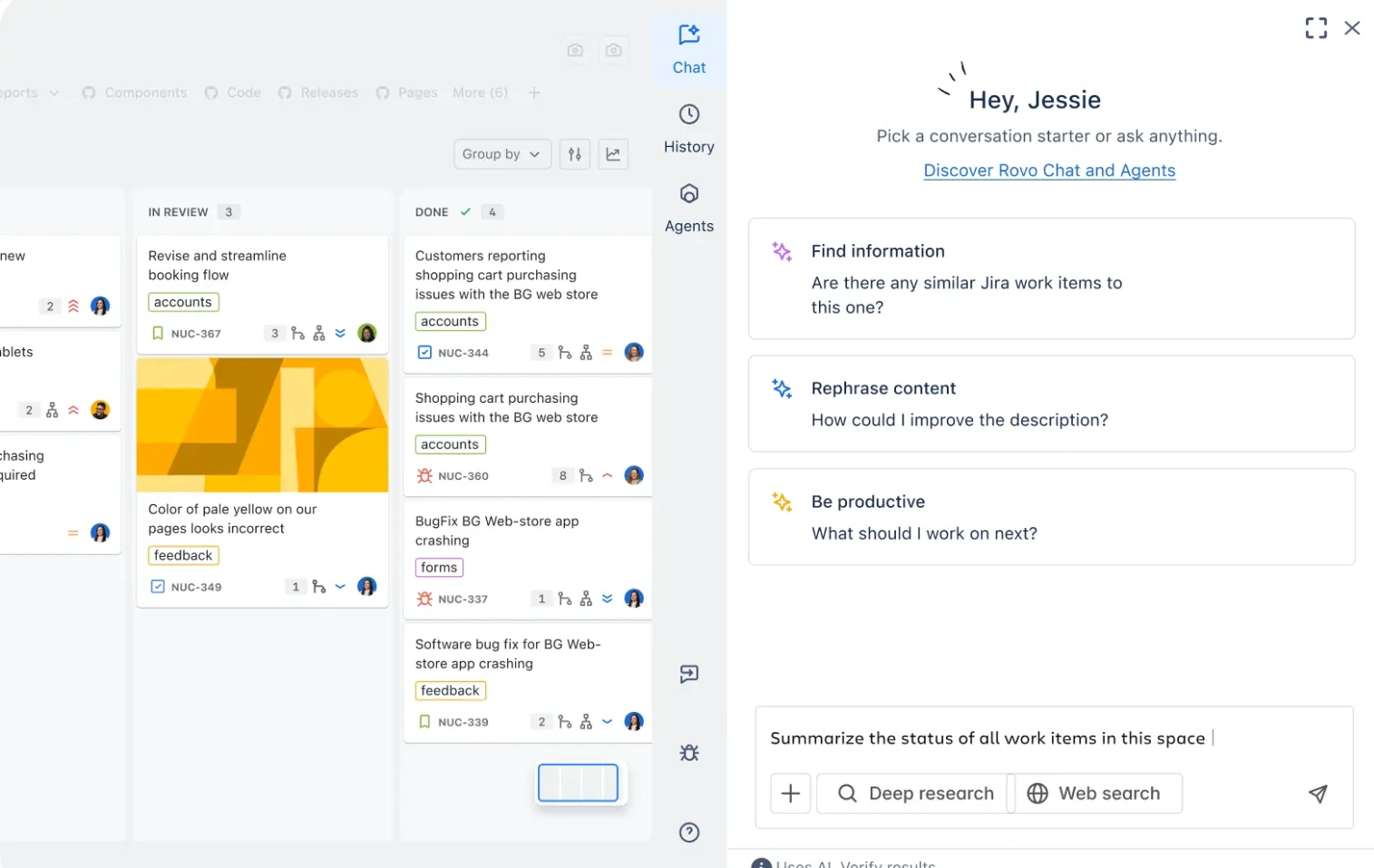
Rovo Chat and Search answer questions across Jira, Confluence and connected tools. Atlassian also offers Rovo agents and supports third-party agents that can be assigned work like a teammate. Examples it describes include a Work Readiness Checker that reviews whether work is clear and complete before planning, project management skills that create and update work items and draft status updates from chat, and Rovo Dev, which aims to turn Jira work items into code.
Treat these as assistance that still needs review, not as autonomous team members. Their usefulness depends on clean data in Jira and Confluence, credit allowances limit heavy use, and some capabilities are still labelled beta.
Jira Collaboration Features
Collaboration in Jira happens on the work item: comments with @mentions, watchers, attachments, links between related items, and a full change history. Linking work items to Confluence pages keeps specifications and decisions close to the work, and integrations with Slack and Microsoft Teams let people create and update work items from chat.
Jira is strongest for collaboration within delivery teams, where the work item is the natural unit of conversation. It is weaker as a general collaboration space: it has no built-in documents (that is Confluence's job), and stakeholders outside engineering often prefer a summary or dashboard to reading work items. Notifications can also become noisy on busy spaces, so agree notification schemes and watch habits early.
Jira Reporting and Dashboards
.png?cdnVersion=3706)
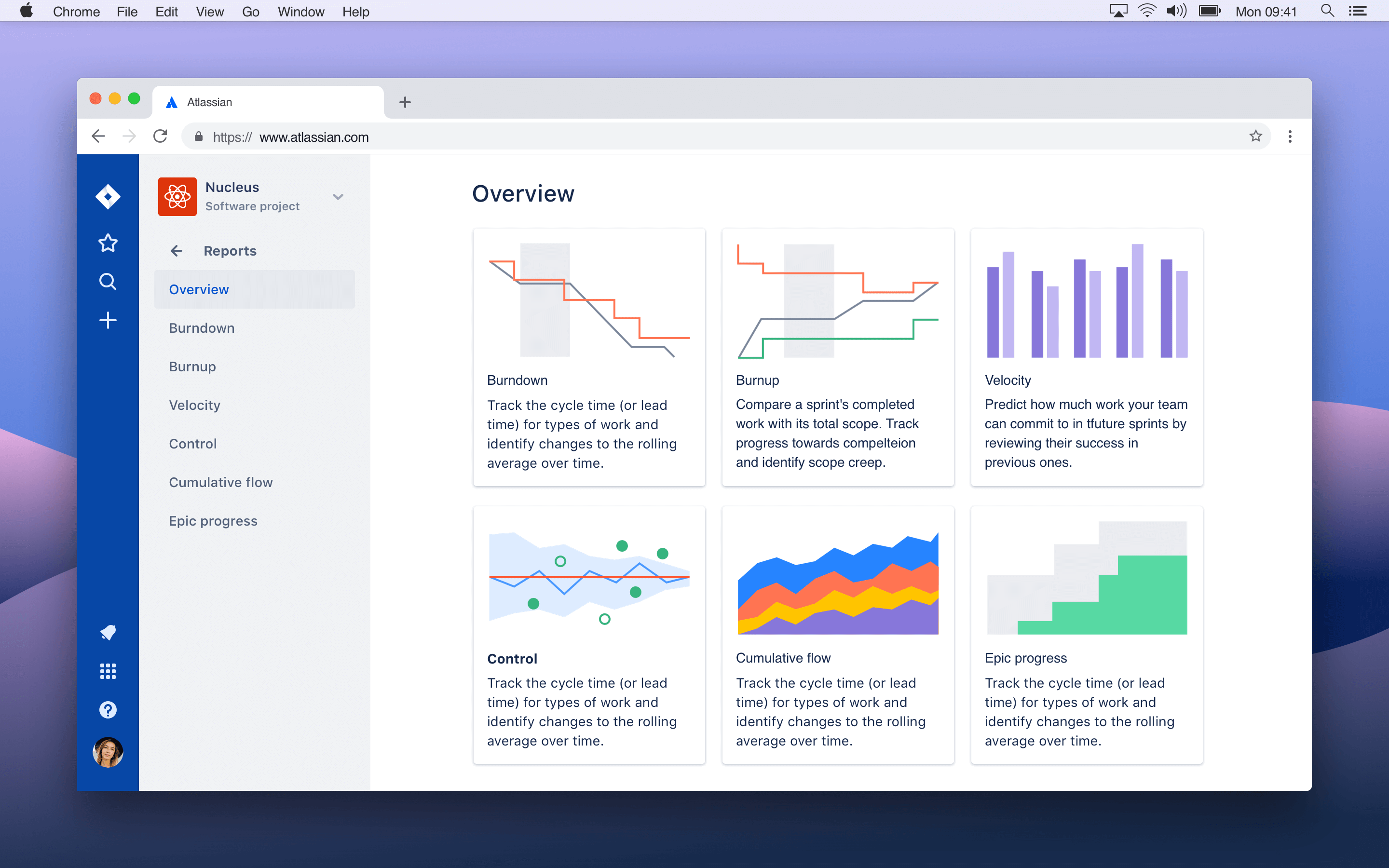
Jira includes the standard Agile reports: sprint reports, burndown and burnup charts, velocity charts, cumulative flow diagrams and control charts for cycle time. Dashboards combine gadgets such as filter results, pie charts, created-versus-resolved trends and sprint health, and every space has a summary page showing work by status, priority and type.
For team-level metrics such as velocity this is more than enough. Cross-portfolio, executive or financial reporting is weaker out of the box, and many organisations add Marketplace apps or export to a BI tool. On Capterra's topic summaries, around 96% of reviews that discuss progress visualisation are positive, so most users are satisfied with what is there. Our guide to Agile metrics and KPIs explains which reports are worth watching.
Jira Integrations
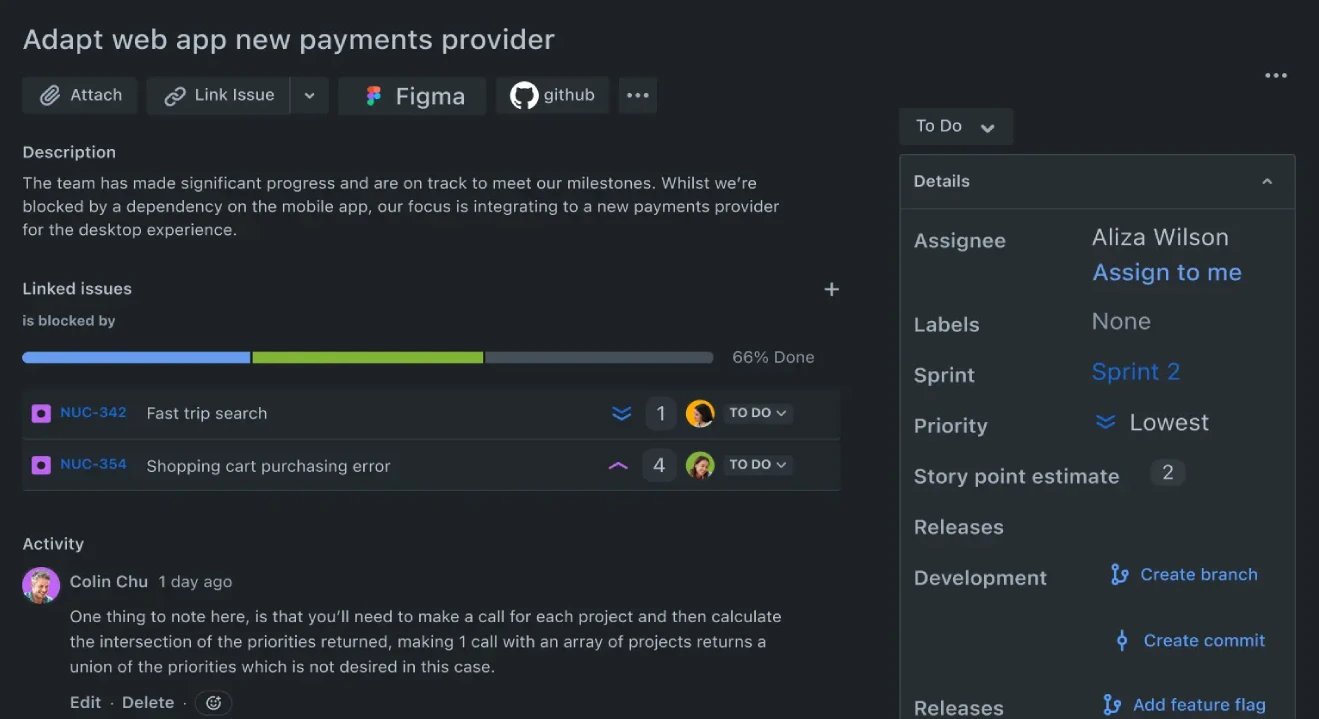
Integrations are a major reason teams choose Jira. Atlassian says the Atlassian Marketplace offers more than 3,000 apps and integrations. Commonly used connections include:
- Confluence for specifications, meeting notes and documentation linked to work items
- Bitbucket, plus GitHub and GitLab through Marketplace apps, to show branches, commits, pull requests, builds and deployments on each work item
- Slack and Microsoft Teams for notifications and creating work items from chat
- Google and Zoom integrations, and Trello for teams moving between the two
- Tempo Timesheets for time tracking and Zephyr for test management
Developers can also use Jira's REST APIs and webhooks. One practical caution: most Marketplace apps are priced per user on the same tier as your Jira site, so adding several apps to a large site can increase the total cost noticeably. Budget for the apps you actually need before committing.
Jira Ease of Use
Initial Setup
A small team can create a team-managed space from a Scrum or Kanban template and start working within an hour. A proper rollout is different: designing issue types, fields, workflows, permission schemes, notification schemes, boards and dashboards in company-managed spaces is real administrative work, and most organisations of any size have a dedicated Jira administrator or use an Atlassian Solution Partner.
Learning Curve
Day-to-day use, such as updating a work item or moving a card, is straightforward. Planning, JQL, workflows and administration take much longer to learn, and Jira's terminology (schemes, screens, resolutions, components) is unfamiliar to non-developers. Capterra's ease-of-use sub-score of 4.1 is Jira's lowest, and on G2 a steep learning curve and challenging setup are among the most cited drawbacks. Training resources help, but budget time for onboarding.
Interface and Performance
Atlassian has redesigned Jira's navigation several times, and the current interface is cleaner than older versions. Users still report clutter: on Capterra, about 64% of reviews that discuss navigation describe it as cluttered or hard to learn. Performance on large sites is the most negative theme, with around 84% of reviews mentioning slowness at scale being negative. Neither is a reason to avoid Jira on its own, but large organisations should test performance with realistic data during the trial.
Jira Mobile App
Jira's iOS and Android apps let you view boards and backlogs, update and transition work items, comment and review notifications while away from your desk. They are well suited to checking on a sprint, triaging a bug or replying to an @mention.
Planning, JQL-heavy work, reporting and administration are better done on desktop. Treat the mobile app as a companion for staying up to date rather than a full replacement for the web app.
Jira Pricing
Jira Cloud has four plans. Atlassian prices Standard and Premium progressively: the per-user rate falls as your user count rises, so its pricing page works as a calculator rather than a fixed list. The figures below are the commonly quoted list prices for small teams on monthly billing; Capterra lists Standard from $7.91 per user/month. Annual subscriptions are priced in user tiers and can work out cheaper.
| Plan | Published price | Best for |
|---|---|---|
| Free | $0, up to 10 users | Small teams and startups trying Scrum or Kanban |
| Standard | About $7.91/user/month (monthly, small teams) | Growing teams needing permissions, more storage and support |
| Premium | About $14.54/user/month (monthly, small teams) | Multi-team organisations needing advanced planning and 24/7 support |
| Enterprise | Contact sales (annual only) | Large organisations with multiple sites and strict governance |
Atlassian offers discounts of 75% for eligible community (non-profit) organisations and 50% for eligible academic institutions. Monthly plans are billed on the highest number of users during the billing period. Pricing checked on Atlassian's Jira pricing page and licensing pages on 7 October 2026; always use Atlassian's calculator for your exact team size before buying.
Jira Free Plan
The Free plan supports up to 10 users, includes Scrum and Kanban boards, backlogs, the timeline, reports and basic automation, and comes with 2 GB of storage and community support only. It is one of the most generous free plans for software teams: a small startup can run real sprints on it. The limits are the 10-user cap, limited permissions and roles, the small automation allowance and no Rovo AI. Once you pass 10 users, every user must be on a paid plan.
Jira Standard Plan
Standard (about $7.91 per user/month on monthly billing for small teams) raises the limit to up to 100,000 users and adds advanced permissions and roles, work-level security, 250 GB of storage, data residency, audit logs, anonymous access, a larger automation allowance, business-hours support and Rovo with 25 AI credits per user per month. It is the plan most single teams and small engineering departments should start with.
Jira Premium Plan
Premium (about $14.54 per user/month on monthly billing for small teams) adds Plans for cross-team planning and capacity, unlimited storage, a larger automation allowance, a 99.9% uptime SLA, 24/7 support with one-hour response times for critical issues, sandboxes, release tracks for controlling when changes reach users, admin insights, IP allowlisting and 70 AI credits per user per month. It suits organisations coordinating several teams or running scaled Agile.
Jira Enterprise Plan
Enterprise is quote-based and billed annually only. It adds a 99.95% uptime SLA, 24/7 Enterprise support, up to 150 sites, the highest automation allowance and 150 AI credits per user per month, and includes Atlassian Guard features such as single sign-on, SCIM provisioning and Active Directory sync, which lower plans need to buy separately. It is designed for large, regulated or multi-business-unit organisations.
Jira Free Trial
Atlassian offers free trials of Standard and Premium. Its licensing FAQ says Standard can be trialled for 14 days and Premium or Enterprise for 30 days, although some product pages mention a 7-day trial for new customers, so check the length at sign-up. No credit card is needed to start; if you do not add one when the Standard trial ends, the site falls back to the Free plan. Use the trial to run a real sprint with your real team rather than clicking through sample data.
Hidden Costs to Budget For
- Marketplace apps, usually priced per user across your whole site
- Confluence, if you want documentation linked to Jira (a separate subscription)
- Atlassian Guard, for SSO and user provisioning on Free, Standard and Premium
- Administration time, or a Solution Partner, for larger rollouts
Jira Pros and Cons
Pros
- Best-in-class Scrum and Kanban tooling
- Highly configurable work types, fields and workflows
- JQL makes almost any question about the work answerable
- Deep integrations with Bitbucket, GitHub, GitLab and CI/CD
- Free plan genuinely usable for up to 10 users
- Marketplace with more than 3,000 apps
- Scales from startups to very large enterprises
- Rovo AI included on all paid plans
- Mature automation with natural-language rule creation
- Strong Atlassian ecosystem and partner network
Cons
- Steep learning curve, especially for administration and JQL
- Needs a dedicated administrator as usage grows
- Interface can feel cluttered, particularly for business users
- Users report slow performance on large sites
- Documentation needs Confluence, a separate product
- Marketplace apps add per-user cost
- Advanced planning and higher AI allowances need Premium or Enterprise
- SSO and provisioning need Atlassian Guard below Enterprise
- Less natural for creative, marketing or operations teams
This matches what users report: Jira's depth for Agile and developer work is widely valued, while complexity, administration and interface clutter are its most consistent drawbacks.
What Do Jira Customers Say?
- Ease of use: 4.1/5
- Features: 4.4/5
- Customer service: 4.2/5
- Value for money: 4.3/5
What G2 reviewers like most
- Ease of use for Agile workflows
- Powerful flexibility
- Powerful task tracking
Most common G2 complaints
- Steep learning curve
- Complex interface and processes
- Initial setup is challenging
Ratings and review themes as published on G2 and Capterra on 5 October 2026; summarised in our own words. Visit the links above for full, verified user reviews.
On Capterra, Jira is rated 4.4/5 from 15,493 reviews, with sub-scores of 4.4 for features, 4.1 for ease of use, 4.3 for value for money and 4.2 for customer service (checked 7 October 2026). On G2, it is rated 4.3/5 from 7,988 reviews (checked 5 October 2026). The themes below summarise these third-party reviews in our own words, not Atlassian's testimonials.
Positive themes. Reviewers most often praise Agile workflow support, oversight of projects and progress visualisation; in Capterra's topic summaries these are about 97%, 97% and 96% positive respectively. G2 reviewers highlight ease of use for Agile workflows, flexibility and powerful task tracking. Integration with developer tools and Confluence, and the ability to tailor workflows, come up repeatedly.
Negative themes. The most common complaints are bugs and glitches (about 57% of reviews on the topic are negative), slow performance at scale (about 84% negative) and cluttered, hard-to-learn navigation (about 64% negative). G2 reviewers cite the steep learning curve, complex interface and processes, and challenging initial setup.
When reading reviews yourself, check whether a review was invited or incentivised by the vendor; both Capterra and G2 label these. Reviews from organisations of your size, and from roles like yours, are more informative than the overall average, because a developer and a marketing manager often have very different experiences of Jira.
Jira Customer Support
Support depends on your plan: the Free plan relies on the Atlassian Community and documentation; Standard includes support during local business hours; Premium adds 24/7 support with one-hour response times for critical issues; and Enterprise includes 24/7 Enterprise support. Atlassian also provides extensive documentation, Atlassian University training courses and a very large community forum, and a global network of Solution Partners offers implementation and administration services.
Capterra's customer service sub-score of 4.2/5 suggests a generally reasonable experience, though individual reviews vary. In practice, many Jira questions are answered faster in the Community or by an internal administrator than through a support ticket.
Jira Security
Jira provides space permissions, user roles, work-level security to restrict who can see individual work items, audit logs, data residency options, and encryption in transit and at rest on paid plans. Administrators can manage password policies, session duration and mobile device management. Premium adds IP allowlisting and admin insights.
Single sign-on, SCIM user provisioning and Active Directory sync are included on Enterprise and require an Atlassian Guard subscription on other plans. Atlassian's Trust Center displays AICPA SOC, ISO 27001, PCI DSS and FedRAMP compliance marks; confirm the current certifications and their scope for Jira Cloud as part of procurement. Atlassian also runs a separate Government Cloud offering, where Rovo is not available.
Jira for Different Types of Teams
Jira for Software Development Teams
This is Jira's core use case: backlogs, sprints, story points, bug tracking, releases and code integration in one place. Teams following agile software development will find almost every practice supported.
Jira for IT and DevOps Teams
IT and platform teams use Kanban boards, automation and deployment tracking to manage infrastructure work and changes. Service desks are better handled in Jira Service Management, which shares the same platform.
Jira for Product Managers
Product managers use Jira for backlog management, roadmaps and release planning, often alongside Jira Product Discovery for ideas and Confluence for specifications. Writing good user stories and keeping epics tidy is what makes Jira roadmaps trustworthy.
Jira for Business and Marketing Teams
Business teams can work in Jira with list, calendar and board views, forms and business templates, which is especially useful when they work closely with engineering. However, they usually find the interface and terminology heavier than tools built for them; marketing teams that rarely interact with developers will often adopt a more visual tool faster.
Jira for Small Businesses and Startups
For a startup engineering team of up to 10 people, the Free plan is hard to beat, and Standard stays affordable as you grow. For a small business whose work is mainly non-technical, Jira is usually more tool than it needs.
Jira for Enterprises
Large organisations use Jira at scale for portfolios of software teams, scaled frameworks such as SAFe, and strict governance. Premium or Enterprise is normally needed for cross-team planning, uptime commitments and identity controls.
Who Should Use Jira?
Great for
- Software engineering and IT teams
- Organisations already using Atlassian tools
Look elsewhere if
- Marketing, creative or business teams needing a simple tool
- Teams without someone to administer it
Jira Feature Checklist
| Feature | Jira |
|---|---|
| Free plan | ✓ Yes |
| Gantt / timeline | ✓ Yes |
| Kanban boards | ✓ Yes |
| Time tracking | ◐ Partial |
| Resource & workload management | ◐ Partial |
| Portfolio management | ◐ Partial |
| Docs & wiki | ✕ No |
| Automations | ✓ Yes |
| Agile / sprint tools | ✓ Yes |
| Proofing & approvals | ✕ No |
| Built-in AI | ✓ Yes |
| Guest / client access | ◐ Partial |
| Flat (non per-user) pricing | ✕ No |
Jira Alternatives and Comparisons
Jira fits teams of almost any size, from small software teams running their first sprints to large organisations coordinating many teams and releases. Beginners can start with a ready-made Scrum or Kanban template and simple board, then add backlogs, timelines, automation and dashboards as their work grows. If you would like to see how it stacks up, we compare Jira with Asana, monday.com, ClickUp, Trello and others on pricing, features and use cases on dedicated pages:
- ClickUp: choose it for Agile features with docs and lower complexity. Compare Jira vs ClickUp.
- Wrike: choose it for an all-in-one platform for non-technical teams too. Compare Jira vs Wrike.
- Asana: choose it for simpler cross-team task management. Compare Jira vs Asana.
- Trello: choose it for simple Kanban boards. Compare Jira vs Trello.
- monday.com: choose it for monday dev with a friendlier interface. Compare Jira vs monday.com.
Jira comparisons
Is Jira Worth It?
Jira is likely worth it if you:
- Run software, IT or product work using Scrum or Kanban.
- Want work items linked to code, builds and deployments.
- Need configurable workflows and precise, query-based reporting.
- Already use Confluence, Bitbucket or other Atlassian products.
- Have, or can appoint, someone to administer Jira properly.
- Expect to scale to many teams and want a tool that will grow with you.
It may not be worth it if:
- Your teams are mainly marketing, creative or operations staff.
- You want a simple, visual tool with almost no setup.
- Nobody will own the configuration and keep it tidy.
- You need Gantt charts with critical path and baselines for plan-driven projects.
- You would need many paid Marketplace apps to fill gaps.
Our verdict: Jira is the strongest Agile tool for software teams in our review, which is why it scores 10/10 for Agile in our methodology, and its free plan makes it easy to start. Its overall score of 8.6/10 and #6 ranking in our project management software review reflect the cost of that depth: a steep learning curve, real administration effort and a less comfortable fit for non-technical teams. Run a real sprint on the free plan or a trial before committing your whole organisation.
Frequently asked questions
Is Jira good project management software?
Yes, especially for software and IT teams. Jira offers mature Scrum and Kanban boards, configurable workflows, JQL and deep developer integrations, and it is rated 4.4/5 on Capterra. It is less suited to non-technical teams that want a simple, visual tool, and it needs someone to administer it.
Is Jira free?
Yes. Jira's Free plan supports up to 10 users and includes Scrum and Kanban boards, backlogs, the timeline, reports and basic automation, with 2 GB of storage and community support. Rovo AI, advanced permissions and higher limits require a paid plan.
How much does Jira cost?
Jira is free for up to 10 users. For small teams on monthly billing, Standard is about $7.91 and Premium about $14.54 per user/month, with the per-user rate falling as team size grows; Enterprise is quote-based and annual only (checked 7 October 2026). Use Atlassian's calculator for your exact team size.
Does Jira have a free trial?
Yes. Atlassian offers free trials of Standard and Premium. Its licensing FAQ gives 14 days for Standard and 30 days for Premium, though some pages mention shorter trials for new customers. No credit card is needed to start, and an expired Standard trial falls back to the Free plan.
Is Jira easy to use?
Basic use is straightforward, but Jira has a steep learning curve for planning, JQL, workflows and administration. Ease of use is its lowest Capterra sub-score at 4.1/5, and many reviewers mention cluttered navigation. Most organisations benefit from a trained administrator.
What is Jira used for?
Jira is mainly used for Agile software development: backlogs, sprints, bug tracking, release management and linking work to code. IT, DevOps and product teams also use it, and business teams can manage requests and projects with forms, list and calendar views.
What is JQL in Jira?
JQL (Jira Query Language) is Jira's search language for finding work items by any field, such as status, assignee, dates or labels. Saved JQL filters power boards, dashboards and automation. On paid plans, Rovo can convert plain-language questions into JQL and fix query errors.
Is Jira better than Asana?
For software teams running Scrum or Kanban, Jira is usually stronger; for cross-functional business teams that want simpler, faster adoption, Asana is often a better fit. See our Jira vs Asana comparison.
Is Jira better than monday.com?
Jira offers deeper Agile tooling, JQL and developer integrations; monday.com is more visual and usually easier for non-technical teams. See our Jira vs monday.com comparison.
Does Jira have Gantt charts?
Not in the classic sense. Every plan has a timeline view for epics and work with basic dependencies, and Premium adds Plans for cross-team roadmaps and capacity. There is no built-in critical path or baseline tracking; Marketplace apps can add full Gantt charts.
Does Jira have AI?
Yes. Atlassian's Rovo AI is included on Standard, Premium and Enterprise plans, with 25, 70 and 150 AI credits per user per month respectively. It offers natural-language search, writing help, summaries, work breakdown, natural-language automation and agents. It is not listed for the Free plan.
Can non-software teams use Jira?
Yes. Jira includes business templates, forms, list and calendar views, and Jira Work Management has been merged into Jira. Business teams that collaborate closely with engineering benefit most; teams that rarely work with developers often find more visual tools easier.
What are the main disadvantages of Jira?
The main disadvantages are the steep learning curve, the administration it needs, a cluttered interface for casual users, reported slowness on large sites, the extra cost of Marketplace apps and Confluence, and advanced planning and SSO sitting on higher plans or add-ons.
Does Jira integrate with Slack, Microsoft Teams and GitHub?
Yes. Jira integrates with Slack and Microsoft Teams for notifications and creating work items, and with GitHub, GitLab and Bitbucket to show branches, commits and pull requests on work items. The Atlassian Marketplace lists more than 3,000 apps and integrations.
Is Jira suitable for small businesses?
It is a strong choice for small software teams, since the Free plan covers up to 10 users. For small businesses whose work is mainly non-technical, Jira is often more complex than needed, and a simpler tool may be adopted faster.
Product screenshots are © Atlassian Corporation and shown for the purpose of review, with links to their source pages.